
derick1209
Inspiring
March 22, 2018
Answered

Add keyframe to all path shape

  • March 22, 2018
  • 2 replies
  • 2910 views

Hi Everyone,

I'm new in scripting but I try to write a simple script for adding a keyframe on every path of shape layer, i succeed with a part of that:

var myLayers = app.project.activeItem.selectedLayers;

var myLayer;

for (var i = 0; i < myLayers.length; i++){

  myLayer = myLayers;

  if (myLayer instanceof ShapeLayer){

    var myContents = myLayer.property("ADBE Root Vectors Group");

    for (var j = 1; j <= myContents.numProperties; j++){

      myContents.property(j).property("ADBE Vectors Group").property("ADBE Vector Shape - Group").property("ADBE Vector Shape").addKey(1);

    }

  }

}

but i have difficult if there is a lot of "Vector Shape" on "Shape - Group" it doesn't work.
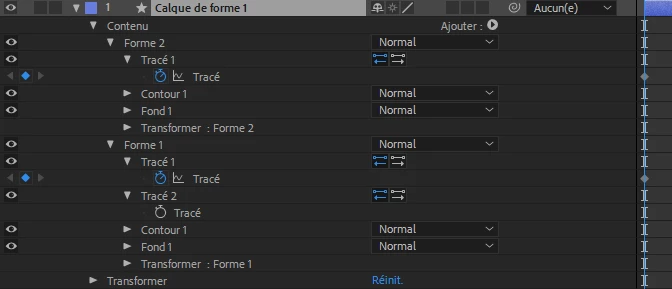
Do you have an idea how to do it ?

Thanks a lot

This topic has been closed for replies.
Correct answer Tomas Sinkunas

You will need a recursive function to make this happen. Here's a simple version of it.

Basically it loops through all layer properties and checks if it's ADBE Vector Shape property. If it is, it stores it in the array. Once all properties have been checked it returns array with all ADBE Vector Shape properties it found along the way.

Now, since we get properties that we need in shapeProperties array, we can perform additional loop add add keyframes to them.

(function() {

    // Get active composition;

    var composition = app.project.activeItem;

    if (!composition || !(composition instanceof CompItem))

        return alert("Please select composition first");

    // Get selected Layers

    var selectedLayers = composition.selectedLayers;

    if (selectedLayers.length === 0) {

        return alert("Please select some layers");

    }

    app.beginUndoGroup("Add Keyframes");

    var layer, shapeProperties;

    // For each selected layer

    for (var i = 0, il = selectedLayers.length; i < il; i++) {

        layer = selectedLayers;


        // Get "ADBE Vector Shape" properties

        shapeProperties = getProperties(layer, "ADBE Vector Shape");

        // Loop through all "ADBE Vector Shape" properties and do your magic

        for (var j = 0, jl = shapeProperties.length; j < jl; j++) {

            shapeProperties.addKey(1);

        }

    }

    app.endUndoGroup();

    // Recursive function to find properties by matchName

    function getProperties(currentProperty, propertyMatchName, propsArray) {

        propsArray = propsArray || [];

        for (var i = 1, il = currentProperty.numProperties; i <= il; i++) {

            if (currentProperty.property(i).matchName === propertyMatchName) {

                propsArray.push(currentProperty.property(i));

            }

            getProperties(currentProperty.property(i), propertyMatchName, propsArray);

        }

        return propsArray;

    }

})();

2 replies

Known Participant
March 23, 2018

Maybe you can try this way :

Use this post to go deep in your shape layer

My script for discovering the names of AE properties

Then after that you can use a switch to list all cases you'll encounter : rectangle, ellipse, star, etc...)

If i have time this week-end i'll try something

derick1209
Inspiring
March 23, 2018

Thanks guys,

Sorry for french but I have not say something else i mention in my first post. Just for comprehension with a french camarade ^^.

GCTOIS thanks a lot i will go to see your link, if I can get what i need.

Tomas Sinkunas
Tomas SinkunasCorrect answer
Legend
March 28, 2018

You will need a recursive function to make this happen. Here's a simple version of it.

Basically it loops through all layer properties and checks if it's ADBE Vector Shape property. If it is, it stores it in the array. Once all properties have been checked it returns array with all ADBE Vector Shape properties it found along the way.

Now, since we get properties that we need in shapeProperties array, we can perform additional loop add add keyframes to them.

(function() {

    // Get active composition;

    var composition = app.project.activeItem;

    if (!composition || !(composition instanceof CompItem))

        return alert("Please select composition first");

    // Get selected Layers

    var selectedLayers = composition.selectedLayers;

    if (selectedLayers.length === 0) {

        return alert("Please select some layers");

    }

    app.beginUndoGroup("Add Keyframes");

    var layer, shapeProperties;

    // For each selected layer

    for (var i = 0, il = selectedLayers.length; i < il; i++) {

        layer = selectedLayers;


        // Get "ADBE Vector Shape" properties

        shapeProperties = getProperties(layer, "ADBE Vector Shape");

        // Loop through all "ADBE Vector Shape" properties and do your magic

        for (var j = 0, jl = shapeProperties.length; j < jl; j++) {

            shapeProperties.addKey(1);

        }

    }

    app.endUndoGroup();

    // Recursive function to find properties by matchName

    function getProperties(currentProperty, propertyMatchName, propsArray) {

        propsArray = propsArray || [];

        for (var i = 1, il = currentProperty.numProperties; i <= il; i++) {

            if (currentProperty.property(i).matchName === propertyMatchName) {

                propsArray.push(currentProperty.property(i));

            }

            getProperties(currentProperty.property(i), propertyMatchName, propsArray);

        }

        return propsArray;

    }

})();

Known Participant
March 23, 2018

This seems fine to me, I just tested it and it works.

Maybe you have a problem with shapes (like circle or rectangle) and the shapes that have a path).

If you want to answer in french, you can

derick1209
Inspiring
March 23, 2018

Thanks for your answer,

Merci ^^ en fait comme sur l'image que j'ai posté le script marche mais quand on a plusieurs tracé dans une forme, il ne check pas tous les tracés et du coup ne met des clés que au premier tracé. Du coup j'arrive pas à mettre 2 conditions for (var j = 1; j <= myContents.numProperties; j++){ 

une pour les premiers groupe et une pour le groupe de tracé, tu aurais une idée ?

Tomas Sinkunas
Legend
March 23, 2018

Guys, please keep posts in English. It's a community forum, so not everyone understands French. Please keep it in English.

Thank you.