
Known Participant
August 17, 2022
Question

Add more groups into 3D Element for After Effects

  • August 17, 2022
  • 2 replies
  • 1014 views

Hi guys,


I am currently trying to use the 3D Element plug-in for After Effects, and I've realized that, for what I need to do, I would need to add more groups instead of the 5 only allowed: 
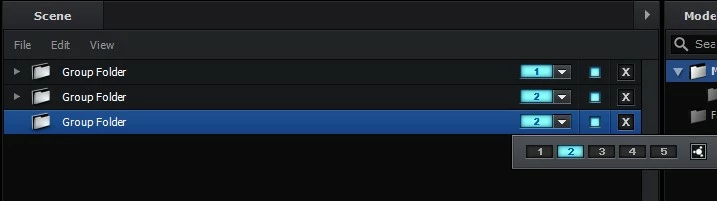
 

Is that even possible to do?


The reason I need that is because I have a 3D model with more than 5 objects which I need to change the colour individually (and that is possible if they one group each). But I need them all in the same layer because if not, they will overlap...


So my question is, how can I add more groups into the same AE layer in 3D Element?


Thank you guys!


This topic has been closed for replies.

2 replies

Mylenium
Legend
August 19, 2022

E3D will never work in this manner. The renderer simply consumes way too many GPU resources and all this stuff gets disabled when running in Premiere, which uses an AE instance. Layers of GPU functions on top of each other and something has to give. You have to think of a different approach to whatever you have in mind.


Mylenium

Kyle Hamrick
Community Expert
Community Expert
August 17, 2022

You can add a second instance of Element to this same layer & set the Render Mode (the very bottom option) to "Unified." (I believe this setting is applied on the FIRST version, but I'm going off the top of my head here!)

You can also get more flexibility within your existing groups by using the Auxiliary Channels, though that's probably not the solution if you're looking for color control. 

Known Participant
August 17, 2022

Awesome! I have tried to add two Elements but I haven't know about the Render Mode 😞


You saved me a lot of time! Thank you very much