
kenchikwong
Participant
September 30, 2019
Question

Adjusting line space based on the text layer scale

  • September 30, 2019
  • 2 replies
  • 2466 views

Hi, I need some help here..
I have an expression on the scale using SourceRectAtTime.width to look at the width of a text layer, so the text layer resizes itself when it goes over certain width.
At the same time I put another expression on the line space; so when the scale expression scales down the layer, it will increase the line spacing to make the height visually remain the same.


TextHeight=sourceRectAtTime(time,false).height;
BeforeHeight=TextHeight;
AfterHeight=TextHeight*scale[1]/100;
LineSpace=(BeforeHeight-AfterHeight)/4*100/scale[1];
[value[0],LineSpace]
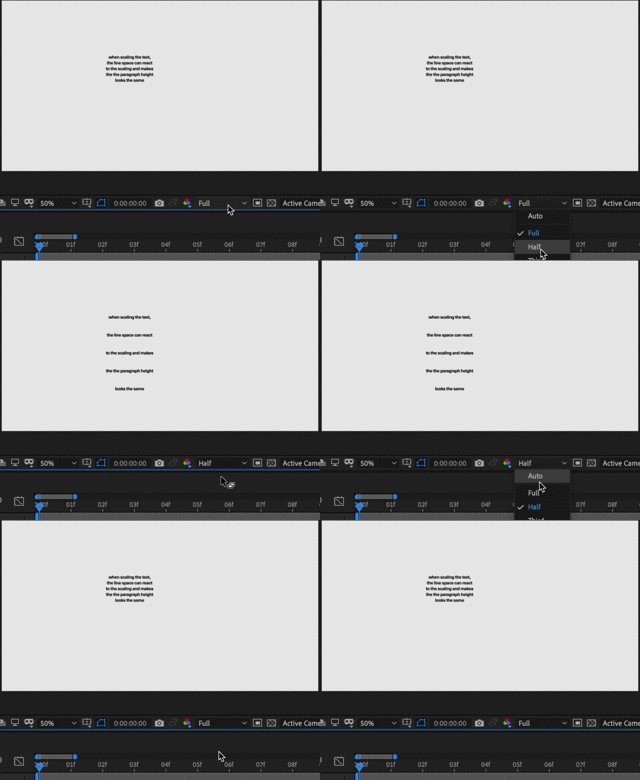


I realize the preview won’t update until I change the sample resolution, and it goes back too if I change the sample resolution back to the one when I typed in the text. I guess it’s because it calculates the target line space based on the layer height, but when it increases the line space, it also alter the layer height, so the cache just messed up.

Is my assumption correct? If it is, I am wondering if there’s a way to fix this, or maybe at least a way to easily refresh the cache everytime I finish typing? (I tried Edit>Purge>Image Cache Memory, which works for the first time, but never work again after that…)


Any help will be greatly appreciate!


This topic has been closed for replies.

2 replies

kenchikwong
Participant
October 1, 2019

Thank you for the help! And here is more detail of what I am trying to achieve:

I have applied the following expression to the scale of a regular Point Text layer, so when the content you type in is larger then 500 pixels, it will scaling down the layer so it won’t exceed 500 pixels


s=thisLayer;

scl=500;

x=s.sourceRectAtTime(time,false).width;

if (x>scl)

{[scl/x*value[0],scl/x*value[1]]}

else

{value}


It’s working pretty nice.

But when I input line return to the text: since the expression scales the whole layer, including the vertical scale, it’s not visually what I want:


I hope to keep the line spacing between lines visually the same even after the scale expression scales down the whole layer:


So I developed the following expression, and put on the line space


TextHeight=sourceRectAtTime(time,false).height;

BeforeHeight=TextHeight;

AfterHeight=TextHeight*scale[1]/100;

LineSpace=(BeforeHeight-AfterHeight)/4*100/scale[1];

[value[0],LineSpace]


This expression kind of works when I change the preview resolution to force the preview refresh, or use Edit>Purge>Image Cache Memory, but sometimes both ways won’t work


I assume the reason is because the line space expression makes it react to the layer height, but when the line spacing increases, the layer height will also increase, then the expression will make the line space to react to that… which creates a “loop” and confuses the AE.


If that’s the case, I am wondering if that’s other way to achieve the line spacing purpose without creating that “loop”, or maybe an better/ easier way to force refresh the preview so it can work every time? Greatly apprecaite for the help!


Attached with the AE file to better illustrate the situation:

https://www.dropbox.com/s/k8fbfsnxmgfuyrp/LineSpaceReactToScaling_Sample.aep?dl=0

Roland Kahlenberg
Legend
October 1, 2019

This looks like a bug - changing Comp Resolution shouldn't affect how Expressions work. Please send in a Bug Report.

But before you do, please ensure that you have the same results if you disable all hardware acceleration in AE. This includes settings in the Project Settings Dialog as well as the main Preferences Dialog Window.

Very Advanced After Effects Training | Adaptive & Responsive Toolkits | Intelligent Design Assets (IDAs) | MoGraph Design System DEV
Community Expert
October 1, 2019

The comp resolution is the last thing you should be using to drive leading (line spacing). Your screenshot animation is interesting but it doesn't show us how you set this up. There is no Text Animator for Point (font) size, but there is for Line Spacing and for scale but if you change scale you need to also change tracking, but that makes the text box change size.


 If these are individual lines of text followed by a return rather than a text box with flowing text you are still going to have problems. 


I think you want to set an area for a text box then automatically resize the font and the line spacing so that the text box always stays the same size. Please let us know if that is what you want to do. A screenshot showing the modified properties of the text layer will also help. UU + Print Screen + Paste is the only way I can figure out what you are doing and figure out why it isn't working. 

kenchikwong
Participant
October 1, 2019
Thank you Rick! I have put some more details into the lower reply, hopefully these make sense.