
Participant
March 19, 2018
Answered

Adjustment layer getting smaller than mask

  • March 19, 2018
  • 2 replies
  • 1036 views

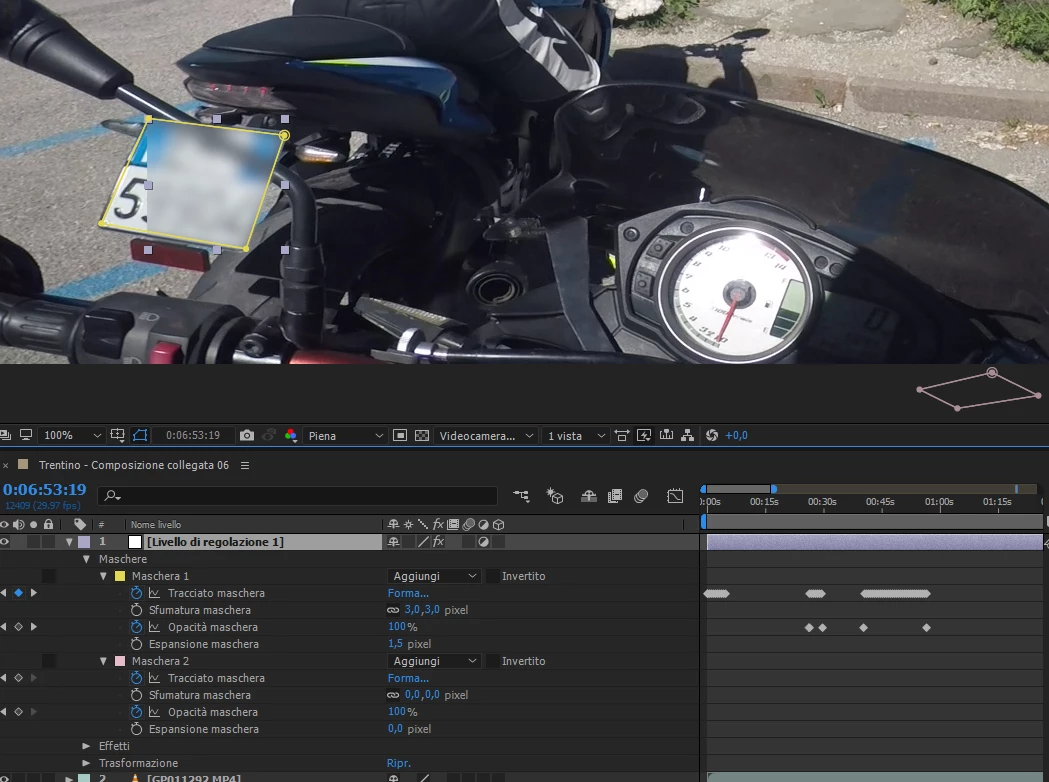
I'm tracking 2 masks on a long video (15m) to hide a licence plate and a speedometer. I created an adjustment layer with blur effect and 2 rectangular masks that I then moved with mask tracker.
I noticed that with automatic mask tracking, the adjustment layer is resized to fit the mask, but if I manually move the mask's points (because the auto-tracking didn't work) the adjustment layer is not resized, giving me this problem. How can I fix this?

This topic has been closed for replies.
Correct answer Roland Kahlenberg

Do you really need to track a 15minute video? Who's going to watch a scene this long? I hope the 15 minutes includes you performing the tracking task. ;-)

Seriously, only track what's required for the finished/deliverable video. AND, why are you using an Adjustment Layer for the Mask Tracking? You can accomplish a blurred/mosaic effect for the tracked area using just one/the original video. Once, you've tracked the region, apply the Blur/Mosaic effect. Then head to the Timeline and twirl down the layer's properties until you see the Compositing Options section. Hit the + button and ensure the effect is linked to the mask via the mask menu.

2 replies

nicari92Author
Participant
March 21, 2018

I found out wat was the problem. When I was manually mooving the points of the mask while I was tracking it, I accidentally mooved the entire adjustment layer (instead of the mask's points), and then continued tracking the mask. Doing so, in some points, the mask mooved out of the layer borders creating the problem.
The metod of Roland Kahlenberg​ avoid this from happening.
Since I didn't want to throw hours of tracking away I tried to create a new adjustment layer, scale it up so it was bigger the the composition, copy the mask from the original layer to the new, larger one, paste the mask here and moove the layer to match the original position. Doing so I didn't solve the problem. When pasting, the mask scaled up automatically to match the new layer size.
The solution I found is to create a matte layer, scale it up over the frame size, here paste the original mask, move the layer to match the tracked mask positions, and than use this layer as an "adjustment layer" to recreate the original wanted effect.

Mylenium
Legend
March 19, 2018

Why even bother? This could be done with a conventional corner pin track to produce a matte to be used as an adjustment layer. Your appraoch is simply not ideal.

Mylenium

nicari92Author
Participant
March 19, 2018

#Mylenium: The plate moves too much around and gets too small (when is far away) to use pin track. The area of search for the corners to track must be too big. The tracking gets too slow.

Roland Kahlenberg
Roland KahlenbergCorrect answer
Legend
March 19, 2018

Do you really need to track a 15minute video? Who's going to watch a scene this long? I hope the 15 minutes includes you performing the tracking task. ;-)

Seriously, only track what's required for the finished/deliverable video. AND, why are you using an Adjustment Layer for the Mask Tracking? You can accomplish a blurred/mosaic effect for the tracked area using just one/the original video. Once, you've tracked the region, apply the Blur/Mosaic effect. Then head to the Timeline and twirl down the layer's properties until you see the Compositing Options section. Hit the + button and ensure the effect is linked to the mask via the mask menu.

Very Advanced After Effects Training | Adaptive & Responsive Toolkits | Intelligent Design Assets (IDAs) | MoGraph Design System DEV