
Participant
November 4, 2024
Answered

Adjustment layer problem

  • November 4, 2024
  • 2 replies
  • 444 views

The problem I've been facing is when my adjustment layer has effects added to it that makes a distortion or something under footage or effects, it sets it in the middle of the screen and the effect doesn't follow the position of the footage or effect.


Some examples of the effects are:


Displacement map

Chromatic displacement

Compound blur

and more...


This is very important because I am a VFX editor and I need this to work for my videos.
This topic has been closed for replies.
Correct answer Airweb_AE

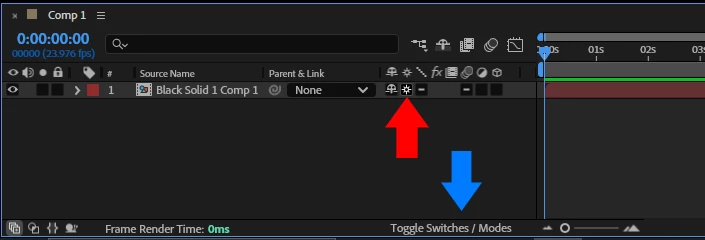
Try to precompose your fire footage and enable Collapse Transformations.


If you don't see the Collapse Transformations icon, click on Toggle Switches / Modes.

2 replies

Warren Heaton
Community Expert
Community Expert
November 4, 2024

You need to track where you want the effects to be applied.

Participant
November 4, 2024

How do i do that?

Airweb_AECorrect answer
Legend
November 4, 2024

Try to precompose your fire footage and enable Collapse Transformations.


If you don't see the Collapse Transformations icon, click on Toggle Switches / Modes.

Participant
November 4, 2024

Omg tysm! It worked!