Known Participant
April 5, 2019
Answered

AE 16.1 and Second Monitor

  • April 5, 2019
  • 7 replies
  • 3031 views

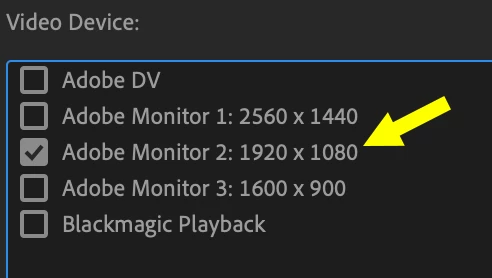
Can't seem to get my updated AE (v16.1 / Mac OS) to preview video on my second 1080p monitor. It worked great before I updated. Anyone else having similar issues?

I check the box for the HD monitor, but it just doesn't want to do it. It either does nothing, or reverts to my third 1600x900 monitor.

Still works properly in the updated Premiere. Only AE is affected for some reason.
This topic has been closed for replies.
Correct answer Mike_Abbott

I understand this issue has been fixed in the latest 16.1.2 (June 2019) update.

7 replies

Participant
November 15, 2021

Your post has been changed because invalid HTML was found in the message body. The invalid HTML has been removed. Please review the message and submit the message when you are satisfied

Kevin J. Monahan Jr.
Community Manager
Community Manager
June 18, 2019

Please let us know if the update did not fix your issue.

Thanks,
Kevin

Kevin Monahan - Sr. Community and Engagement Strategist – Adobe Pro Video and Audio
Participant
June 17, 2019

Our facility just upgraded to v16. (We're slow)

I just wrestled this issue for the last couple hours. Premiere preview works like before. AE would not work with my previously functioning Mercury Transmit monitor. It would allow me to check it, but would change my selection to another monitor.

I tried swapping the cables around with no luck. What finally worked for me was to duplicate the monitors in the windows display settings. I have 3 monitors. I duplicated the monitor I wanted to use and the monitor AE keep choosing for me. After they both showed the AE preview screen, I went back to the display setting and extended the monitors back to how they were. AE was using both monitors, then I went to the video preview setting and both where checked. I unchecked the one I didn't want and the other one seems to be working.

Not sure for how long.

Mike_Abbott
Mike_AbbottCorrect answer
Legend
June 18, 2019

I understand this issue has been fixed in the latest 16.1.2 (June 2019) update.

Kevin J. Monahan Jr.
Community Manager
Community Manager
June 18, 2019

Thanks Mike,

Fixed issues: Bug fixes in the April 2019 releases (version 16.1, 16.1.1), and June 2019 release (version 16.1.2) of After Effects 

AE Transmit device selection misbehaves with more than two monitors connected.

Regards,
Kevin

Kevin Monahan - Sr. Community and Engagement Strategist – Adobe Pro Video and Audio
JamSki88Author
Known Participant
April 5, 2019

My specs:

  • Mac OS 10.14.4
  • iMac 5K 2017
  • 32 GB 2400 MHz DDR4
  • 4.2 GHz Intel Core i7
  • Radeon Pro 580 8 GB

I got it to briefly work by swapping the cables on the back of my iMac, but when I rebooted, it reverted to the non-working state.

Community Expert
April 6, 2019

Make sure you are using genuine Thunderbolt 3 cables. The data transfer rates are more than double a USB C 3 cable. I've had all kinds of problems with cables that I bought on Amazon that said they were Thunderbolt cables, but they were not.

Tim Kurkoski
Adobe Employee
Adobe Employee
April 5, 2019

We've seen a small number of reports of this problem and are investigating. If you're experiencing this problem, could you please go to the link below and add your GPU and system configuration info? Thanks.

https://adobe-video.uservoice.com/forums/911311-after-effects/suggestions/37282141-mercury-transmit-issue-in-16-1

Known Participant
April 12, 2019

I'm having the same problem.  Very frustrating!  Posted in the other forum, but here's my info here as well...

Mac Pro (late 2013)

OS 10.14.4

2.7 GHz 12-Core Intel Xeon E5

64 GB 1866 MHz DDR3

AMD FirePro D700 6 GB

JamSki88Author
Known Participant
April 13, 2019

I swapped my thunderbolt cables in the back (the ones that control my monitors) and it seems to be working now.  Not sure why that solved anything.

Fingers crossed...

Mike_Abbott
Legend
April 5, 2019

Just checked this on my Win 10 box with 3 monitors - and I see the same issue. I can get preview on one monitor, but not the other. The check mark in the preferences reverts to 'the other monitor' when I try.

However - I am running three GPU's with 2 monitors connected to one, and the other monitor connected to another...

So maybe I shouldn't be surprised...

Community Expert
April 5, 2019

OS? Working fine on my Mac 10.14.4