I did as you recommended. I successfully reproduced the bug. I've uploaded the test to creative cloud: http://adobe.ly/2gqECDM
Let me explain what I did to execute the test.
1) I created a screen recording using Quicktime. (I saved the file as "screen_recording")
2) Using AE2015, i time-remapped the file. (I saved the file as "2015_time_remap.aep")
3) I opened the AE2015 file in 2017. Low and behold the time remap was different!!! (I saved the file as "2017_time_remap.aep")
thanks for taking the time. ok I see where the problems is. it seems the footage you recorded has a weird frame rate. I got it by using VLC player which is a free software that is more than just a reliable video player. notice the weird frame rate: 56.17
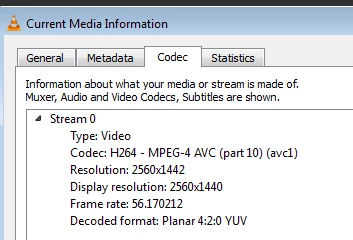
in Ae it get's interpreted one way in CC2015 and another in CC2017 and actually CC2017 is in the right because it is trying to play the video in the frame rate of 60 which will make it 5 seconds and 44 frames.

and not like previous version that does interpret it at 56.17 but says it's 60fps and the video is now 6 seconds and 7 frames (as it should be)
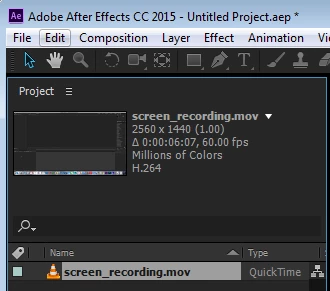
so what you can do is in CC2017 change the interpret footage to the real frame rate (right click on the footage-interpret footage) and insert the correct frame rate
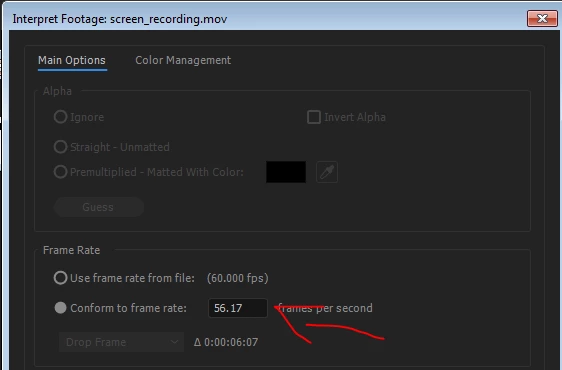
now it will interpret correctly
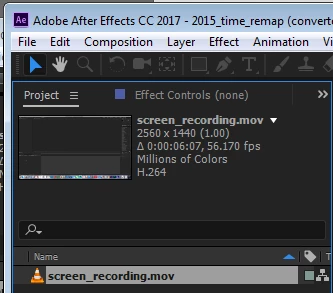
this is a workaround, the real solution would be to record in a video capture software that can encode the video in the exact specified frame rate, and not give this weird frame rate.
 AdChoices