
AE 2019 / PC - Repeating cached frames
This issue I'm running into a little odd if you're not right in front of it, so bear with me.
I brought in a mp4 clip that I'm then rendering out to a PNG sequence so I can use it elsewhere.
A rather significant issue popped up where AE will cache a certain amount of frames, but then repeat those frames throughout the sequence. Check out the image to get a better idea. The sequence seems fine until frame 64 and then jump back to frame 31 in terms of the image...the frame number continues to clock upward to 65.
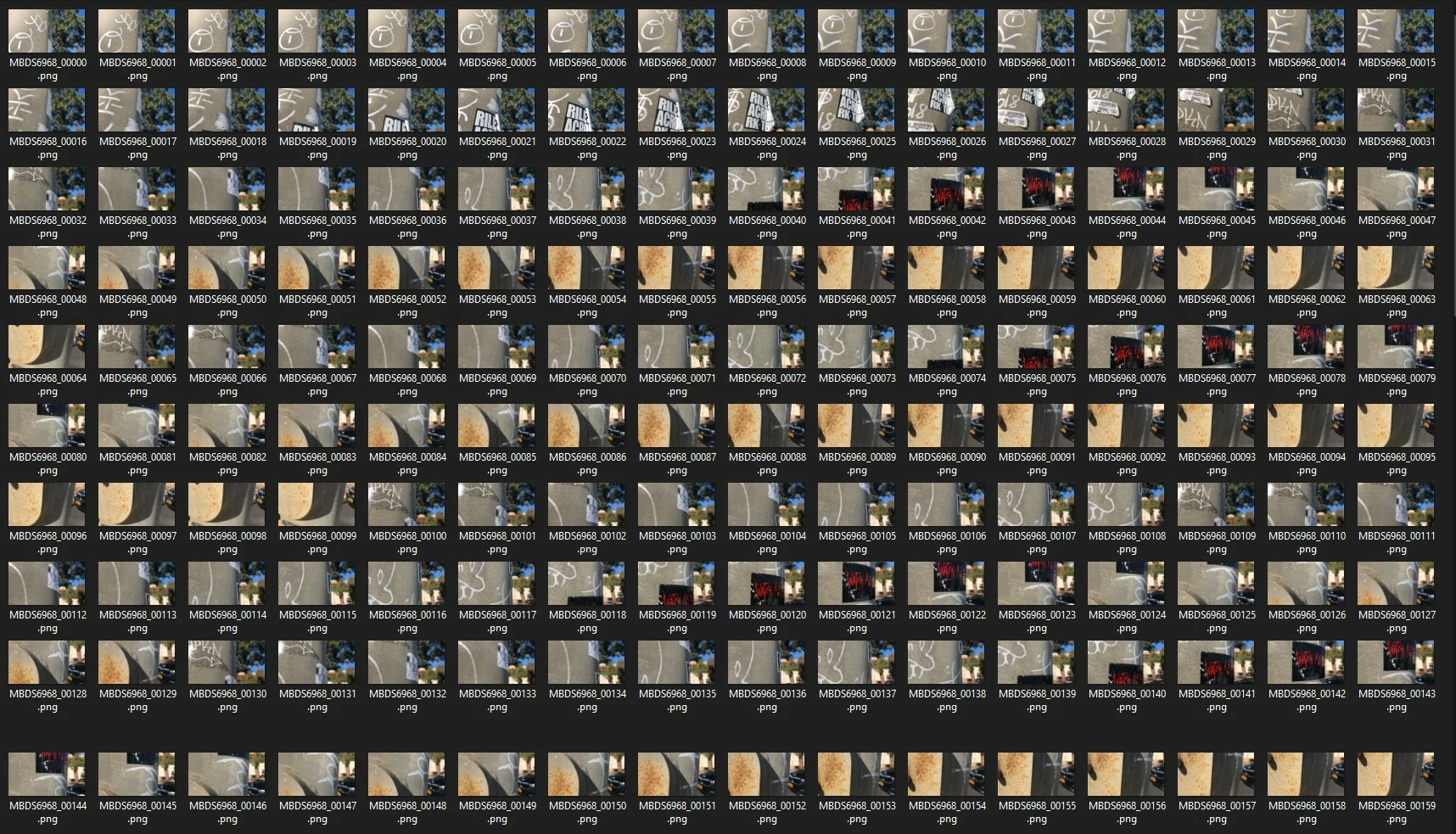
This is the image sequence rendered from my movie clip. The clip is fine, when played in something like QTplayer, but once it caches in AE, it does this stuttering playback.
EVEN WORSE, is that *that* is what's rendered! If it was just some goofy playback issue, I could probably work around that, but when AE renders that error, now I basically can't use AE to render. I've purged the cache and memory many, many times just to makes sure. It initially goes away, but right after that first caching, it geeks again.
To test things further, I brought the clip into Media Encoder and it *did* render the PNG sequence correctly. Is there something in 2019 that's blowing up?
Am I missing something? Has anyone else run into this?
Thanks
 AdChoices