This topic is closed to new replies. Start a new post to keep the conversation going.

23 replies

Participant
Feb 13, 2020 5:35 PM UTC

I'm having this exact same issue. February 2020 and still no fix for that. Half of the renders are wasted. 

Translate
Participant
Feb 17, 2020 10:44 PM UTC

For some reason, it is impossible to use the box blur effect. Instant glitches. 

Translate
gupta shivangi
Legend
Dec 11, 2019 2:08 PM UTC

Hi all,


Thanks for your patience. As mentioned by @john, Adobe After Effects has released a patch update which provide a fix for the preview issues on 16" MacBook Pro. For more information, please check https://helpx.adobe.com/after-effects/kb/fixed-issues.html


Thanks,

Shivangi

Translate
Participant
Dec 23, 2019 2:36 AM UTC

this isnt fixed. Been using AE native effects like glow and still ahving these issues. please help 

Translate
Participant
Dec 28, 2019 4:51 AM UTC

Doesn't seem to be fixed.

16" MacBook Pro
After Effects 17.01

Mac OS Catalina 10.15.2

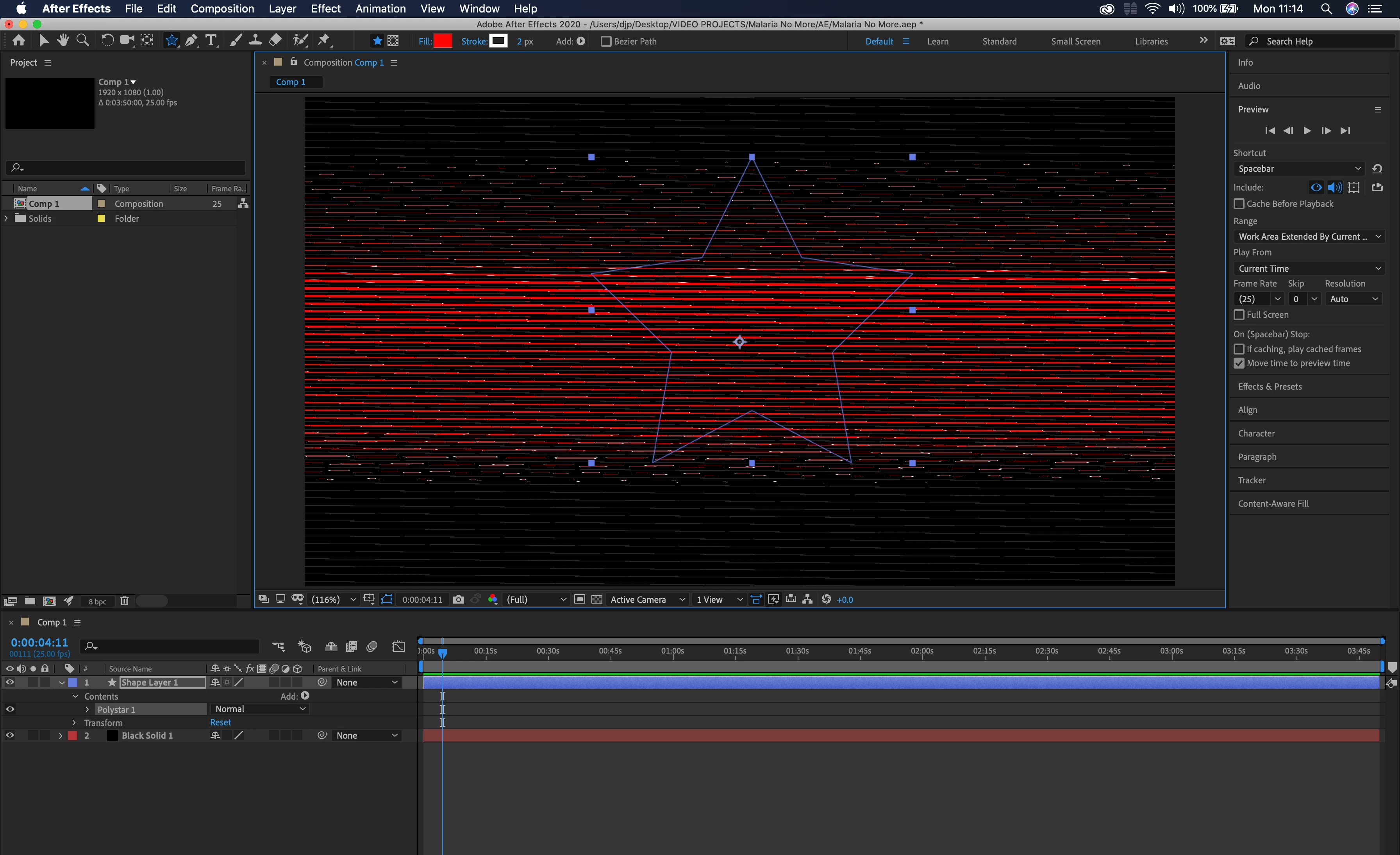
Simple native box blur shows up as stripes. Not just preview, renders this way too.


Translate
Inspiring
Dec 10, 2019 3:10 PM UTC

This is now fixed in version 17.0.1! A fix for premiere is next I hope.

Translate
Participating Frequently
Dec 2, 2019 7:19 PM UTC

Same here. seems to be an incompatibility with some of the new cards. I was on the phone with adobe for an hour the day i got this machine, the verdictfrom the tech on the call was:  'use AE2019 for now, call AMD about updated drivers'. !!

Translate
Participating Frequently
Dec 2, 2019 7:36 PM UTC

Strangely, turning on 'Show Rulers' in AE2020 will fix this problem. Which makes me think it' not a driver issue at all.

Translate
alano87986020
Participant
Dec 2, 2019 11:10 PM UTC

Yeah that works, Also if you resize the window I noticed it would fix it. You have to find a certain breakpoint in the window where it works. 

Translate
Vishu_Aggarwal
Participating Frequently
Nov 25, 2019 2:31 PM UTC

Try changing the Video Rendering and Effects from Mercury GPU Acceleration (Metal) to Mercury Software Only from the Project Settings. Project settings can be accessed from the File menu. 


Also, check the System Compatibility Report under the Help menu.


Translate
Vishu AggarwalAdobe Certified Instructor, Professional and Expert
Participant
Nov 25, 2019 3:32 PM UTC

That's the first thing I tried. Nothing changed. Rolled back to CC2019 on both Premiere and AE, and just accepted that Adobe release beta versions now (but still charge you the full whack).  

Translate
Participant
Nov 25, 2019 8:48 PM UTC

I'm having the same issue. Is 2019 working for you?

Translate
BenSCR
Inspiring
Nov 25, 2019 2:17 PM UTC

I'm having the exact same problem with a MacBook Pro (16 inch-2019).

Translate
Participant
Dec 2, 2019 5:39 AM UTC

I'm also having this issue, but its intermittent which is more frustrating, when I export it or dynamic link it to premerie it renders perfectly.

Translate
Nov 25, 2019 11:49 AM UTC

Moving to the After Effects forum from Get Started

Translate