
Participant
August 8, 2017
Answered

AE cant render as Mp4 -there is no option to

  • August 8, 2017
  • 5 replies
  • 72094 views

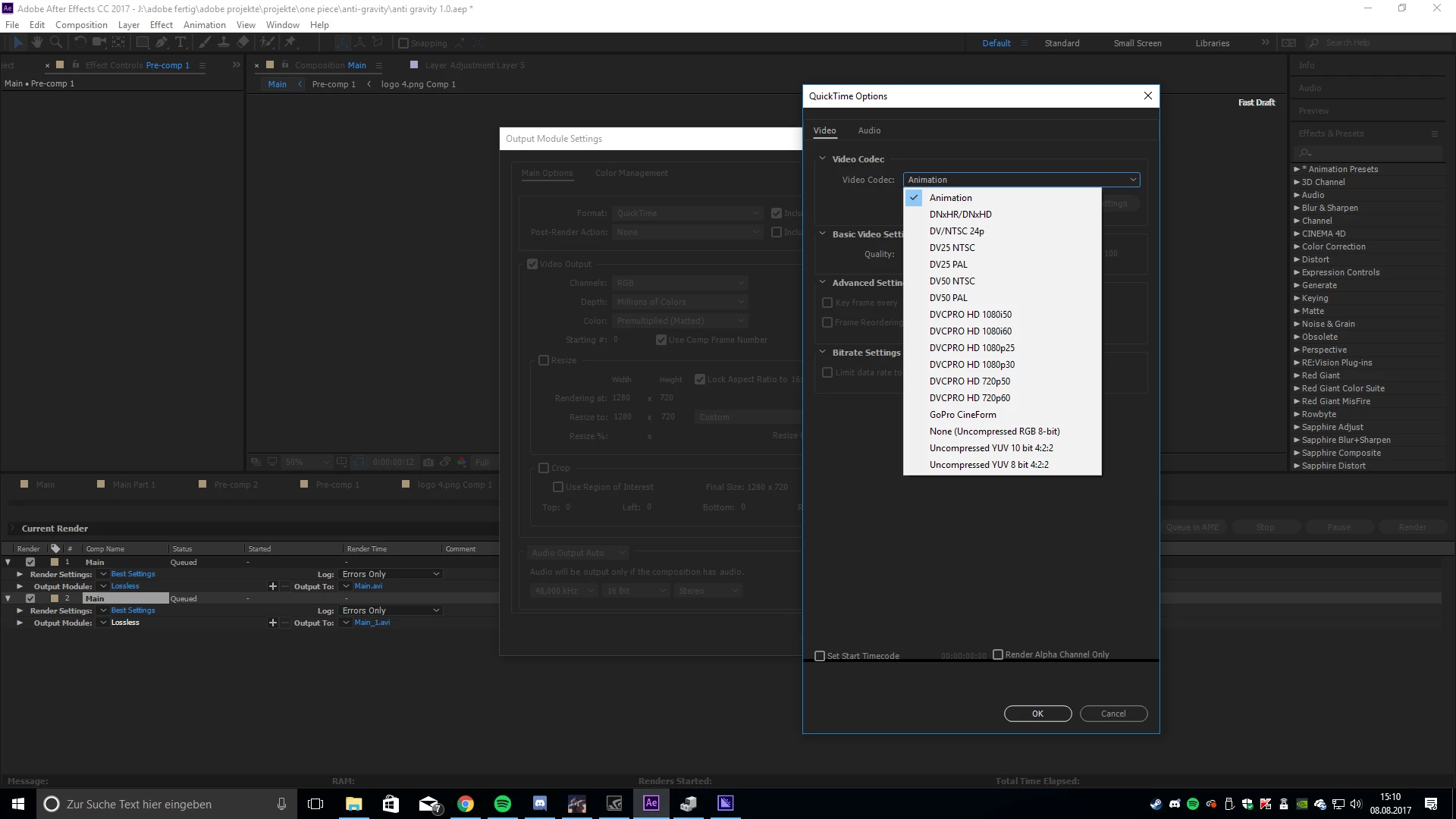
well, what am i supposed to say. Why won't this work now. With quick time selected it won't give me the option to render as a 0.264 😕😕

I just recently reset my whole computer, wether there is some reason connected with that i don't know.

I'm really struggling to render my project right now. Eeverything else will only give me a black screen

here is a picture for the option i am given.
This topic has been closed for replies.
Correct answer Rick Gerard

First, Apple stopped supporting and developing H.264 in a QuickTime container. You don't want to do that. Second, the output module in the Render Cue is not capable of multi pass rendering and all MPEG encoding benefits from MP rendering. Third, the ability to render a very clean mp4 using H.264 compression is included in the Adobe Media Encoder along with some really good presets for common delivery standards.

All of this information in available in the Help files and is posted all over this forum and the net in general.

If the Adobe Media Encoder does not solve your problem then get back to us. If every rendering option gives you a black screen then you have other problems with your comp and we need workflow details.

5 replies

Participant
August 6, 2021


why dont i have an option to render video to MP4 ( like every other video i have seen in youtube they have mp4 option ) i have been here for 2 hours trying to figure this thing out and am getting frustrated.

SimonTaylorVFX
Participant
January 9, 2020

Really wish there was an answer to this, for the current production pipeline based on scripting and the end product needs to be a MP4 container. There isn't currently a way (according to Adobe's documentation) to send jobs to AME and specify output preferences with a script. Current workflow is to do a lossless after effects render and then set up a watchfolder in ame to rerender as MP4...then as this has to be in one folder, we have to use another script to output this file back into the right project folder on the nas. Would save a lot of hassle to be able to render straight from after effects to the project folder in the right format for delivery

DanRac
Participant
September 28, 2020

I agree with this as well. I have come across this problem from a development standpoint and would love to not have to round trip to ME for mp4 renders. Some people in the comments have suggested that we "follow the path of least resistance", but for my purposes I have found that not having the option has created bigger problems. 


For my application, I am currently faced with two options niether of which are great. First, I could do what SimonTaylorVFX mentioned above or at least something similar using other 3rd party engines. This would force the user to launch software in the background which may or may not be installed on thier systems. The other option I found is to write a custom plugin that adds the codecs back in the AE render queue. This second option would be very time consuming which is why I am here.


Looking at the dates posted here in this forum (2017-2020) I'm noticing that this is a re-occuring and persistent issue. Unless, Adobe wants to force it's users to use ME I can't see any reason why it's not an option at this point. Is there a REALLY GOOD technical reason for why there is no option for rendering mp4's natively from AE? 


This seems like a reasonalble request from the community and something that could easily be solved by the Adobe dev team. Especially considering the price we pay!

Community Expert
September 28, 2020

If you want a really good reason that you can't get a good MP4 (h.264) compressed file from the Render Cue I will give you two. First, it never worked well, not even close to well. Second, the Render Cut/Output module processes only one frame at a time so it is impossible for the compression engine to create the IPB frames that MP4 MPEG compressions rely on for quality compression and small file size. If you do not send properly compressed files with a good set of IPB frames to a streaming service (YouTube, Vimeo, Instagram, Facebook) they will recompress it with a sledgehammer and you will lose quality. A lot of quality.


What is IPB compression? An I-frame has luminance and chroma information in the frame. The color is compressed in blocks of 4 pixels, and luminance is compressed for every pixel using from the original pixels. A P-frame is a frame that predicts where the pixels are going to move by looking at the next frame and guessing where they move. Everything is predicted. A B-frame is a bidirectionally predicted frame where the prediction is based on the previous and next frame. These P and P frames are a lot smaller than I frames. The Adobe Media Encoder looks at the original Comp, generates a string of uncompressed frames, and then it compresses the I frames and predicts the P and B frames from the stream of original frames resulting in file sizes that are up to 1/3 smaller with a lot fewer color and compression artifacts. That's why MP4 (MPEG) H.264 compression was removed from the Render Cue. 


There is one advantage of using the Media Encoder that you are not thinking of. You can render a file while you continue to work in After Effects. There is no noticeable effect on the efficiency of AE or the responsiveness of the UI if your system meets the Minimum System Requirements. If you want to get the most work done in the least amount of time, invest in a background rendering system like Render Garden. Render time on a modest system will be cut in half. On my iMac Pro, a project that would take 15 minutes to render in the AME or 10 to 12 minutes to render to a production format using the render cue will render in about 3 minutes using Render Garden and give me both a lossless production master and an MP4 while still allowing me to work in AE. To tell you the truth, I don't remember the last time I stopped working on a comp to wait for a render. I have 3 BG rendering solutions, RG is my favorite. 

Participating Frequently
July 19, 2018

The inability to output H264 in an MP4 container directly in AE, is a major pain point for our group.  Having to send comps to Media Encoder adds minutes while the dynamic link brings the project info in.  If it's in Media Encoder, why can't After Effects have the same functionality?  Seems like an oversight to me, with an easy fix.

P.M.B
Legend
July 19, 2018

digwrkflws  wrote

Having to send comps to Media Encoder adds minutes while the dynamic link brings the project info in.

Think about it this way,  Yes, establishing the link between in ME could take a few minutes & few minutes equals a few dollars, right?

And over time those dollars add up, right.   But if you were able to do it directly in AE and save those few minutes then After Effects would be tied up for entire length of time it takes to render the video.  When media encoder is rendering the video you can start your next project in After Effects.  So, in a proper workflow the three minutes it takes to set up rendering Media Encoder actually creates literally hours of addition time in After Effects.   So Using ME actually increases productivity or at the very least creates the possibility to increase productivity.  Ultimately it all depends on the employees, right?

~Gutterfish
Community Expert
July 19, 2018

You have to understand that using Dynamic Link does not save time in rendering. In fact, it usually takes longer to render, and can take much longer to render than using AE's output module to render and replace with a suitable production format.

Why? Because AE will be running in the background doing the render when using Dynamic link on top of Premiere Pro running in the background rendering the rest of the PPro sequence. Premiere Pro's Dynamic Link is really only a time saver for extremely simple composites, graphics or similar tasks you can't do right inside PPro. If AE can't render a full frame preview faster than 3 or 4 frames per second render it. If you invest in Render Garden you won't lose any more time than it takes to cue up the render.

Known Participant
April 17, 2018

Hi

I may be being extremely stupid, but I need someone to explain to me in words of one syllable :-)

I'm on a Mac, with the latest versions of everything on Creative Cloud, other than Media Encoder. A client has specifically asked for MP4 versions of the animation, and I'm not sure where to find it in ME. There doesn't seem to be an option any more. I downgraded ME because some codecs disappeared, and I have now got back H.264, but I don't know if this gets me any closer to my destination. I understand (a little) that QuickTime is a container, so if a client wants MP4 (I assume they want  a file which actually ends in .mp4) how do I do this in the new versions of CC?

Thank you.

Community Expert
April 17, 2018

If you are in After Effects all you have to do is add a composition to the Adobe Media encoder using the Composition Menu.

Inside AME you pick H.264 and you will be offered a bunch of standard presets. Just match the frame size and everything will be properly adjusted. The file will be an H.264 MP4.

If you are using Premiere Pro the Adobe Media Encoder is the only thing that can be used for rendering. It is all automatic. The same advice applies, just pick the h.264 format and the appropriate preset.

All of this info is readily available in the help files.

Known Participant
April 17, 2018

Thank you Rick. I have looked at the help files, and I do know how to add files to AME, but I think my question is more about trying to understand MP4. Is it a wrapper, or a codec? And when a client asks for it, what is the best advice? In the end I gave them an M4V file and they are happy, but I am still frustrated that I can't get my head around this.

Rick GerardCommunity ExpertCorrect answer
Community Expert
August 8, 2017

First, Apple stopped supporting and developing H.264 in a QuickTime container. You don't want to do that. Second, the output module in the Render Cue is not capable of multi pass rendering and all MPEG encoding benefits from MP rendering. Third, the ability to render a very clean mp4 using H.264 compression is included in the Adobe Media Encoder along with some really good presets for common delivery standards.

All of this information in available in the Help files and is posted all over this forum and the net in general.

If the Adobe Media Encoder does not solve your problem then get back to us. If every rendering option gives you a black screen then you have other problems with your comp and we need workflow details.

Participant
August 8, 2017

alright, media encoder seems to have solved my problem!