JensKoenig
Participant
November 28, 2016
Answered

Ae CC 2017 crashes when opening preferences

  • November 28, 2016
  • 11 replies
  • 38092 views

2017 release 14.0.1

previous releases wer fine! After updating to this version making new file, saving and then going to preferences lets Ae crash.

After starting again and loading the file last saved, message CUDA not supported.

Not going to perferences and opening older projects: A soundfile file .m4a is not supported anymore.

How do I solve this problem?

additional info:
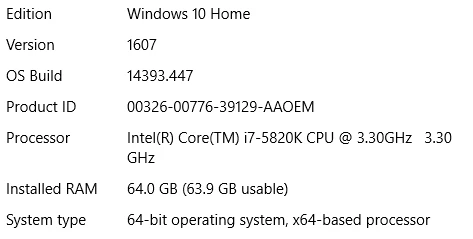
Graficcars: GTX980

And yes, Ae was ok before the update!

This topic has been closed for replies.
Correct answer Roei Tzoref

No. It did not help. It's still crashing when accessing Preferences.


14.1 that came out yesterday is supposed to resolve this.: https://blogs.adobe.com/creativecloud/after-effects-cc-january-2017-update-is-now-available/ so make sure you update your software.

11 replies

Participant
February 12, 2021

thx very much!!! also remember delete too all conf file with the last date, im only delete prefs of the program and dosnt work!

hirciklemen
Inspiring
September 27, 2017

Me too https://prnt.sc/gqc3ry :/ After opening any project {for example: Klemen Hirci Diana Lešnik}, it's start freezing, then crash But when I see in Adobe forum, but now it's working fine

p.s This screenshot "Crash message" it's in slovene"

Participant
March 1, 2017

This issue actually comes with user setting of layout. The Unsupported GPU is the major cause behind it. I have solve this issue by deleting all of pref files in the following path:

C:\Users\Type your user name here\AppData\Roaming\Adobe\After Effects\14.0

LucasFonts
Participating Frequently
April 28, 2017

Current Adobe Illustrator CC also hangs on preferences, and yes I tried connecting Bluetooth headphones. This is so hilarious!

janellr87459496
Participant
January 25, 2017

UPDATE!!!!! after disabling audio it worked but only 1 of 20 tries otherwise it would just crashed again. BUT! i found this! After Effects or Premiere Pro crashes after starting

As soon as i seen firewall i i checked all of my firewall settings and everything was good to allow after effects to load. So I dug deeper. Opened task manager ( cntrl + alt + del in windows ) and looked for any anti virus?ad aware programs i had installed and forgotten about that had some kind of firewall. Sure enough.... I had somehow installed ad aware companion and it had a process running called lavasoftTCP.exe or something like that. I quickly unistalled it and after effects hasn't crashed once after 10 successful openings. Hopefully this was the only issue and it stays this way. So check ALL of your firewalls or any programs that could be blocking it. It needs to connect to adobe servers! HOPE THIS HELPS!!

davideg5386905
Participant
January 12, 2017

Resetting the preferences didn't work for me... But when I plugged my headphones... BAM! Solved...

rapharocker
Participant
January 12, 2017

The problem was similar on my computer.

And it is still not really solved , we do need a really fix from Adobe.

The trick I use is always have my headphone plugged in before I turn on AE.

Also always have it plugged in before I close the software , and never unplug it when AE is running.

As a previous user said on this discussion, it's due to system switching from one audio driver to another.

I think people how uses the same audio device ( and so the same driver ) for speaker and headphones don't have this problem.

Bentho
Participant
January 3, 2017

Deleting all the text documents in your version of AE found in this folder path \Users\your name\AppData\Roaming\Adobe\After Effects\version (14.0 for me)\Adobe After Effects 14.0 Prefs (Prefs-indep-composition, Prefs-indep-general, Prefs-indep-output, Prefs-indep-render, Prefs-paint, and Prefs-text), that's what makes it worked for me. Hope it does for you. Also hope that Adobe will stop using us as lab rats for its beta release. Some people's livelihood depends on them, and yet they find a way to mess us up. Too big to fail will not always be. Some will come with better software eventually. In the meantime, continue to eat our cake and be grateful about it....

January 2, 2017

didn't work for me... however this did -

rapharocker
Participant
January 10, 2017

Great ! This worked for me too.

Participating Frequently
December 20, 2016

Same issue here with crashing upon opening preferences, on a Mac with OS X 10.10.5. In my case resetting the preferences worked:

  • Press Ctrl+Alt+Shift (Windows) or Command+Option+Shift (Mac OS) while the application is starting.
Benjo17250
Participant
December 19, 2016

Delete all of the following files (Widows/Users/[user_name]/AppData/Roaming/Adobe/After Effects/[version]):

Adobe After Effects xx Préfs

Adobe After Effects xx Préfs-indep-composition

Adobe After Effects xx Préfs-indep-general

Adobe After Effects xx Préfs-indep-output

Adobe After Effects xx Préfs-indep-render

Adobe After Effects xx Préfs-paint

Adobe After Effects xx Préfs-text

Adobe After Effects xx Win fr_FR Raccourcis

It's works for me

Known Participant
January 6, 2017

Benjo's solution of deleting multiple preferences files works for me, couldn't get it to work by just deleting the one pref file by itself.

Participant
December 18, 2016

Same thing happening to me, when audio jack is unplugged and go to preference. ae crashes, damn.. hope this problem will solve in next update