
davida87202251
Participant
November 5, 2016
Answered

AE CC 2017 - Keyframe animations not playing within compositions

  • November 5, 2016
  • 4 replies
  • 5641 views

H there,

As the title suggests I have animations nested within 2 and 3 compositions deep in my project which all play within their own compositions (I have however experienced a few issues where some of the puppet tool animations would jump to a position I haven't told them to on playback), but when I come back out to the main composition there is no movement at all.

Also when I animate from the main composition I'm getting some strange masking issues, however I haven't added any masking (Reference image attached).
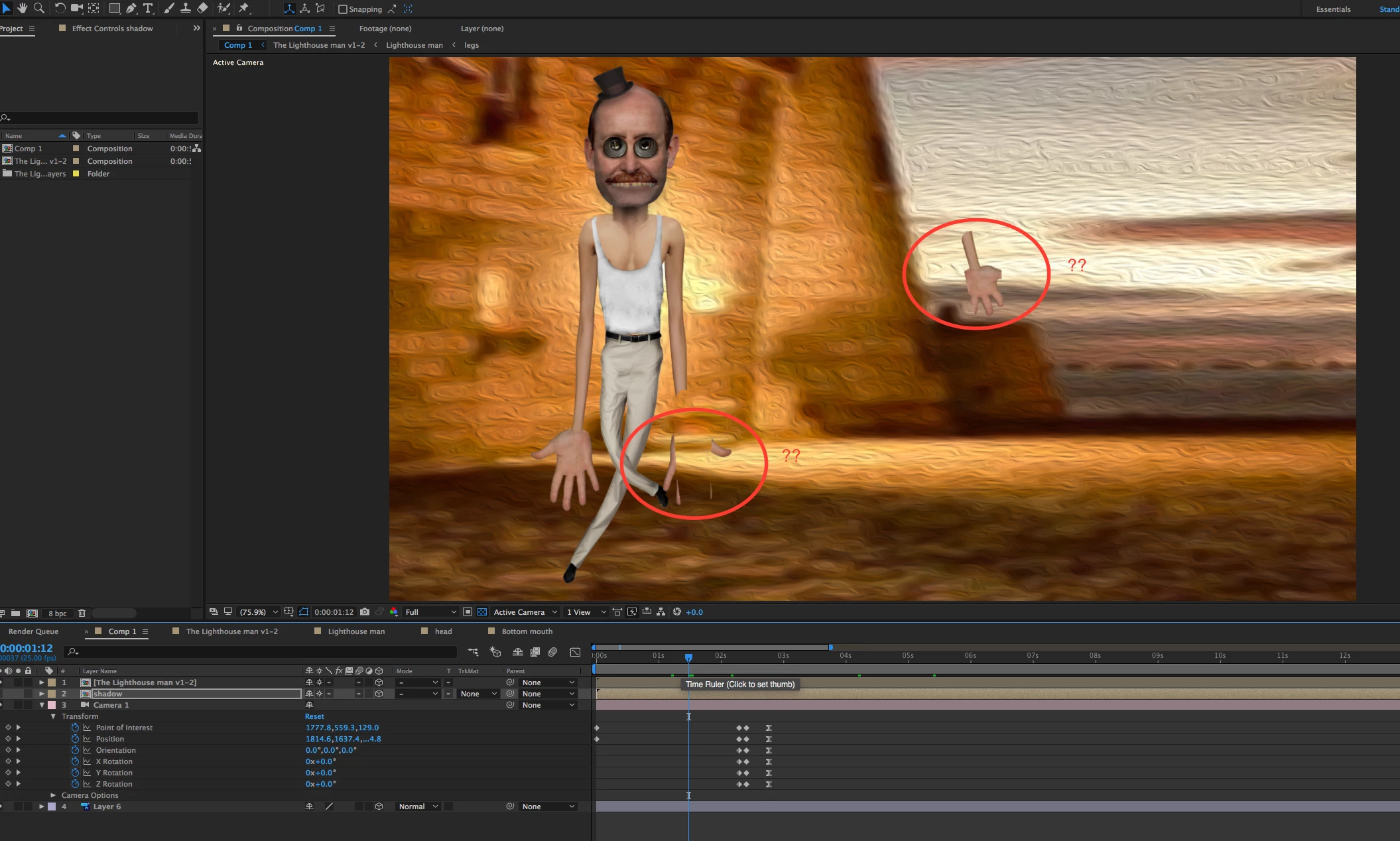
My workflow is: Composition creation in photoshop cc > after effects cc.

PS Document is RGB.

As a long time user I have never had this problem before. Can anyone shed any light on the situation?

Many thanks,

David

This topic has been closed for replies.
Correct answer Victoria Nece

Looks like you have collapse transformations enabled on something animated with the puppet tool. These two features can conflict with each other. Try turning off collapse transforms and see what happens.

4 replies

Participating Frequently
November 29, 2016

I collapsed transformations and enabled back again. it did half the job. There were problems with some rotations. I activated: On Transparent (check first, in some animations work and others it doesn't.) Everything seems fine now.

Roei Tzoref
Legend
November 29, 2016
activated: On Transparent (check first, in some animations work and others it doesn't.)

on transparent makes sure that no pixels outside the mesh will be shown. this could look as if it solved your problem in some cases but as the help files explain - working with collapse+puppet+animation transformation on is really making a mess and results can be unpredictable.

Victoria NeceCorrect answer
Adobe Employee
November 5, 2016

Looks like you have collapse transformations enabled on something animated with the puppet tool. These two features can conflict with each other. Try turning off collapse transforms and see what happens.

davida87202251
Participant
November 6, 2016

That seems to have solved the problem in this instance. However after many years using After Effects in this way it's the first time I've encountered this issue. Do you know if it'll be resolved moving forward?

Many thanks,

David

Roei Tzoref
Legend
November 6, 2016

this issue is a result of the render order pipeline which was always there in Ae and probably will be forever. puppet is an effect and effects are applied before transformations, unless you click the collapse switch and it reverses the order. therefore you should not change or animate transformations for a collapsed layer or precomp when using the puppet effect. this is from the help files:

Animating with Puppet tools in After Effects

Note:

Don’t animate the position or scale of a continuously rasterized layer with layer transformations if you are also animating the layer with the Puppet tools. The render order for continuously rasterized layers—such as shape layers and text layers—is different from the render order for raster layers. You can precompose the shape layer and use the Puppet tools on the precomposition layer, or you can use the Puppet tools to transform the shapes within the layer. (See Render order and collapsing transformations and Continuously rasterize a layer containing vector graphics.)

Dave_LaRonde
Inspiring
November 5, 2016

Why don't you just wait for the second bug fix to come out?

The FIRST bug fix typically fixes common bugs -- and who knows, yours may be among them -- but breaks things that once worked just fine.

The SECOND bug fix generally fixes the bugs created by the first bug fix.

In addition you can probably look forward to a third bug fix, which addresses more exotic & rare bugs.

What to do in the meantime?  Use an earlier version.

November 5, 2016

I have also had similar problems with masks not appearing where they should and video footage appearing in my composition that has not been imported into my AE project, or even exists on my local hard drive.

I tried resetting AE preferences and uninstalling and reinstalling, nothing worked except starting a new project.

davida87202251
Participant
November 5, 2016

Unfortunately, I've also experienced the same issues with starting a new project since the update. I've also tried importing previously created photoshop compositions and encountered the same issue.

I'm concerned as I will need to use after effects for work next week. Does anyone know if it's possible to revert back to the previous version?

Many thanks,

David

Roei Tzoref
Legend
November 5, 2016
I'm concerned as I will need to use after effects for work next week. Does anyone know if it's possible to revert back to the previous version?

this version is a brand new version, not an update. as always with your CC subscription you can install alongside CC 2017, 2015.3, 2015, 2014, 2013, 2012 (CS6).

https://helpx.adobe.com/creative-cloud/help/download-install-app.html#Installpreviousversionsofapps