Participant
November 1, 2017
Answered

AE CC2018 - 3D Camera Tracker Freeze

  • November 1, 2017
  • 7 replies
  • 6085 views

Hey everyone,

I am trying to stabilize some 360 drone video using the VR Comp Editor. After applying the AE 3D Camera Tracker, it starts analyzing in the background nicely, but once finished analyzing, it seems to freeze while "Solving Camera" shows. I've been waiting for like an hour, and re-started AE and the computer and everything, but still stops at this point.
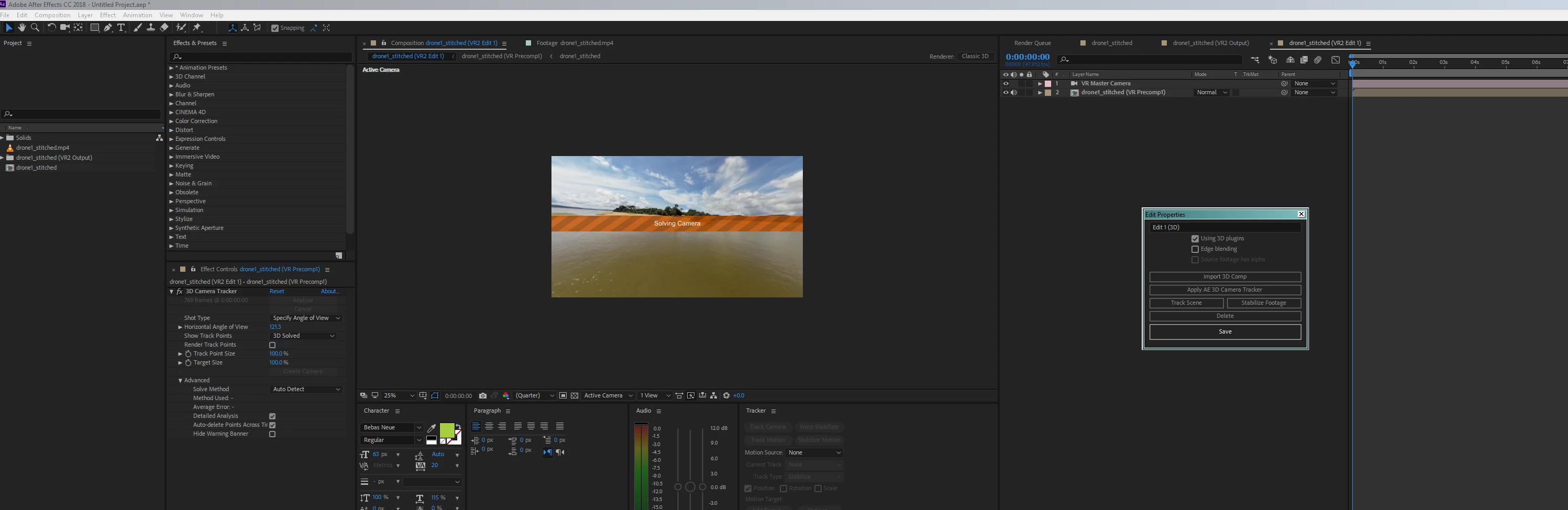
Weird thing is, I already did stabilize this very footage once successfully, but wanted to refine something and do it again, and now it just stops here and won't move forward. AE however doesn't freeze, I can pretty much do anything in there, but this "Solve Camera" thing won't finish. And not just this footage - now the same thing happens each time I want to stabilize any other 360 footage, even in a new project..

I know it's a new feature originating from Mettle, but I hope it's not buggy, because this is work I'm doing with deadlines, and this was already working nicely with Mettle..

Thanks for any quick help!

This topic has been closed for replies.
Correct answer Nexahs1138

AMD processor can't do motion tracking in AE, you need an intel to do that.

7 replies

Participant
April 19, 2023

I am having the same problem, with AMD processor, BUT..


I already cut and tracked one ball flight video all the way through. Now I am moving to a different section of the same video to track and it gets stuck on 70%.


Participating Frequently
April 26, 2018

Please Adobe Fix this problem update cc 2018.

Not working 3D camera tracker and stabilizer. Premiere PRO and AE not import .avi format and have problem with movies alpha channel.

Participating Frequently
April 10, 2018

Hello,

Same problem here. Just updraded to the new CC2018. But the camera tracker does nothing. When i activate the tracking, nothing happens. Neither on windows (Intel CPU, Nvidea GPU, windows 7) or Mac (MacPro the can version).

Just installed CC 2015. Camertracking works in this version, but not in CC 2018. I think it is a bug.

Participant
March 5, 2018

I'm having the same issue with AE CC2018 (Win10, Nvidia GPUs), and it's driving me nuts. I opened the same footage in AE CC2014 and 3D Camera Tracker tracks and solves no problem. But something in 2018 makes it stall out trying to solve camera.

Anyone else find a solution to this issue?

Nexahs1138
Inspiring
November 7, 2017

Have you done this before? If yes then it's a bug, if no then is your processor AMD or intel? AMD can't do the tracking.

Participating Frequently
November 21, 2017

What do you mean AMD can't do the tracking? I have an AMD and I'm having this exact error, any solutions?

Nexahs1138
Nexahs1138Correct answer
Inspiring
November 27, 2017

AMD processor can't do motion tracking in AE, you need an intel to do that.

lynch.scott
Participating Frequently
November 7, 2017

I'm also having the same problem, did the tracker on a 26 second clip, it analyzed but has been "Solving" for a very long time, in the past this never took that long.

finnv85334888
Participant
November 3, 2017

Having the same problem right now with AE CC18 (although I happened to encounter it in CC17 already). Tracked it once and camera was solved. Tracked same shot again to refine: Camera solve limbo. Whole of AE freezes.