
Inspiring
September 23, 2017
Question

AE crashes when working on project involving Cineware proxy

  • September 23, 2017
  • 1 reply
  • 1402 views

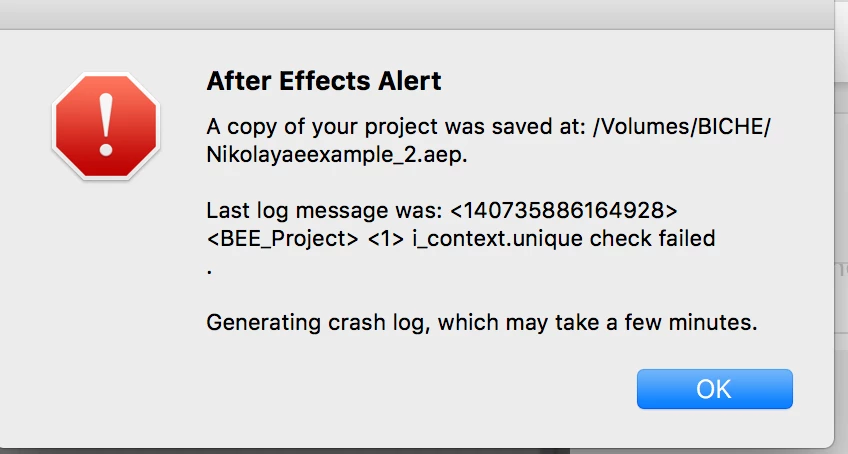
I'm using a plugin called Cineware Proxy, which is a way to pre-render Cineware files in AE for smooth playback of Cinema 4D layers.  Almost invariably, AE crashes once the proxy render is complete.  It will be fine until I try to play back the rendered Cinema layer, and then I'll get an error message followed by a crash.  I'll post the screenshot of what I'm seeing.  When I try to open up a file involving Cineware proxy, I get this error called "33:4 data missing."  I have no idea what's causing this.  I'm working on a MacBook Pro 15", OS X Sierra, and AE 17.2.  I'm just having a lot of trouble with this, and it's made work impossible. Would anyone know how to fix this?
    This topic has been closed for replies.

    1 reply

    Kevin J. Monahan Jr.
    Legend
    October 6, 2017

    Hi gomerpyle3333,

    Sorry for this issue. Did you ever find a solution? Please let us know if you have or if you still need help.

    Thanks,

    Kevin

    Kevin Monahan - Sr. Community and Engagement Strategist – Adobe Pro Video and Audio
    Inspiring
    October 11, 2017

    Hi Kevin, unfortunately I'm still having the issue.  Trashing my prefs helped, but the moment I tried loading Proxy again it crashed. I'm on the latest version Ae, and it was working before--so I have no clue what's going on.  The people who made the plugin said no one else has reported the issue. I have a deadline, so if you do have any advice I might try, I'd really appreciate it. Thank you

    Known Participant
    September 22, 2022

    I've been having after effects crashes whenever I open files containing cineware. Tried debugging the problem and I'm getting this message. Before the crash.

    Cineware_AE_SceneLayer!WaitUntilCinewareIsRunning+0x3ca37