melbendi
Inspiring
July 21, 2023
Answered

AE dumps links to footage, replaces with "Recovered"

  • July 21, 2023
  • 2 replies
  • 469 views

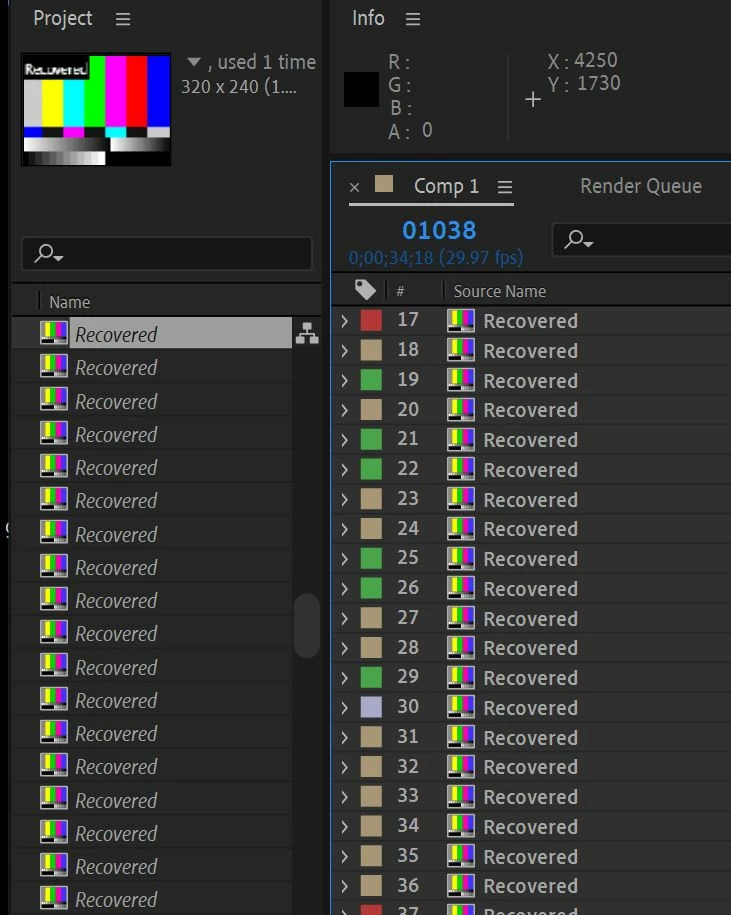
I'm having a problem in which the project loads correctly, but then in little while, it disconnects from all the imported assets and replaces them with a blank object named "Recovered".  Please see attached image. I'm currently in the latest version, 23.5.0 (Build 52), but the problem began in the previous version.  I thought updating would fix it, but it hasn't. The project is on a local internal drive, so the problem isn't the connection.  Does anyone have any suggestions? Thank you!
PS - I came back to add that before it gets to the stage shown in the image, the first thing that happens is that only the Project panel is effected, with the names being replaced with "Recovered" and the icon showing as color bars, however the Timeline is still OK at that point, and I can even edit the comp as long as I don't click on any of the media in the Project window.  If I click on anything in the project window, for example, if I try reloading the media, at that point as soon as I click on one of them, all the layers in the Timeline are replaced with a small (I think 320 x 240) color bar image called "Recovered", as shown in the image, and all my media is gone.  As long as I don't touch anything in the Project window, and can still edit and render in the comp window.  I tried reimporting the project into a new project, but that didn't fix it.  Even if I open an older version of the project that didn't have this problem before, the problem is there.  I've tried restarting, as well, but no change.
This topic has been closed for replies.
Correct answer melbendi

I found a fix! As I said above, if I clicked on any of the "Recovered" item in the Project window, it instantly replaces all my assets in the Timeline with "Recovered" slugs.  But I discovered that if I selected a layer in the Timeline to reveal the source in the Project window, it was there.  So the "Recovered" items were some kind of phantom objects, each linked to an asset, but not representing the asset itself.  So in the Project window, I selected an item above the list of "Recovered" items, then shift-selected the item below the last "Recovered" item in the list, then deselected the items I had clicked on to select the list to have only all the "Recovered" items selected, then hit the delete key.  It all appears to be fixed now.  The file seems to be fine. Very strange bug or corruption.  I just wanted to post the fix in case anyone else runs into this. 😉

2 replies

melbendi
melbendiAuthorCorrect answer
Inspiring
July 24, 2023

I found a fix! As I said above, if I clicked on any of the "Recovered" item in the Project window, it instantly replaces all my assets in the Timeline with "Recovered" slugs.  But I discovered that if I selected a layer in the Timeline to reveal the source in the Project window, it was there.  So the "Recovered" items were some kind of phantom objects, each linked to an asset, but not representing the asset itself.  So in the Project window, I selected an item above the list of "Recovered" items, then shift-selected the item below the last "Recovered" item in the list, then deselected the items I had clicked on to select the list to have only all the "Recovered" items selected, then hit the delete key.  It all appears to be fixed now.  The file seems to be fine. Very strange bug or corruption.  I just wanted to post the fix in case anyone else runs into this. 😉

Mylenium
Legend
July 21, 2023

Without any info about your system, the files in question, where they are stored and so on nobody can tell you much. From busted CoDecs to the file system having issues this could be anything. You need to be more specific.


Mylenium

melbendi
melbendiAuthor
Inspiring
July 21, 2023

Hi Mylenium! Thank you.  My system is a laptop, MSI Creator 17, 32GB RAM, RTX 3080 GPU, running Windows 10 64-bit.  The files in the comp are PNG, PSD, AI, and solids, mostly precomped with nested animation. There are also a few very short, maybe 60 frame, SWF animations from Animator, but I've never had any trouble with them before, and this is effecting all imported file types.  As far as codecs, I have the standard codecs that come with AE and Premiere, plus one third party codec, NotchLC, installed.