

trialboj
Inspiring
March 27, 2020
Answered

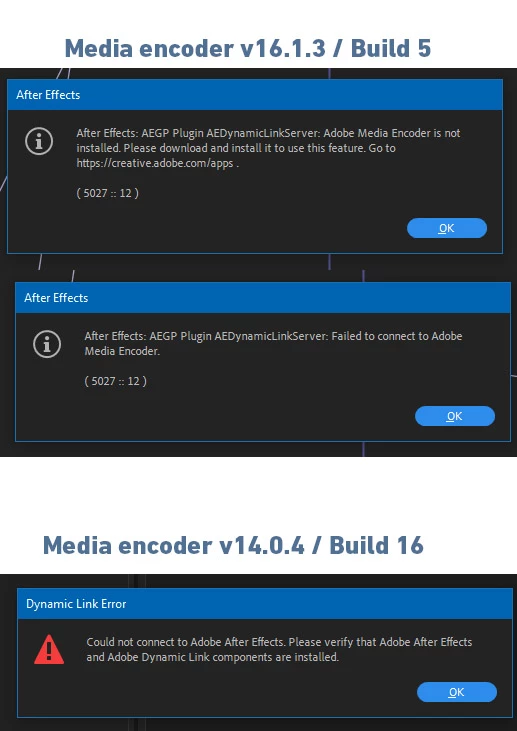
Ae error message - media Encoder is not installed... BUT it IS! latest n(ot) greatest version.

  • March 27, 2020
  • 2 replies
  • 2171 views

Please help, cuz I don't find the solution.


Here is the problem, with version numbers, I just updated both of these for the lates v.


The dynamic link does not work, even when I try to drag an AE project file into the encoder. BUT when I import an AE comp into premier, I can play it and export as I want. I can not use the encoder from premiere either...


Any advice?
This topic has been closed for replies.
Correct answer trialboj

Yes ok, the version number was the problem.

My solution was, to downgrade the media encoder, to 13, and now premiere and after can easily connect and export anything 😄


probably the upgrade would work as well, but I don't want to update to the 2020 versions yet.

2 replies

Rameez_Khan
Legend
March 27, 2020

Hi trialboj,


It looks like you're trying to connect incompatible versions of After Effects and Media Encoder.

After Effects v16.x.x can connect to Media Encoder 13.x.x, not v14.x.x.

For Media Encoder 14.0.4, you need to use After Effects 17.x.x.


Hope this helps.

Rameez


trialboj
trialbojAuthor
Inspiring
March 27, 2020

Hello, Ok that could be the problem. But can you please help me why do I have multiple option in creative cloud? neither of these offer the latest version 😞


Do I have to uninstall the v16 after, and than install a 'fresh' 17.3 Ae? Do this option earse all my plugins, and setups in after effects?

thx

print screen of the CC 

Rameez_Khan
Legend
March 27, 2020

Can you show us a screenshot of your Creative Cloud app?

No, you don't have to uninstall After Effects v16. You can keep both versions on your computer simultaneously.


-Rameez

Mylenium
Legend
March 27, 2020

Without any system info we can't tell you much. Typically those fluke error messages simply come down to the required local port connections and shared memory areas being blocked, which can be caused by anything from specific network firewall configurations, third-party security tools, memory-resident tools like messenger and desktop notifications and a gigazillion other things, including of course actual botched installs and missing components. Start by monitoring your activities via task manager and check your event viewer for critical entries that may indicate potential culprits.


Mylenium

trialboj
trialbojAuthor
Inspiring
March 27, 2020

Well, that's a pretty bad news. I just moved home this pc, everything is tha same, except, that here is no other pc-s connected via enthernet.


If I uninstall the media encoder, with a third pary app (which also deletes stuff from registy, than a fresh install could solve this problem? )