

viktorc92663764
Inspiring
November 9, 2019
Question

AE error: string memory leak (83 :: 2)

  • November 9, 2019
  • 4 replies
  • 9014 views

I didn't find a proper answer coz I think this is the fresh issue related to the last realise:
Today I've upgraded from AE 2019 (v16.1.3) to  AE 2020 (v17.0), now I have both of them.
The issue: When I exit from the new one version (AE 2020) I always get the message:
AE error: string memory leak (83 :: 2)
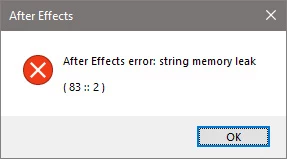
What is interesting:
When I open the same project in the previous version (AE 2019) this message doesn't appear.
Of course, I could work with the previous version of AE but it doesn't work with new Adobe Media Encoder 2020 😒 and old Encoder disappeared from CC desctop app.
Would be appreciated if you help to get rid of this.
....
System:
- ASUSTeK COMPUTER INC. PRIME Z390-A
- Microsoft Windows 10 Pro (64-bit)
- Intel® Core™ i9-9900K CPU @ 3.60GHz
- NVIDIA GeForce RTX 2060
- Intel® UHD Graphics 630Update available
- Realtek High Definition Audio
- NVIDIA High Definition Audio
- NVIDIA Virtual Audio Device (Wave Extensible) (WDM)
- Intel® Ethernet Connection (7)
- Memory 32 GB
- Storage:
Samsung SSD 970 EVO Plus 500GB
WDC WD2003FZEX
WDC WD1002FAEX

This topic has been closed for replies.

4 replies

joshuaalan
Participant
December 2, 2019

Same memory leak issue here -


Hardware Overview:

Model Name: iMac
Model Identifier: iMac19,1
Processor Name: 8-Core Intel Core i9
Processor Speed: 3.6 GHz
Number of Processors: 1
Total Number of Cores: 8
L2 Cache (per Core): 256 KB
L3 Cache: 16 MB
Hyper-Threading Technology: Enabled
Memory: 64 GB


AE version 17.0.0 (Build 557)

AME version 14.0 (Build 556)

Participant
July 2, 2020

Same here. Does it really cause major issues other than the message? My project seems intact.


Known Participant
November 28, 2019

i'm getting the same string memory error on quitting with CC AFX 2019 16.1.3 on a mac running mojave 10.14.6. i have no 3rd party plugins installed and 32 gigs of ram. 

notbyhalf
Inspiring
November 13, 2019

It could be a coincidence but I just updated my Trapcode Suite from 13.1 to 15.1 and this "error on quit" went away.
I seemed to be getting this error every time I quit After Effects (macOS High Sierra 10.13.6).

[EDIT] Nevermind. I am still getting this error.

OussK
Community Expert
Community Expert
November 9, 2019

I'm not sure about the error, but you must be able to reinstall the older version of AME, 

click on the other version and reinstall the older version 


viktorc92663764
Inspiring
November 10, 2019

Thank you.
I've done as you suggested -- installed old version of AME, will work with old AE version cuz the new AE still show the message "AE error: string memory leak (83 :: 2)".
Interesting that is no answer from Adobe side. or they haven't to answer here?

tiffanyl14655871
Inspiring
February 12, 2020

I'm getting the same error message on and off for the last 6 months.  Using a Mac and have the latest versions of everything.