
Legend
April 25, 2020
Answered

AE expression error (can't find solution in forum)

  • April 25, 2020
  • 1 reply
  • 2716 views

I know very little about AE and am not delusional about being able to learn it all quickly. That's why I'm grateful for a site I found with the expressions I needed to just copy and paste. Their Wiggle expression worked great, but I'm having trouble with their Squash and Stretch expression. Here is what they provide, copied and pasted exactly:

maxDev = 13; // max deviation in pixels
spd = 30; //speed of oscillation
decay = 1.0; //how fast it slows down
t = time - inPoint;
x = scale[0] + maxDev*Math.sin(spd*t)/Math.exp(decay*t);
y = scale[0]*scale[1]/x;

  See the screenshot for the error I'm getting:
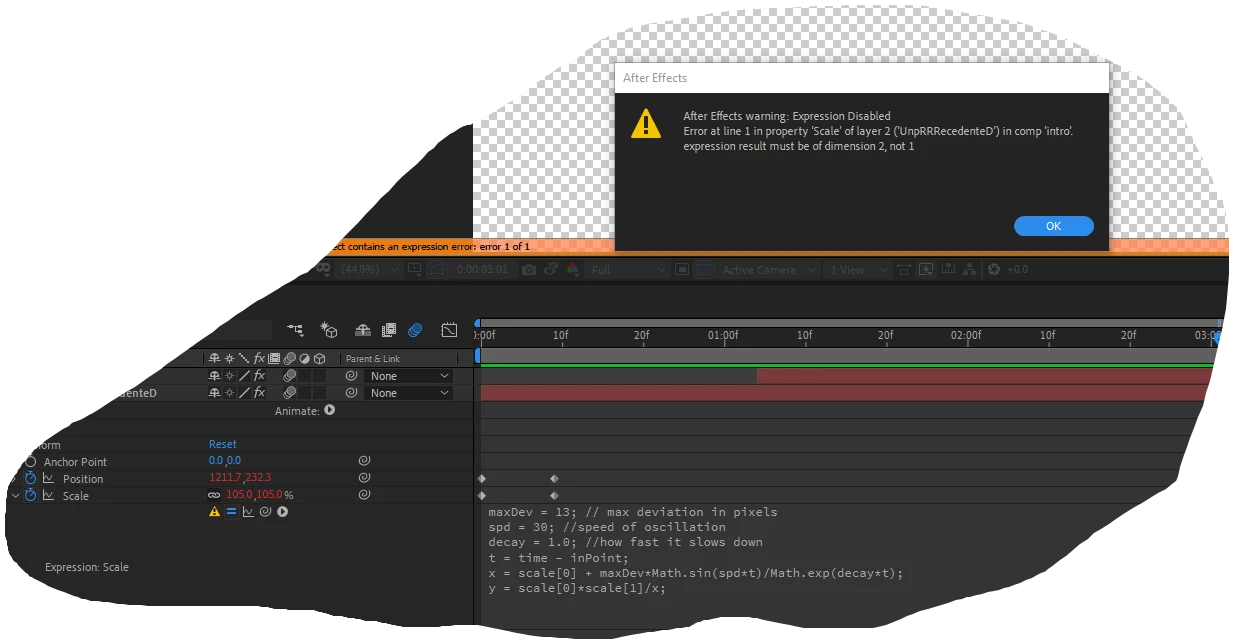
 

I have searched this forum already, and plenty of new users have seen this error. The common solutions I've read so far are:

  • Use "square" brackets instead of parentheses, but... there aren't any parentheses at all in Line 1. ??? (I've tried, for fun, inserting brackets in various ways to see if something worked or blew up. Neither.)
  • The expression is full of typos. This may well be the case, I'd have no way of knowing, not really understanding what the expression means. Like I said, I'm grateful for copy and paste at this point, until I can learn what I need as I go. I did notice that in Line 1, there is an extra space before the word max, after the two slashes. I tried deleting it but it made no difference.


I also read somewhere that the expression engine has changed, and expressions that used to work no longer do. I suspect this is the problem. The page I copied the expression from was written in 2017, and I'm using the latest AE (updated approximately a week ago). I have a feeling this expression used to work and doesn't anymore.


Can anyone help me fix it? Thanks in advance!

This topic has been closed for replies.
Correct answer Dan Ebberts

You left off the last line:


maxDev = 13; // max deviation in pixels
spd = 30; //speed of oscillation
decay = 1.0; //how fast it slows down
t = time - inPoint;
x = scale[0] + maxDev*Math.sin(spd*t)/Math.exp(decay*t);
y = scale[0]*scale[1]/x;
[x,y]

1 reply

Dan Ebberts
Community Expert
Dan EbbertsCommunity ExpertCorrect answer
Community Expert
April 25, 2020

You left off the last line:


maxDev = 13; // max deviation in pixels
spd = 30; //speed of oscillation
decay = 1.0; //how fast it slows down
t = time - inPoint;
x = scale[0] + maxDev*Math.sin(spd*t)/Math.exp(decay*t);
y = scale[0]*scale[1]/x;
[x,y]
cre8vimpAuthor
Legend
April 25, 2020

Astounding! Thank you so much! That worked like a charm. I would have had NO WAY of knowing that was the issue in my present state of ignorance (which as of reading your reply is sliiiiiiightly less ignorant). I suppose I was barking up the wrong tree, because AE said an error was in Line 1. I am interested in learning what all of this means of course but that will take time.


Just curious, would this expression have worked before, in previous versions of AE? Because I checked the source, and I didn't accidentally leave out the line... the way I copied it is in fact the way they posted it... see screenshot:


They didn't include the last line either. So perhaps it used to work without it?


And, I'm assuming you're "the famous" Dan Ebberts... if so, I'm privileged to have you answer my question. Thank you again!

Dan Ebberts
Community Expert
Community Expert
April 25, 2020

I don't know about famous, but I can tell you that I believe that expression originally came from an old page on my site:


https://www.motionscript.com/expressions-lab-ae65/squash-and-stretch.html


where the last line is present, as it needs to be.


It seems that the new JavaScript engine does sometimes mistakenly point to line 1 for errors. I've filed a couple of bug reports on it, but as far as I know, it hasn't been fixed yet.


Dan