
Participant
March 11, 2020
Question

AE has issues with exported assets from XD (png, jpg)

  • March 11, 2020
  • 3 replies
  • 1429 views

As the title describes, I have an issue of missing files when exporting adobe XD to After Effects using the handy "Export > After Effects" . Every time when there's something missing it has to do with a png file (I assume jpg and svg as well).


Example:
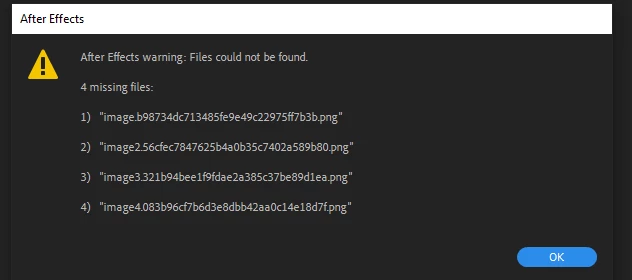
 

So I would get an After Effects project with parts missing.


More info about my setup:

  • Laptop setup: most of the time everything is constantly upgraded.
  • I have access to multiple programs thx to school.
  • Always updated XD and AE to the latest version.
  • Not installed on my main drive (on D:\).

What I have tried as a fix:

  • Reinstalling everything (main drive C:\ and same drive D:\ so twice I reinstalled).
  • Using older versions.
  • Simple restart pc.

What I have not done so far:

  • Clean installation of laptop (wish to avoid this option since I do not know if this will even work)


What I have noticed.

On a different computer doing the export, I had no poblems, so nothing with the XD file.

What I've noticed when comparing (XD > export > After Effects) on both computers was the computer that has issues, did NOT make a temp folder with png in User/AppData/Local/Temp/project_name while the computer where everything works did. No clue why this is and do not know if this is the cause.


So once again on this computer Export with images = not a good time.


Can you please help me with this problem.


Ps: I have the plugin for XD to AE


    This topic has been closed for replies.

    3 replies

    Participating Frequently
    August 10, 2021

    Exact same thing is happening to me right now...2 days ago everything was fine.

    Both XD and AE are updated.

    I made no changes to my system.

    Windows 10

    1080gtx

    128gb ram


    Can I get some support love?


    Alex Affonso
    Inspiring
    March 12, 2020

    You mentioned that the computer with the issue does not create the User/AppData/Local/Temp/project_name folder. Maybe you have an access issue with the user in this computer and XD does not save the files accordingly? Have you tried to run XD as admin instead (just right click XD app icon and select Run as Admin when opening it)?

    theryAuthor
    Participant
    March 12, 2020

    Interestingly enough there is no "Run as administrator" for XD but for all other apps there is.

    Is this because XD as a Windows app? Adobe XD is not installed in the same folder as the other apps, not 100% certain but XD is installed in C:\Program Files\WindowsApps .


     Ps: my user account is administrator if this gives some help.

    Mylenium
    Legend
    March 12, 2020

    Standard answer: Start by actually checking your layer, state and object names in XD and rename them sensibly if necessary.


    Mylenium

    theryAuthor
    Participant
    March 12, 2020

    Apologies I should have mentioned the name.

    These are the original names  (img below) of the objects that then get renamed (in example first post).