kulss
Inspiring
April 21, 2023
解決済み

AE & Media Encoder not working properly (M1 Mac)

  • April 21, 2023
  • 返信数 1.
  • 605 ビュー

Hi! 


As you read in the title, I have a problem when rendering from After Effects through Media Encoder on a Mac M1 (more specs down below). I have seen

a couple of threads about the topic with different answers, but none of them seem to work for me.


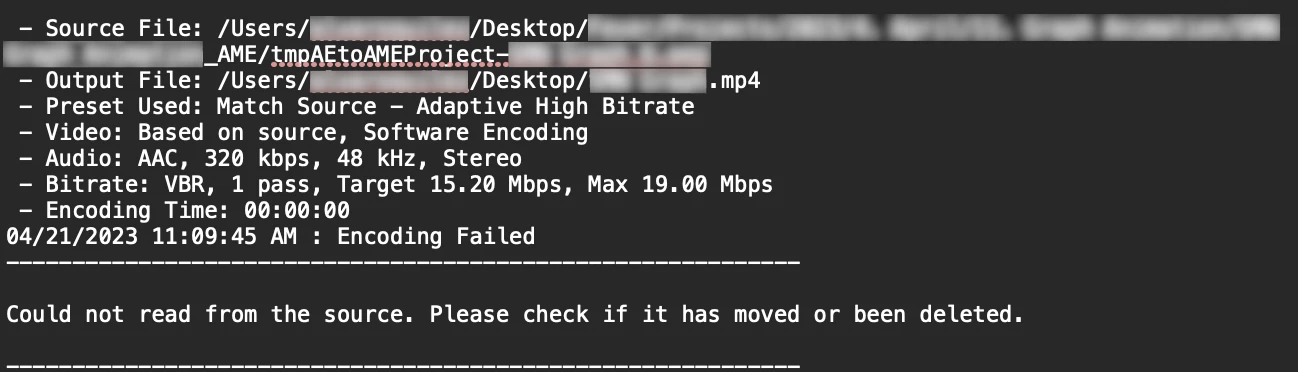
First of all, when I press File > Export > Add to Media Encoder Queue..., it doesn't appear in the Media Encoder queue. In order to have my file in the queue, I need to add it to the AE native Render Queue and then press Queue in AME. By doing this, it does appear on the Media Encoder queue. Then, as soon as I press render, I get the ⚠️ icon and when I press on it to see the error, it says "Could not read from the source. Please, check if it has moved or been deleted". I'm attaching the Renderer I'm using as well.




I have the latest After Effects and Media Encoder (23.3). These are my Mac specs:

  • Apple M1 Pro, MacOS Ventura 13.2.1
  • 32GB RAM


If anything else is needed, feel free to ask! Thank you 🙌
このトピックへの返信は締め切られました。
解決に役立った回答 kulss

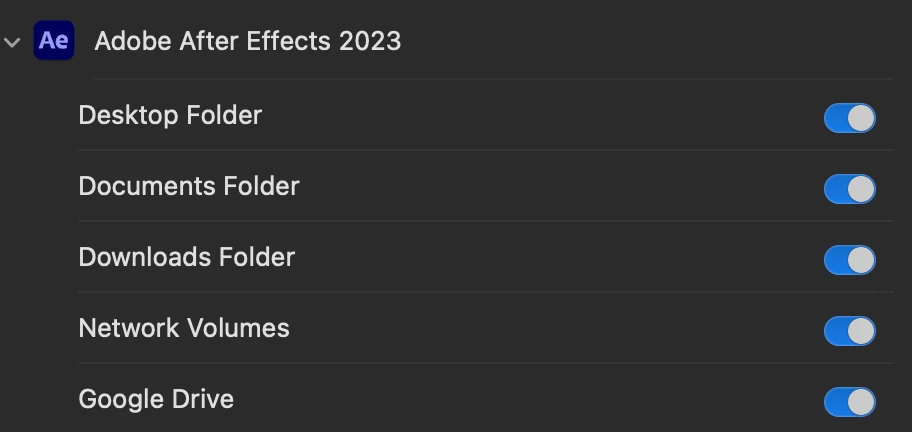
After fixing something from my Photoshop permissions, I figured out that the problem with After Effects might be there as well. It turned out to be that some permissions were turned off, which caused all the problems related to rendering.

In Mac, you can fix it through System Settings > Privacy & Security > Files & Folders and then, turn on all permissions from the Adobe app in particular. By doing this, all my problems where fixed 🙌

Hope this helps anyone who's having the same problem!

返信数 1

kulss
kulss作成者解決!
Inspiring
April 24, 2023

After fixing something from my Photoshop permissions, I figured out that the problem with After Effects might be there as well. It turned out to be that some permissions were turned off, which caused all the problems related to rendering.

In Mac, you can fix it through System Settings > Privacy & Security > Files & Folders and then, turn on all permissions from the Adobe app in particular. By doing this, all my problems where fixed 🙌

Hope this helps anyone who's having the same problem!

14Kizzle
Participant
March 10, 2024

Thanks for this information! You are a true blessing that saved my life today! I'm using a Mac M1 running Ventura and needed to render from Ae to Me for a video podcast at my job. Timing was crucial for me to finish and the dynamic link between the two was not working. I have a Windows PC that use in most cases, but it wasn't with me. I just purchased a Mac mini with 16GB ram/2TB SSD to edit on go and it was not working until now! Your tip fixed my issues! Much thanks... Kulss

kulss
kulss作成者
Inspiring
March 11, 2024

Hi Kizzle! Really happy it could solve your problem 😄