amyh59334368
Participant
December 10, 2017
Question

AE Missing Output Modules

  • December 10, 2017
  • 1 reply
  • 1492 views

I have installed AE CC twice but the same problem persists: in the render panel I am missing output modules. I have read a number of other posts and none of them provide a solution to this problem.

My system is as follows:

  • Mac Pro, 2 x 2.93 GHz 6-core Intel Xeon
  • Mac OS High Sierra 10.13.1
  • 16GB RAM
  • Firewall not activated
  • Quicktime Player Version 10.4

When I try to render and go to choose an output, I get the following:
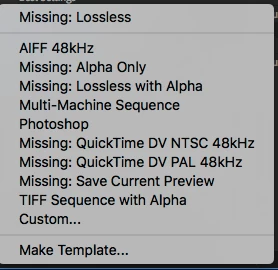
I would like to know how to get those missing modules installed and why are they missing in the first place? I uninstalled AE CS5 before installing AE CC.

If you need more information, please let me know. Thanks in advance.

    This topic has been closed for replies.

    1 reply

    Jose Panadero
    Community Expert
    Community Expert
    December 10, 2017

    Do you have installed some third party plugins? I remember that old versions of Magic Bullet Suite could be the problem. What version of CC are you using? Do you have installed the latest update for your After Effects version??

    amyh59334368
    Participant
    December 10, 2017

    I do not have any third-party plug-ins installed because I have not used After Effects before this. I have CC 2018 and I just checked to make sure no updates are available.

    I am also having problems with Media Encoder as I thought I could just bypass AE Render until I figured it out. ME is also a no-go.

    Mylenium
    Legend
    December 11, 2017

    Quicktime player is not Quicktime. You have to install QT 7.x to revive those output modules. they are all based on it.

    Mylenium