


Participant
Oct 14, 2025 8:30 AM UTC
Answered

AE mouse scroll zoom not working

Hi. When I click "alt" + scroll, it doesn't move me to the place where my mouse cursor is (in After Effects). It must be a problem with the program because everything works fine in Illustrator. I uninstalled and reinstalled it. I also changed the settings, but it still doesn't work.

nishu_kush
nishu_kushCorrect answer
Legend
Oct 14, 2025 2:06 PM UTC

Thanks for writing in, Yasemiv.

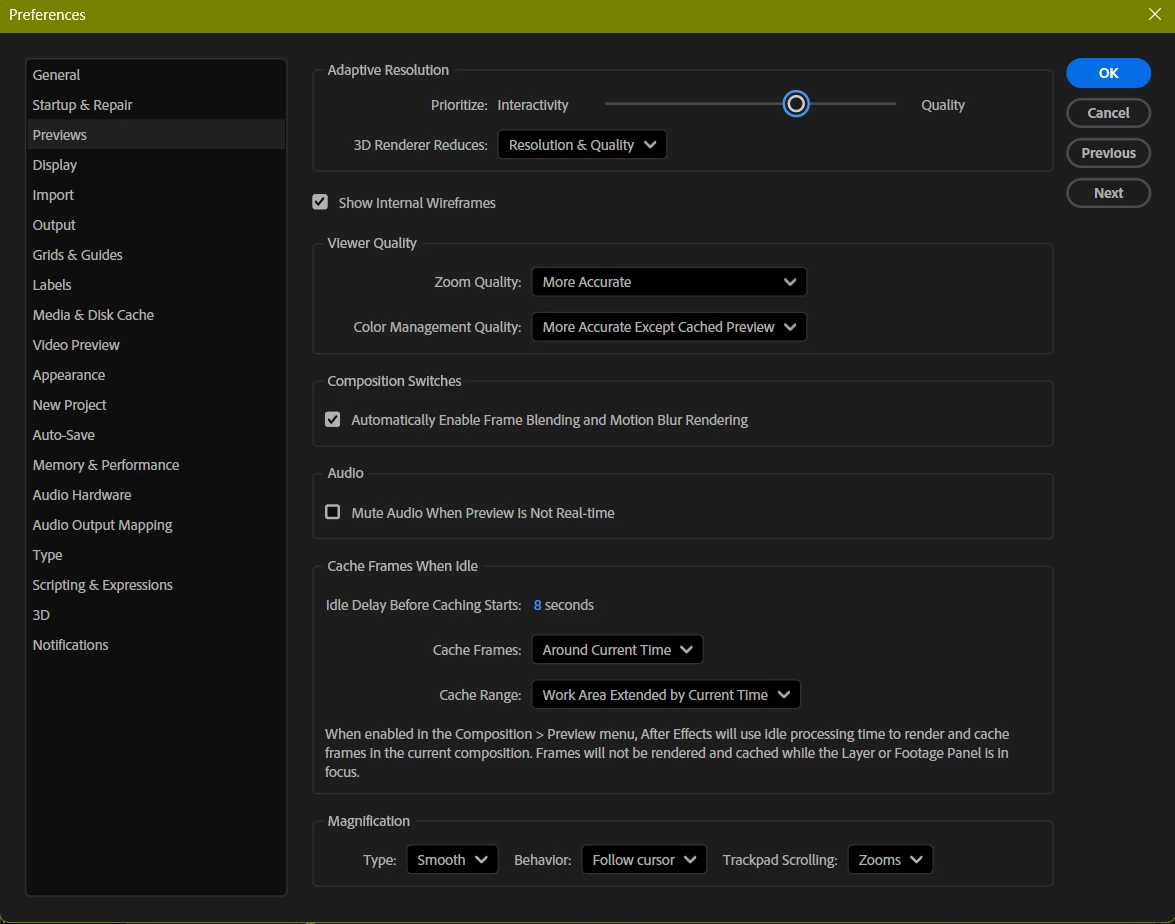
When Follow Cursor is selected in the Preferences, it'll follow the mouse without pressing the Alt key and zoom in/out to centre when scrolling with Alt key pressed. The behaviour reserves if you change the drop-down to Centre.

Let me know if it helps.


Thanks,
Nishu

3 replies

nishu_kush
nishu_kushCorrect answer
Legend
Oct 14, 2025 2:06 PM UTC

Thanks for writing in, Yasemiv.

When Follow Cursor is selected in the Preferences, it'll follow the mouse without pressing the Alt key and zoom in/out to centre when scrolling with Alt key pressed. The behaviour reserves if you change the drop-down to Centre.

Let me know if it helps.


Thanks,
Nishu

Translate
YasemivAuthor
Participant
Oct 15, 2025 8:08 AM UTC

Hi! Thank you, everything works perfectly now! By the way, in Adobe Illustrator, crtl moves me left and right - is it possible to set something like that in After Effects too?

Translate
nishu_kush
Legend
Oct 15, 2025 12:51 PM UTC

I don't think that functionality is available in After Effects. Sorry about that.

Let me know if there are any other questions.


Thanks,
Nishu

Translate