

TheArker
Participating Frequently
August 26, 2018
Answered

AE "Out of Memory" Error crashing other stuff

  • August 26, 2018
  • 14 replies
  • 66348 views

So just recently, I went from having a Hard Disk (4TB) to an SSD (1TB) and before then, AE was working perfectly, but for some reason, AE just keeps spamming me with this nonstop error :
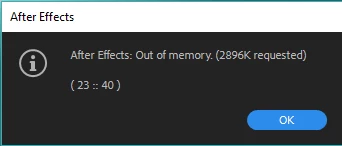
If I click on Ok a bunch of times, my monitor goes black for a few seconds and Firefox crashes, along with probably other applications, if I had some. I tried stuff with memory and I have 11GB of memory allocated for AE, yet I hardly do anything and it says out of memory (Like putting Mir on a solid and rotating it).

I have

- 16GB of RAM

- 4GB GTX 1050 TI SC

- 1000GB SSD

I hope anyone can help!

This topic has been closed for replies.
Correct answer Brandon Loshe

Hi alexcormier,

How often do you purge your memory and disk cache (Edit - Purge - All Memory & Disk Cache...)? I also get that message occasionally on my older computer with a smaller hard drive. Usually just doing that does the trick for me.

14 replies

Participant
December 13, 2019

Hi! I'm getting this error as well, and would try what you propose, but I'm just stuck with the error message and can't do anything else in the program than say "ok" and get the same error again. I would like to not lose what I have been working on, and generally just be able to do anything with the program, what can i do? 

ashh66966916
Participant
January 21, 2019

I’ve had this error ,  it stoped when I set the memory to far lower that I’ve installed so I have 32 gig I told after effect to only use 24 ... also I set my cash disk to half the amount avalibe , 250 gig to like 170 go haven’t had a erro since 

TheArker
TheArkerAuthor
Participating Frequently
August 30, 2018

This new error just started to pop up and as soon as I try to open up anything else, it makes my monitor crash (Turns black and stays black, but still plays music or whatever else) along with anything that may be open.

Also, it displays these errors even when I'm hardly doing anything. For example : Roto-ing a small video and trying to render the video.

This single action makes everything crash, and I have a decent PC

Brandon Loshe
Brandon LosheCorrect answer
Legend
August 30, 2018

Hi alexcormier,

How often do you purge your memory and disk cache (Edit - Purge - All Memory & Disk Cache...)? I also get that message occasionally on my older computer with a smaller hard drive. Usually just doing that does the trick for me.

TheArker
TheArkerAuthor
Participating Frequently
August 31, 2018

I was not even aware there was such an option and it seemed to have done the trick for the memory problem, thank you so much! Although, for some reason, rendering a simple preview of a video with basically only a Curves effect and Roto brush takes ages even with Half the resolution (I have 11GB of RAM for Adobe Apps). Are there any tricks for this as well?

Mylenium
Legend
August 27, 2018

And what is youre cache set to? Are you sure the newly added disk isn't interfering with your SSD and the respective controller/ PCI bus? check your device manager and settings.

Mylenium

TheArker
TheArkerAuthor
Participating Frequently
August 29, 2018

My cache is set to 100GB.

The disk and SSD aren't interfering with anything, from what I've seen. I've tried checking for updates, but there's nothing either.

Thanks for your reply, nonetheless