Participant
January 6, 2018
Answered

AE parameters/values are not displayed correctly

  • January 6, 2018
  • 2 replies
  • 454 views

Hey There!

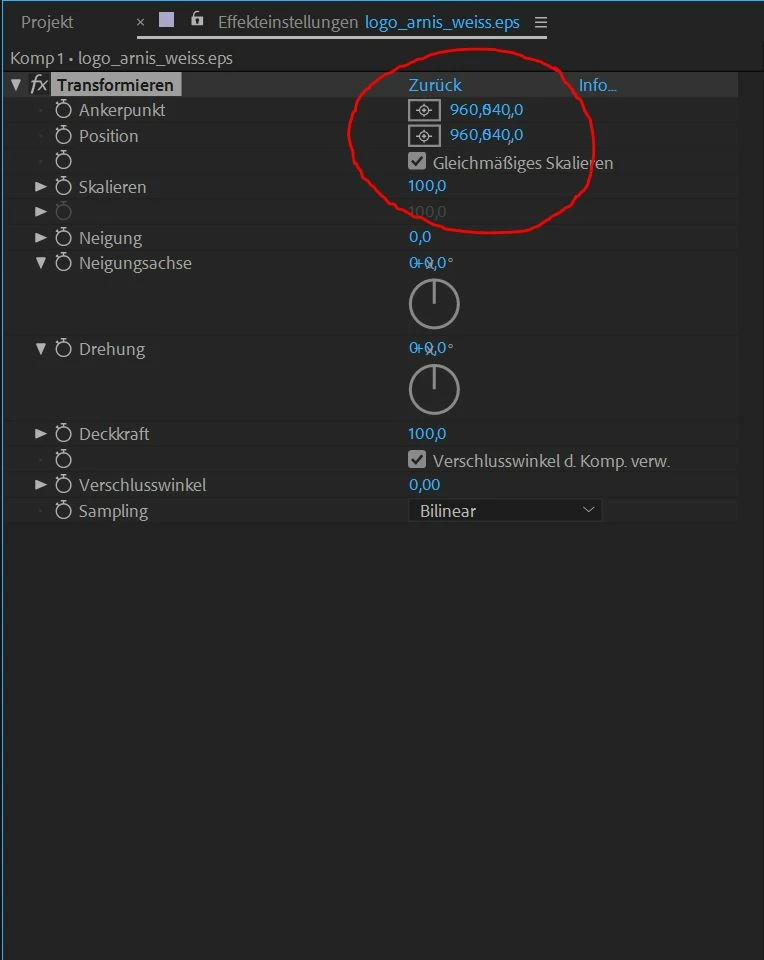
I just figured out, that suddenly the values for keyframing are not displayed correctly anymore.

As you can see in the picture the values a like kinda overlapping.

Does anybody know how this can be? I tried to change the scaling of the monitor under Windows display settings. But doesn't help.

Operating System is Windows 10.

Thanks for your support.

    This topic has been closed for replies.
    Correct answer arnehamkens

    thank you! now everything is displayed correctly.

    2 replies

    Szalam
    Community Expert
    Community Expert
    January 23, 2018

    The After Effects update that came out last night (might take up to 24 hours to propagate to Adobe's servers around the world) fixes this issue. (And several others - it also adds some new functionality.)

    Roei Tzoref
    Legend
    January 6, 2018

    a bug in the recent version. see if a workaround is available in this thread: Re: Values Overlap in GUI AE CC 2018 (WIN) at 4K Resolution

    arnehamkensAuthorCorrect answer
    Participant
    January 6, 2018

    thank you! now everything is displayed correctly.