
Inspiring
August 1, 2023
Answered

AE SDK Custom Effect UI: using PF_Event_KEYDOWNs...

  • August 1, 2023
  • 1 reply
  • 651 views

I'm writing a custom ARB handler and UI... It includes text strings, so I want to allow PF_Event_KEYDOWN events to modify the text content.

The problem -- apparently AppSuite4()->PF_InvalidateRect isn't allowed during KEYDOWNs?? The key gets handled ok. But then, AE presents an alert, "After Effects error: internal verification failure, sorry! {PF_InvalidateRect can only be called during valid events.}

I really need to refresh the display after a keystroke changes it... Am I thinking about this wrong?
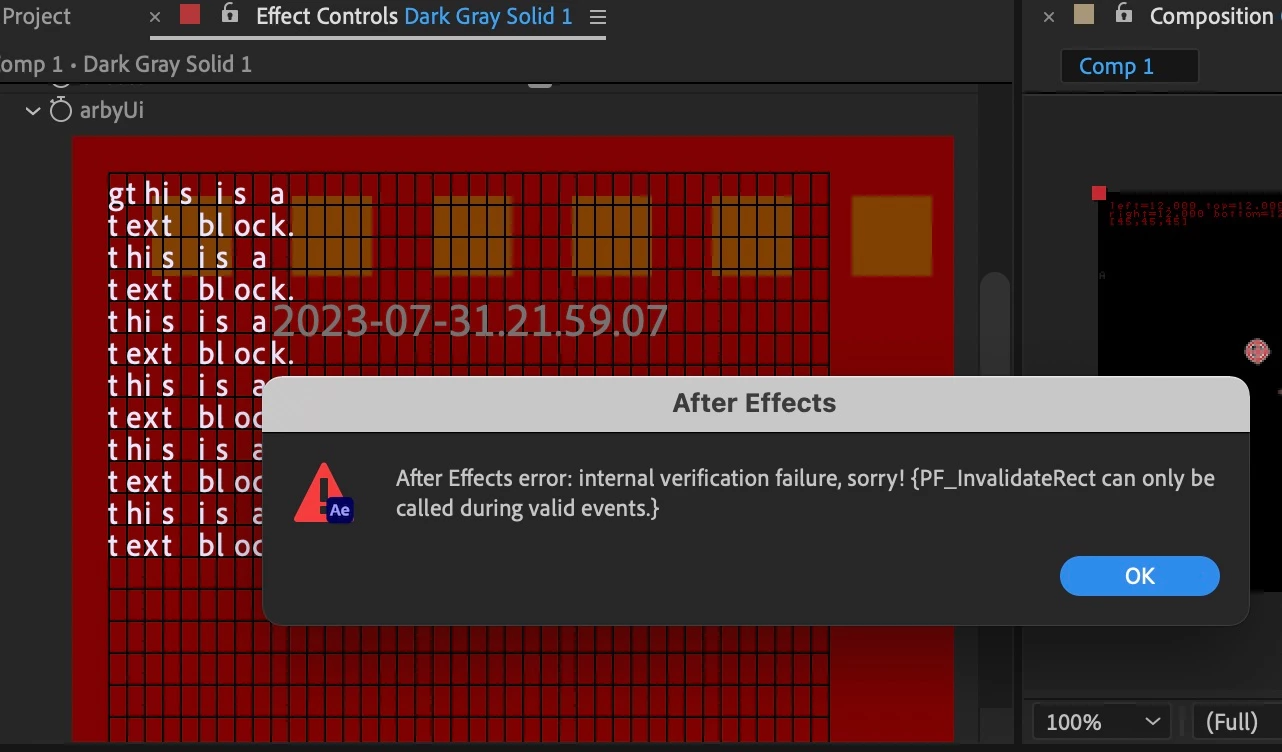
any tips very appreciated ...

This topic has been closed for replies.
Correct answer david van brink

Found i think the correct solution, one of the outflags is just for this. works as desired.

            out_data->out_flags |= PF_OutFlag_REFRESH_UI;

1 reply

Inspiring
August 2, 2023

I have an unsatisfying workaround of marking the param value changed on every keystroke. This does succeed in updating the UI, but marks the document altered even if the param didn't "really" change, such as when moving the cursor in the text area. And of course it triggers re-rendering of the comp...

        ec.param->uu.change_flags |= PF_ChangeFlag_CHANGED_VALUE;

        extraEv->evt_out_flags = PF_EO_HANDLED_EVENT | PF_EO_UPDATE_NOW;


Community Expert
August 2, 2023

try PF_UpdateParamUI.

at worse, use PF_RefreshAllWindows. ANARCHY!!!!!