

yash-lucid
Inspiring
December 19, 2025
Question

AE stops moving time to preview time
  • December 19, 2025
  • 1 reply
  • 166 views

yashlucid_0-1766144458590.png


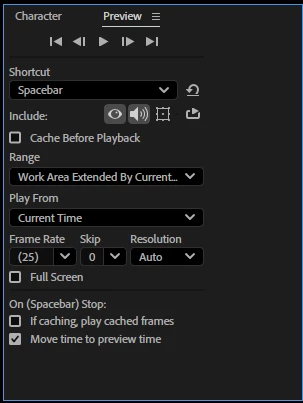
I have Move time to preview time checked, and it works great but suddenly decides to stop working. Playing video works, but stopping stops at the start point, not end point, only randomly after working for awhile. The fix is to restart AE, but eventually it happens repeatedly after use.


  • Intel Core i9-14900HX

  • NVIDIA GeForce RTX 4060

  • 64GB DDR5 RAM

  • 1TB m.2 SSD [OS/Adobe/Working Files]

  • 2TB m.2 SSD [250GB allocated for AE Scratch disk]
  • All latest Adobe/Win11Pro/and video drivers
  • DELL SE2419HR 24"


1 reply

Participating Frequently
December 19, 2025

Things that usually trigger it

From experience, it tends to happen after:

  • Switching compositions a lot

  • Changing preview ranges / work areas

  • Using RAM Preview + spacebar interchangeably

  • Toggling Loop / Skip / Audio in the Preview panel

  • Long sessions without restarting AE

Faster fixes (without restarting AE)

Try these when it breaks:

  • Toggle it off and on

    • Preview panel → uncheck Move Time to Preview Time

    • Play once

    • Check it again

  • Switch preview methods

    • Use 0 on numpad once, then go back to spacebar

  • Click in the Timeline panel

    • Make sure the timeline (not the comp viewer) has focus

  • Reset Preview panel

    • Preview panel menu (☰) → Reset

One of these usually “re-wakes” the behavior.

If it keeps happening a lot

These reduce how often it breaks:

  • Stick to one preview method (spacebar or numpad, not both)

  • Avoid changing preview range while playing

  • Occasionally reset the Preview panel instead of restarting AE

  • Save, close, and reopen AE between long sessions (sad but true)

yash-lucid
Inspiring
December 19, 2025

Thanks, unfortunately none of those work for me, it appears to a bug where the timeline indicator is completely frozen unless AE restarts.

nishu_kush
Legend
December 19, 2025

Hi Yash,


Can you try running After Effects in Safe Mode and see if that fixes it? If it does, resetting the preferences should help.

Let me know how it goes.


Thanks,
Nishu