


Inspiring
Dec 1, 2022 11:41 PM UTC
Answered

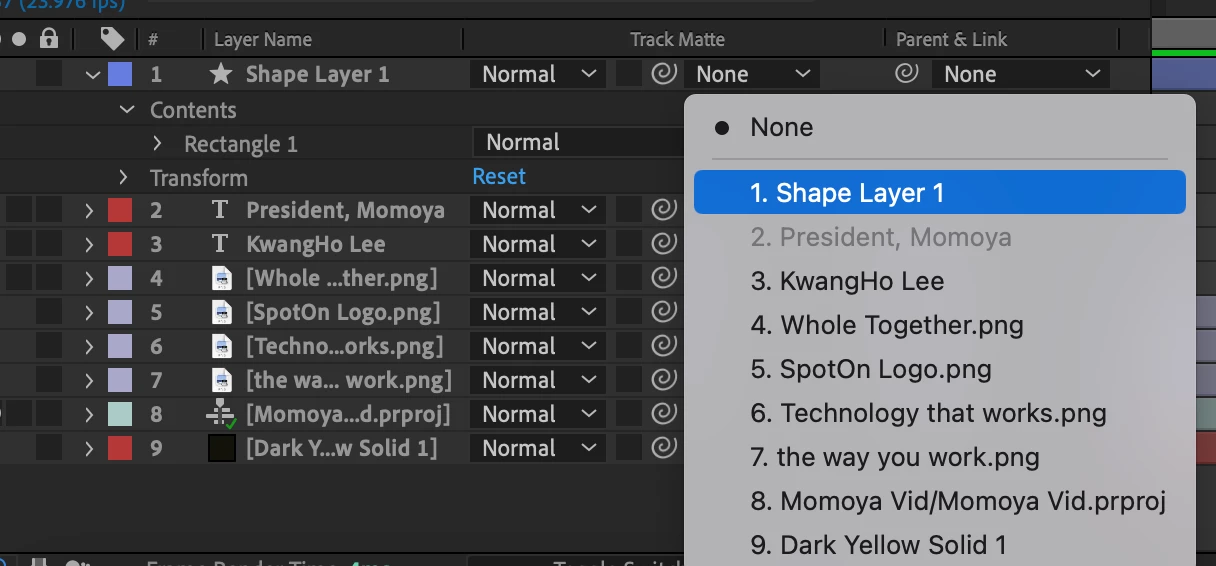
AE Track Matte is only showing layers in the composition rather than matte options.

I'm trying to do a simple text reveal animation. I created a shape to cover the text. For whatever reason, Track Matte isn't giving me any matte options. It's only showing the layers in the composition when I click the drop down arrow. Any help?



Brian C CarterCorrect answer
Community Manager
Dec 2, 2022 12:02 AM UTC
In After Effects 23.0, Track Mattes are no longer limited to only the layer directly above the layer you want to matte. Use the Pickwhip or Dropdown to choose a layer to use as a matte, and then two switches will be enabled to toggle Alpha / Luma and Inverted.

School of Motion has done a walkthrough of all the new possibilities at https://youtu.be/fG4yZTpTGlk?t=316

3 replies

Brian C CarterCommunity ManagerCorrect answer
Community Manager
Dec 2, 2022 12:02 AM UTC
In After Effects 23.0, Track Mattes are no longer limited to only the layer directly above the layer you want to matte. Use the Pickwhip or Dropdown to choose a layer to use as a matte, and then two switches will be enabled to toggle Alpha / Luma and Inverted.

School of Motion has done a walkthrough of all the new possibilities at https://youtu.be/fG4yZTpTGlk?t=316
Translate
Participant
Jun 3, 2023 3:03 AM UTC

I can see track matte in my after effects but I can't see the loop button beside it??

can some one help me please??

Translate
Participant
Mar 30, 2024 3:37 AM UTC

https://youtu.be/9DT-mZMUO3c?si=S3-9X21IT28UbiGX


I hope that can help you Swathi

Translate