Participant
February 28, 2023
Question

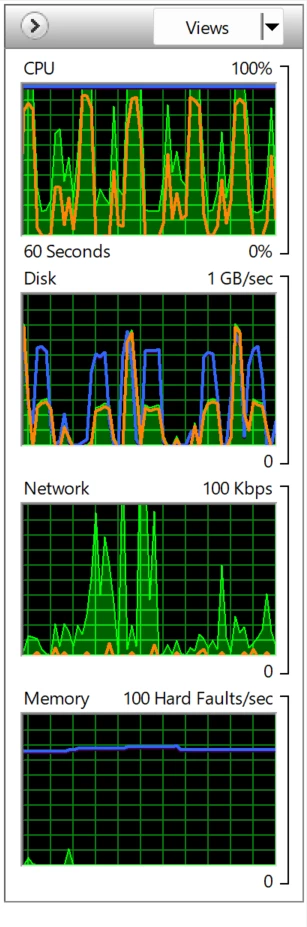
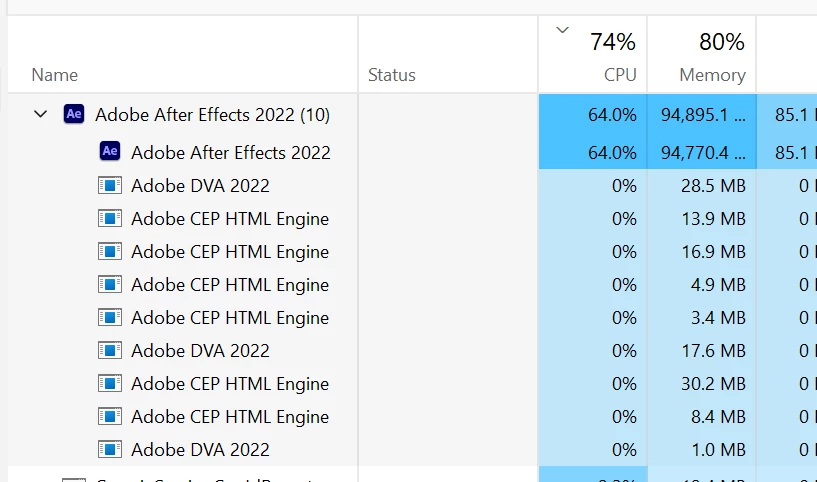
AE uses 100% CPU while not in use

  • February 28, 2023
  • 4 replies
  • 726 views

I have an project in AE opened in the background and AE is using my CPU - it jumps from 20% to 100%... Anyone knows why it is happening?


This topic has been closed for replies.

4 replies

Participant
March 2, 2023

Sorry for not providing enough informations and many thanks for the replies.


CPU: i7 9700K
GPU: RTX 3080, 3x RTX 2070 SUPER (2 Monitors are plugged into the 3080)

RAM: 128 GB KINGSTON FURY DDR4 3200MT/s CL16 XMP

Windows 11

After Effects v 23.2 and 22.6.4 
GPU Driver: NVIDIA Studio Driver 528.49
I am using a Deep Glow plugin for AE

The problem was on project opened in AE 22 and after installing the intel GPU drivers looks like it's gone... but I have to check it again with more focus on it. (A lot of work I have no, so my machine is busy with rendering..)

Howerever I have a problem with CPU usage while rendering now from AE 23... utilization of the CPU while rendering is from 20% to 50% - it looks like it won't go more than 50%  


Dan

Community Expert
February 28, 2023
nishu_kush
Community Manager
Community Manager
February 28, 2023

Thanks for writing in, DannyMotion.


I agree with what Mylenium said. Please share your system specifications (CPU, GPU, RAM, OS version) and the GPU driver's version installed on your computer. Also, does it happen with all the projects or a particular one? Are you using any third-party plug-ins? Try disabling the Speculative Preview (go to Composition > Preview > uncheck Cache Frames When Idle).

Let us know how it goes.


Thanks,

Nishu

Mylenium
Legend
February 28, 2023

Without any info about the project we can't tell you much. This could be a leaky CoDec, a driver problem or an incompatible plug-in causing havoc.


Mylenium
