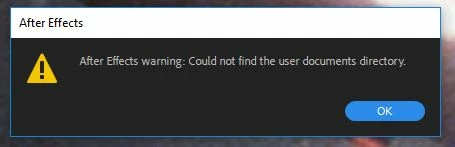
AE won't launch: "Could not find the user documents directory"
All of a sudden I can't launch AE CC2018 and I get this error message. I uninstalled and reinstalled CC2018, ran as admin, installed CC2017 and no change. Premiere crashes too. Pro tools won't load the video engine either. AE is the only application that gives me any kind of error message. Any ideas? System specs below.
Computer
Model : ASUS All Series ASUS MB
Chassis : Desktop
Mainboard : ASUS Z97-DELUXE
BIOS : AMI (OEM) 1304 07/11/2014
Intel vPro : 9.01.01.1000
Total Memory : 32GB DIMM DDR3
Processors
Processor : Intel(R) Core(TM) i7-4790K CPU @ 4.00GHz (4C 8T 4.4GHz, 4GHz IMC, 4x 256kB L2, 8MB L3)
Socket/Slot : FC LGA1150
Chipset
Memory Controller : ASUS Core (Haswell) DRAM Controller 100MHz, 2x 16GB DIMM DDR3 1.33GHz 128-bit
Memory Module(s)
Memory Module : G.Skill F3-1600C7-8GTX 8GB DIMM DDR3 PC3-12800U DDR3-1600 (9-9-9-25 4-34-10-5)
Memory Module : G.Skill F3-1600C7-8GTX 8GB DIMM DDR3 PC3-12800U DDR3-1600 (9-9-9-25 4-34-10-5)
Memory Module : G.Skill F3-1600C7-8GTX 8GB DIMM DDR3 PC3-12800U DDR3-1600 (9-9-9-25 4-34-10-5)
Memory Module : G.Skill F3-1600C7-8GTX 8GB DIMM DDR3 PC3-12800U DDR3-1600 (9-9-9-25 4-34-10-5)
Video System
Monitor/Panel : Dell Computer DELL U2312HM
(1920x1080, 23.1")
Monitor/Panel : Dell Computer DELL U2412M
(1920x1200, 24.1")
Monitor/Panel : Dell Computer DELL U2212HM
(1920x1080, 21.7")
Video Adapter : NVIDIA GeForce GTX 970 (13CU 1664SP SM5.2 1.16GHz/1.5GHz, 208kB L2, 4GB 7GHz, PCIe 3.00 x16)
Video Adapter : NVIDIA GeForce GTX 970 (13CU 1664SP SM5.2 1.16GHz/1.5GHz, 208kB L2, 4GB 7GHz, PCIe 3.00 x16)
Video Adapter : NVIDIA GeForce GTX 970 (13CU 1664SP SM5.2 1.16GHz/1.5GHz, 208kB L2, 4GB 7GHz, PCIe 3.00 x16)
Graphics Processor
OpenCL : NVIDIA GeForce GTX 970 (1664SP 13C 1.16GHz/1.5GHz, 208kB L2, 4GB 7GHz)
DirectX 11 Device(s) : NVIDIA GeForce GTX 970 (1664SP 13C 1.16GHz/1.5GHz, 208kB L2, 4GB 7GHz)
OpenGL : GeForce GTX 970/PCIe/SSE2 (4GB)
OpenGL : GeForce GTX 970/PCIe/SSE2 (4GB)
OpenGL : GeForce GTX 970/PCIe/SSE2 (4GB)
Storage Devices
INTEL SSDSC2BW240A4 (240GB, SATA600, 2.5", SSD) : 224GB (C:)
Samsung SSD 850 EVO 500GB (500.1GB, SATA600, SSD, OPAL) : 466GB (N:)
2x HGST Hitachi HDS723030ALA640 (3TB, RAID1/SATA600, SCSI-5, 3.5", 7200rpm) : 3TB (M:)
WDC WD80EZZX-11CSGA0 (8TB, USB3/SATA600, 3.5", 5400rpm) : 7TB (L:)
WDC WD80EZZX-11CSGA0 (8TB, USB3/SATA600, 3.5", 5400rpm) : 7TB (H:)
Logical Storage Devices
System Reserved : 549MB (NTFS, 4kB) @ INTEL SSDSC2BW240A4 (240GB, SATA600, 2.5", SSD)
CACHE (N:) : 466GB (NTFS, 4kB) @ Samsung SSD 850 EVO 500GB (500.1GB, SATA600, SSD, OPAL)
RAID 1 (M:) : 3TB (NTFS, 4kB) @ 2x HGST Hitachi HDS723030ALA640 (3TB, RAID1/SATA600, SCSI-5, 3.5", 7200rpm)
BACKUP 2 (L:) : 7TB (NTFS, 4kB) @ WDC WD80EZZX-11CSGA0 (8TB, USB3/SATA600, 3.5", 5400rpm)
BACKUP 1 (H:) : 7TB (NTFS, 4kB) @ WDC WD80EZZX-11CSGA0 (8TB, USB3/SATA600, 3.5", 5400rpm)
Hard Disk (C:) : 223GB (NTFS, 4kB) @ INTEL SSDSC2BW240A4 (240GB, SATA600, 2.5", SSD)
Peripherals
LPC Hub Controller #1 : ASUS 9 Series Chipset Family Z97 LPC Controller
Audio Device : ASUS 9 Series Chipset Family HD Audio Controller
Audio Codec : Realtek Semi 0900
Audio Device : EVGA GM204 High Definition Audio Controller
Audio Codec : nVidia nForce4 Intel Edition CPU to PCI Bridge
Disk Controller : ASUS ICH8R (ICH8) SATA RAID Controller
Disk Controller : ASUS Asmedia 106x SATA Controller
USB Controller #1 : ASUS 9 Series Chipset Family USB xHCI Controller
USB Controller #2 : ASUS 9 Series Chipset Family USB EHCI Controller #2
USB Controller #3 : ASUS 9 Series Chipset Family USB EHCI Controller #1
USB Controller #4 : Renesas Tech uPD720201 USB 3.0 Host Controller
USB Controller #5 : ASUS ASM1042A USB 3.0 Host Controller
FireWire/1394 Controller #1 : Syba Tech TSB82AA2 IEEE-1394b Link Layer Controller
FireWire/1394 Controller #2 : Avlab Technology XIO2200(A) IEEE-1394a-2000 Controller (PHY/Link)
SMBus/i2c Controller #1 : Intel ICH SMBus
Printers and Faxes
Printer : Send to Microsoft OneNote 16 Driver (1200x1200, Colour)
Printer : Microsoft XPS Document Writer v4 (600x600, Colour)
Printer : Microsoft Print To PDF (600x600, Colour)
Fax : Microsoft Shared Fax Driver (200x200)
Printer : Canon MX430 series FAX (200x200, USB)
Printer : Canon Inkjet MX430 series (600x600, USB, Colour)
Printer : Adobe PDF Converter (4000x4000, Colour)
Scanners and Cameras
Scanner : WIA Canon MX430 series (Scanner, USB)
Peripherals
Media Player : WD My Book 25EE (7.28TB)
Media Player : WD My Book 25EE (7.28TB)
Network Services
Network Adapter : Intel(R) Ethernet Connection (2) I218-V (Ethernet)
Network Adapter : Intel(R) I211 Gigabit Network Connection (Ethernet, 1Gbps)
Network Adapter : TAP-Windows Adapter V9 (Ethernet)
Wireless Adapter : Broadcom 802.11ac Network Adapter
Operating System
Windows System : Microsoft Windows 10 Professional 10.00.16299
Platform Compliance : x64
 AdChoices