bogdan ionut
Participant
September 8, 2017
Question

AE working color space / scaling

  • September 8, 2017
  • 2 replies
  • 1610 views

Hi there.

Original video used for test test:

h264

Color space                    : YUV

Chroma subsampling             : 4:2:0

Bit depth                      : 8 bits

BT.709

In After Effects, when the working space is set to REC709 (16-235) the overall signal is scaled down as shown in the waveform monitor.

In Davinici Resolve the signal is scaled down when the full range is used insted to interpret the footage, just the opposite, which it makes more sense to me.

Can anyone explain what is AE  doing with the signal when different working space is used?
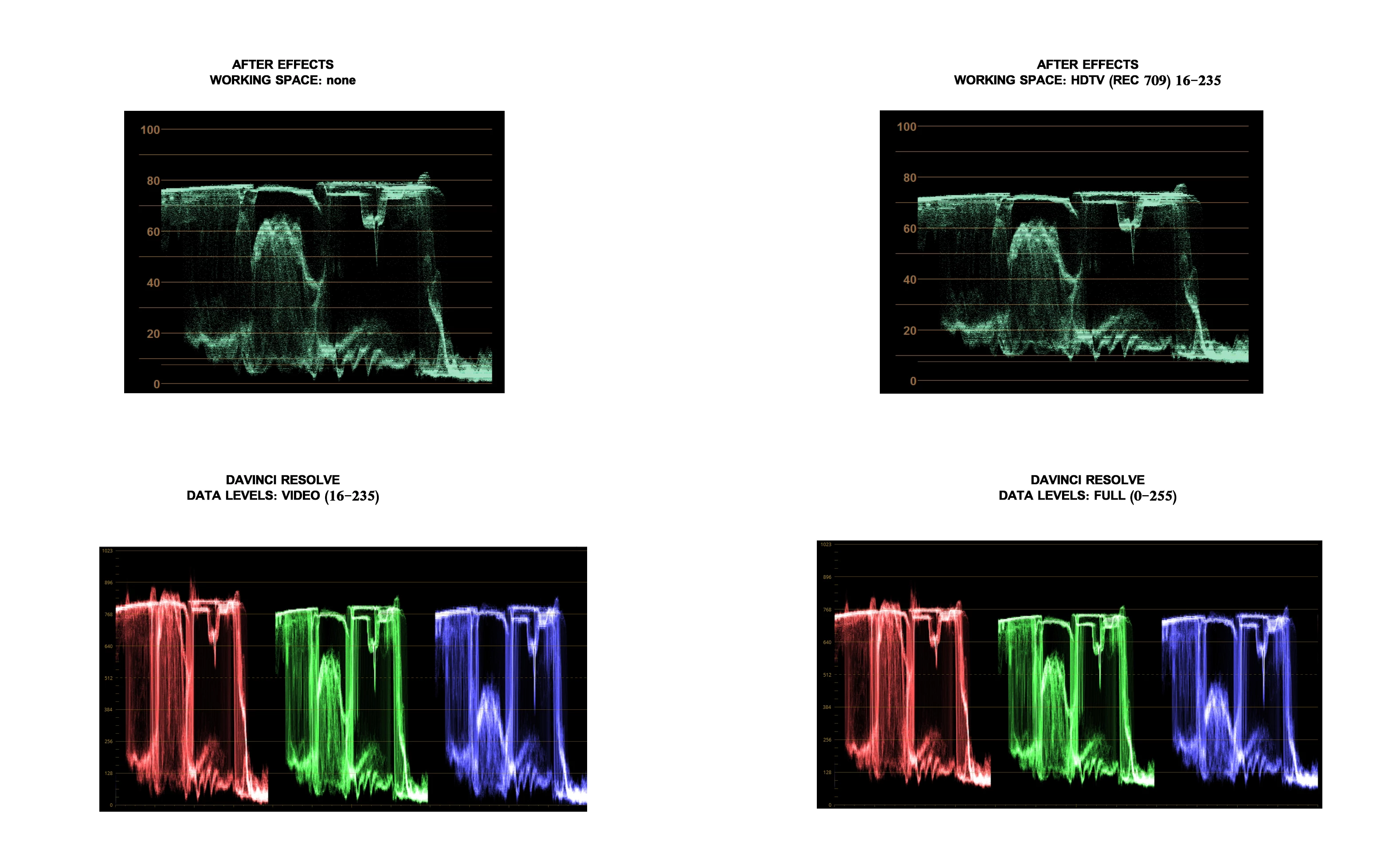
Best regards.

This topic has been closed for replies.

2 replies

C_Waldorf
Participating Frequently
March 16, 2018

I have a question in the same region.

In some Test with full and legal range footage in 422 and 444,

we see, that a File have other interpretations on a scope

in ADOBE Premiere than in ADOBE After Effects!

Wy is the Video Output between this two ADOBE products not the same?

I thay, that ist not professional.

We get a spot from a customer in ProRes 422 in full range (i think, that ist not correkt !)

But our After Effects Artist can not see this Problem, of course After Effects squeezes

the picture from black to white into his workspace.

Our Premiere Cutter see the mistacke after the import in Premiere directly.

Hiere is on the scope the black under 0% or 0mv and the white is over 100% or 700mv

I men the interpretation in Premiere ist ok and the After Effects interpration is very unprofessional.

Dave_LaRonde
Inspiring
September 8, 2017

So use the NONE working space.  What's the big deal?  It's just crummy H.264 video anyway....

bogdan ionut
Participant
September 8, 2017

I just want to understand the phenomena...