Nick Böse
Participant
December 7, 2022
Question

AEF-Interface: customize columns

  • December 7, 2022
  • 2 replies
  • 367 views


Hi!
I mostly work mobile on a laptop and accordingly have to save a lot of space in the interface. 
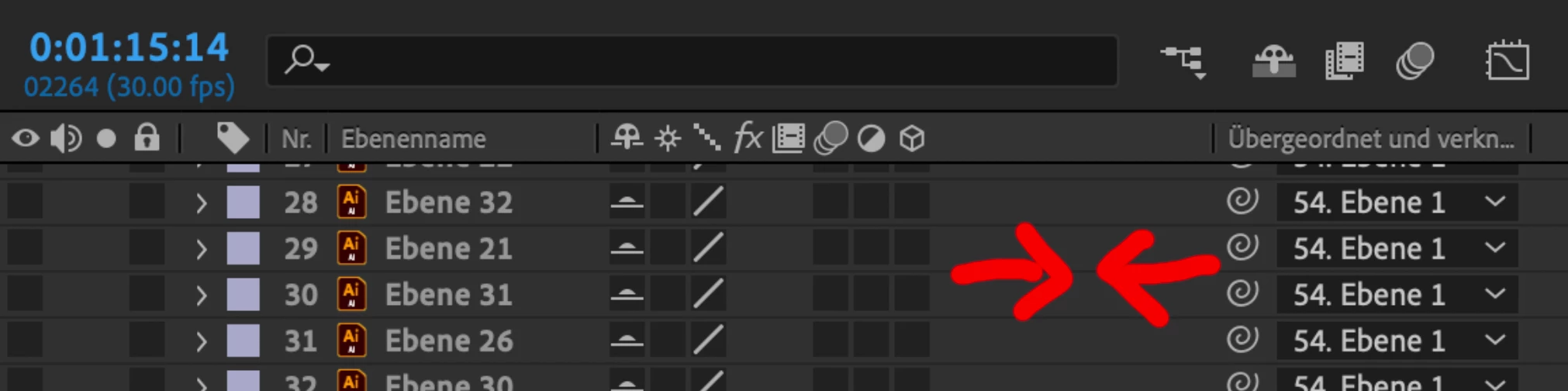
It has long bothered me that you can't reduce the wasted space between the 3D cube and the concatenation tool (see picture). 
I can customize all other columns, just not this one. What am I doing wrong?

THANK YOU!
Nick


This topic has been closed for replies.

2 replies

Community Expert
December 7, 2022

Icons in the bottom left corner of the timeline will show and hide columns, Shift + F4 and F4 will show and hide columns the Parent/Link column, and you can click and drag between columns in the Column Name row to change the width. 

It is sometimes tricky to grab the. Intersection. You just have to wait for the pointer to change to the doubble arrow.

Mylenium
Legend
December 7, 2022

You're not doing anything wrong. This space is reserved for contextual switches icons. That's an ages old limitation in how AE draws stuff in the timeline, but yes, it's perhaps not that useful in this day and age and should be changed.


Mylenium