



AEGP plugin CINEWARE SceneLayer: CINRENDER - connection failure
Hi everyone
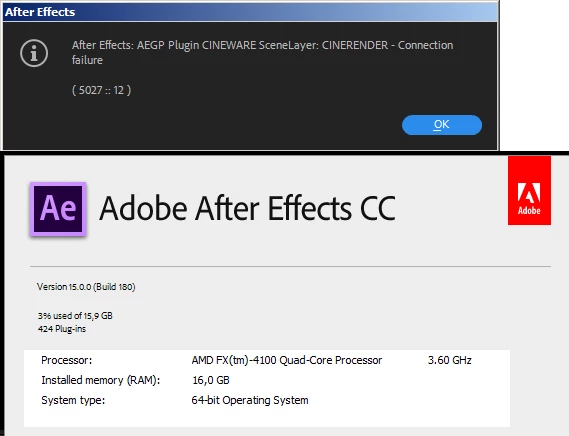
We are experiencing an error when trying to create a Maxon Cinema4d layer inside an After Effects composition. As seen in the attached image the error is "After Effects: AEGP plugin CINEWARE SceneLayer: CINRENDER - connection failure (5027::12).
Technical data: After Effects 2018.1, Windows 7, AMD 4100 Quad Core processor, 16 GB RAM, Nvidia GTX 650. Drivers of the Nvidia Card are updated to its latest version.
We know this problem has been discussed before, but we have tried all the possible solutions, including:
- Run After Effects as Administrator
- Update After Effects from 2017 (14.2.1) version to 2018.1 version (14.2.1 was showing the same error)
- Changing the TCP render port from 5030 to 5027 and viceversa
- Turning off the windows firewall
- Tried to change permissions on C:\Users\LOOP\AppData\Roaming\Adobe to read/write (windows still protects the folder from writing, nonetheless)
With no change on the error report.
We have tried in other computers, all equiped with Intel I7 or I5 processors, with these results:
- Intel HD Graphics 4000: Error
- Nvidia GT 250: Error
- Radeon RX 550: No problem
- ASUS EAH56450 Graphic Card: No problem
 AdChoices