Pavel Polozhentsev
Participating Frequently
December 13, 2023
Answered

Affter effects: unable to allocate...

  • December 13, 2023
  • 1 reply
  • 1177 views

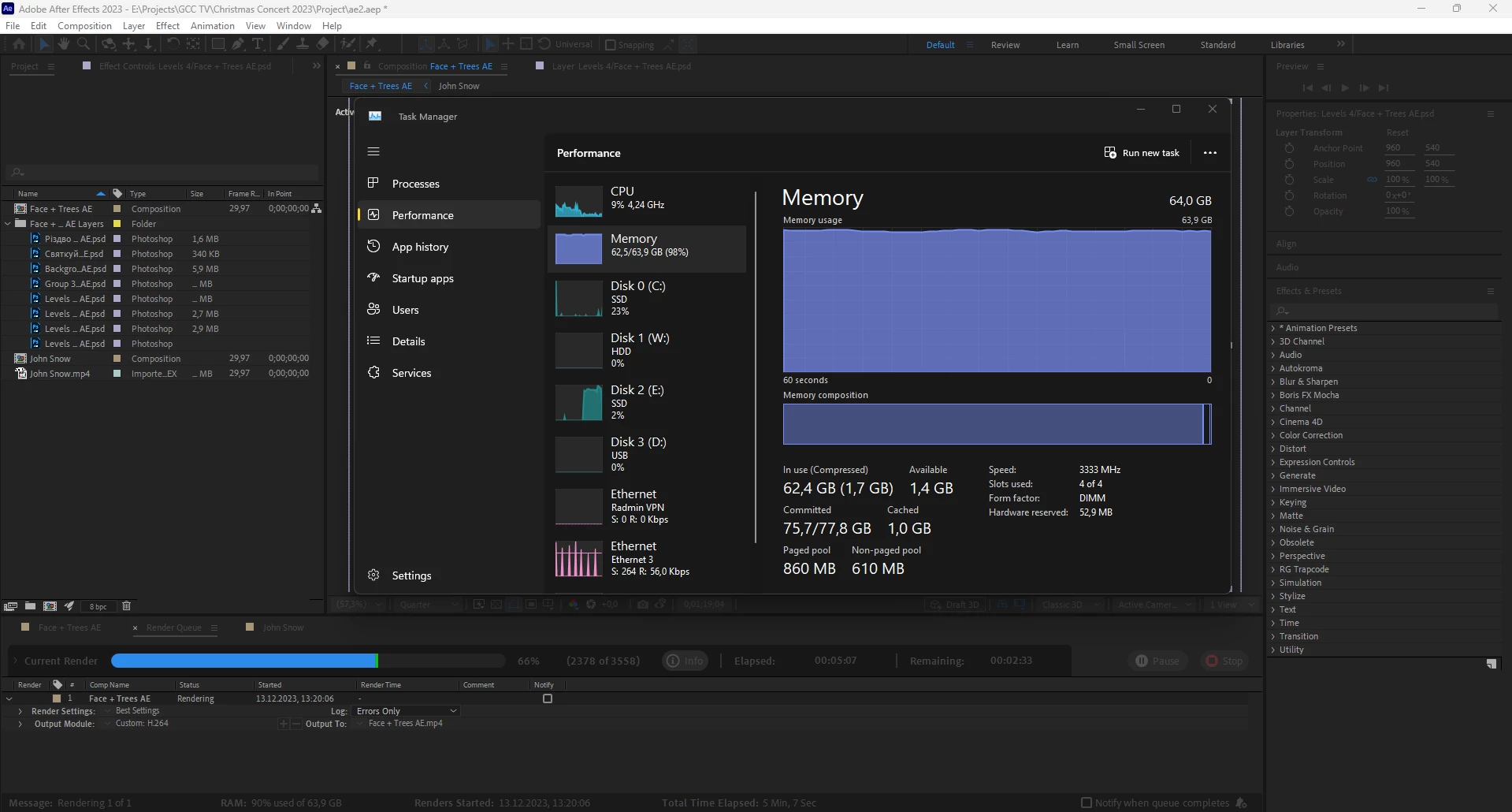
My project is very simple: several layers of photoshop and one two-minute video in mp4 format. I'm using the wiggle expression on four layers and using the blend mode (screen) on the video. When I'm trying to render a 2 minute video in mp4 format. I'm getting a stupid error. AE uses all my RAM and stops rendering... How do I fix this?
My specs:
Premiere Pro v24.0.0 (Build 58).
OS: Windows.
CPU: Ryzen 9 3900X.
GPU: RTX 2080s.
RAM: 64.


This topic has been closed for replies.
Correct answer jenkmeister17177426

Hi, sorry I haven't been in touch for a long time. I would like to inform you that I have found a solution for new versions of AE. And yes, this is in all projects and on two different computers. And so, if you disable the Cache "Frames When Idle", then everything works great. If it turns on AE and tries to eat up all the RAM, it doesn’t matter to him that there are restrictions in the settings.
Thanks for your time, I hope AE does a lot better in the future. Because right now it's just terrible. The old engine simply cannot cope with new updates and loads.


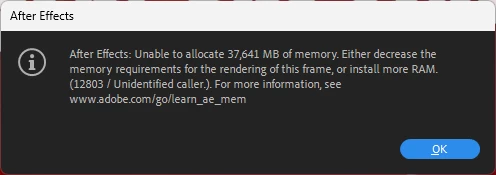
Cache Frames When Idle will render the current composition in the background, but it does honor the settings for RAM usage. It is simply kicking off rendering frames as though you hit the space bar to preview, there isn't any bypassing of the rest of AE's memory checks. The original error message you showed is very clear that a frame was trying to be rendered that required 32GB of RAM. 


I'm sorry you feel AE is terrible. 

1 reply

nishu_kush
Legend
December 13, 2023

Hi Pavel,


How much RAM do you have allocated to After Effects in After Effects Preferences? Are you using any effects or any third-party plug-ins? What's the resolution of your comp and media that you're using? Try clearing the media cache. Here's how: https://community.adobe.com/t5/after-effects-discussions/faq-how-to-clean-delete-or-trash-media-cache-files-in-after-effects/td-p/10634312

Looking forward to your response.

Note: Moving this thread from Bugs to Discussions for troubleshooting.


Thanks,

Nishu

December 13, 2023

I'm not sure what version of AE 2023 you are using, but the error message seems to indicate AE needs to allocate a block of 32GB RAM for a single frame. So either an effect you're using or the resolution of the footage is too much.


You could try rendering out a PNG sequence so that if it fails part way through you could continue to export from that point. Once you have the complete PNG sequence, take that back into AE and render that into the H.264 file. 

Pavel Polozhentsev
Participating Frequently
December 20, 2023

Thanks for the answer. I'll have to use the PNG sequence... and then convert everything to another format. I'm so tired of such problems with After Effect that I'm ready to study Fusion by Blackmagic, even though it's more for compositing than for motion... Simple composition, not a single effect, 64GB of full RAM - easy for After Effects... I even did tests. And it's very funny. The FHD composition is a couple of shapes, and the animation is posed - 30+ GB of RAM... it's very expensive...