
ninose11
Inspiring
Oct 23, 2017 3:20 PM UTC
Answered

Afteer Effects CC 2018 magnification doesn't fit to 100% only 200%???

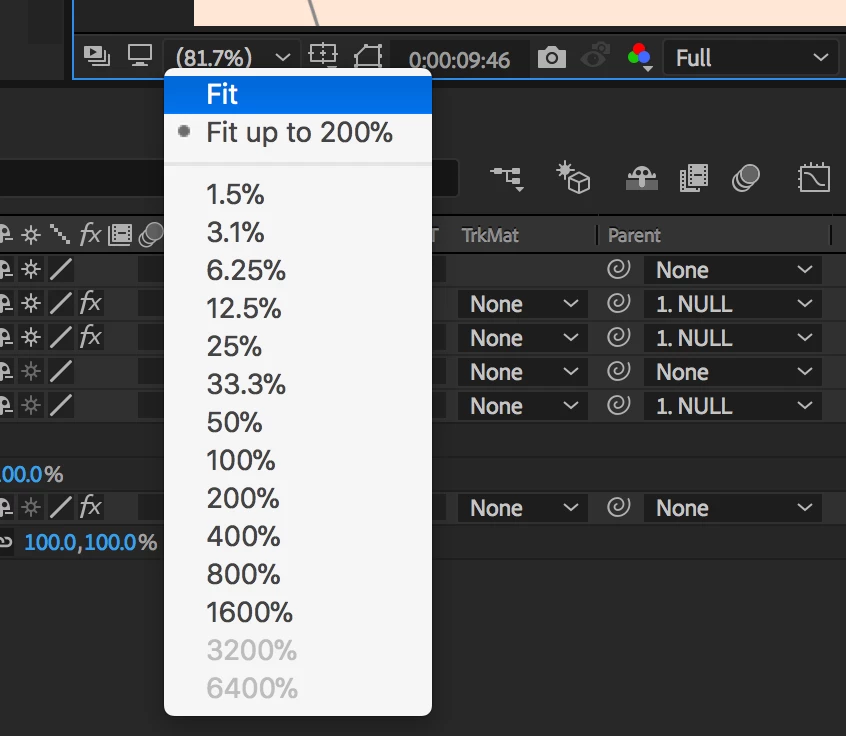
I was trying to create a keyboard shortcut for setting my magnification view to 100%, but for some reason After Effects CC 2018 wont fit to 100%, only to 200%.

Why doesn't the 100% option work via a keyboard shortcut, it always defaults to 200% when 100% is selected via the keyboard shortcut?

Is this a bug or am I doing something wrong???
    This topic is closed to new replies. Start a new post to keep the conversation going.
    Rick GerardCorrect answer
    Community Expert
    Oct 23, 2017 4:32 PM UTC

    Thank you again Rick. Is this one of the changes that came with CC 2018? Because with AE CC 2017 on my Macbook Pro Retina, I used to be able to zoom to 100% with a keyboard shortcut.    


    What keyboard shortcut? I also use a MacBook Pro R and as far as I remember / always has given you 200% Magnification Ratio. I still have the last 4 versions of AE installed and they all work the same.

    9 replies

    BrigitteRoars2
    Participating Frequently
    Jul 24, 2022 6:25 AM UTC

    In 2022 I too suddenly have this issue and it's such a shame. I like zooming to fit so I can see the whole stage, now I have to zoom to fit then zoom out, unnecessary extra steps in my workflow.

    Translate
    prbmotion
    Participating Frequently
    Jan 11, 2024 9:26 PM UTC

    Having this exact issue in 2024. Functionality was giving 100% when I hit "/" but now it's 200%, which is wasting time when I do it 100 times a day

    Translate
    Community Expert
    Oct 23, 2017 3:22 PM UTC

    Fit to 200% is what you want because that option is only available on a HR display like a Mac Retina display. That is the Magnification Factor you want to use to critically check each pixel in the frame. If you did not have a recognized HR display you would not get the option to fit to 200%. I know that it is confusing but that is the way it is.

    Translate
    ninose11
    ninose11Author
    Inspiring
    Oct 23, 2017 3:28 PM UTC

    Thank you for your help Rick. But is there no way to create a keyboard shortcut to force AE to zoom to 100% even if it is less accurate than 200%???

    Translate
    Community Expert
    Oct 23, 2017 3:45 PM UTC

    "Fit To" will always give you an unusual magnification factor unless your comp panel is wide enough to show the entire frame. Ctrl/Cmnd + = or - will change the magnification factor by the value increments you see in the Magnification Ratio popup. If you are at 82% and you press Ctrl/Cmnd + = you will be at 100%.

    BTW, you can't really see the individual pixels at 100%. They are there but because of the dot pitch, you would a magnifying glass to discern if things were properly lined up with the pixel grid anyway. That's why the default for an HR display is 200%. For example, a thin font like the one used on this website may be only 1 pixel wide on a standard display, but if you have an HR display the same font size will actually be twice as big and 2 pixels wide so you can read it. That is why Adobe and others like Microsoft decided to automatically scale things up with HR displays. Microsoft just calls 200% 100% when you are viewing a word doc on an HR display.

    Translate