hilaly07
Participating Frequently
Apr 7, 2018 9:18 PM UTC
Answered

after effect preview not work

Hi

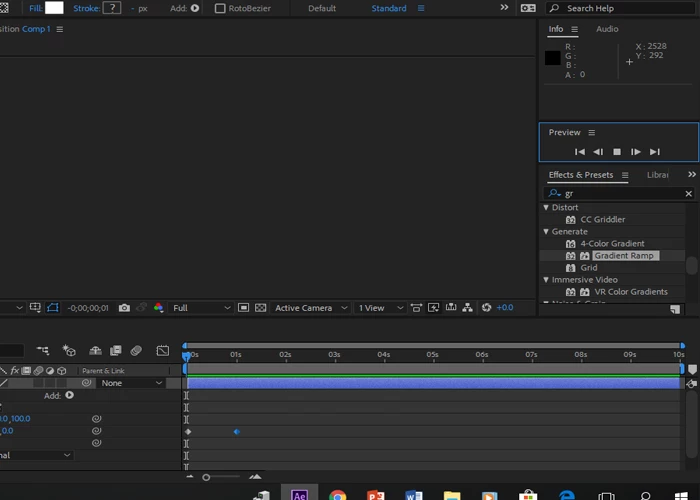
yesterday this problem happen when press play bottom the review not work

also timeline not moving

i use AE cc 2018

Windows 10 64 bit

Ram 8 GB

you can see the play bottom is square shape and no motion appear

_Maido_
_Maido_Correct answer
Participating Frequently
Jul 3, 2019 7:13 AM UTC

I've said previously, it's best that you contact support, to have someone take a closer, hands-on look at your system and this includes taking a look at your OS settings and AE settings.

Meanwhile, when you say "no playback", exactly what happens when you initiate a Preview?

What happens in the Timeline, does the Preview Time Indicator (vertical red line) move across the timeline?

What happens in the Comp Panel?

Please take a screen grab of your Comp and Timeline Panels.


When I leave AE open and take a break, a lunch (or leave it open overnight ), when I come back and hit the spacebar, it will play it once without sound and when I stop it and try to play it again, it does nothing. I can scroll the timeline and it composition updates, but can't play it back anymore. When I purge all the cache and memory it cleans it up and it also caches/renders it internally (green bar fills up) but it won't play it. When I check "cache before playback" on Preview panel then it time cursor will follow the caching process, but no way to really play it back in realtime with sound.

Restart always repairs it. My fellow animator next to me has the same issue.

Not really the dealbreaker type of thing, but kind of interrupts the flow every time it happens.

But, I figured it out

It seems to be an issue with audio hardware (and monitors connected with audio-supported cables). When I (1) removed external devices from windows audio settings and (2) changed audio hardware (File > Preferences > Audio Hardware) back to Speakers it started to playback my preview (AE needs restart to get the audio back though). (3) If you have headphones connected to the monitor audio output, then

This kind of explains the issue (and my situation after leaving AE open):

"When an audio-supported video cable is being used such as a DisplayPort or HDMI cable, Windows may change the default audio device to the audio-supported cable thinking another audio device is being used. The issue may be seen to occur when a portable is coming out of sleep as the system is detecting the audio-capable cable first."


85 replies

scottg55490461
Participant
Jul 11, 2020 1:38 PM UTC

Switching sudio output to speakers fixes it.

Translate
poppinkittoo
Participant
Jun 27, 2023 6:28 AM UTC

thank you so much ! worked on my PC


Translate
Participant
Jun 18, 2020 10:04 PM UTC

Thankyou from 2020

Translate
dgclearcover
Participant
May 13, 2020 10:10 PM UTC

Thank you! This sorted the issue for me immediately. Thinking I'll switch from HDMI to DisplayPort to avoid the issue. Cheers!

Translate
onyxh42445751
Participant
Apr 4, 2020 1:17 PM UTC

Thanks this fixed it for me i just changed the audio hardware and it worked fine right after 🙂

Translate
Ravens Of Mars
Participant
Jan 14, 2020 8:41 PM UTC

Here's a ridiculous thing to try. Make sure the stoopid eyeball is clicked in the preview window. 

Translate
Known Participant
Mar 12, 2024 5:17 PM UTC

Where do I find that fukin thing? After effects is sooooo frustrating. Why can't they have a normal timeline with cut and play functions. I can't find the window you showed?

Translate
Participant
Aug 21, 2019 8:49 AM UTC

I tried this :
Composition -> Preview -> Uncheck "Play Current Preview" 
It worked. Hope this can help u guy.

Translate
monsterrain
Participant
Aug 13, 2019 3:20 AM UTC

Post #18 & #31 #14 are exact useful solution for me.

I have same issue . After purge whole caches and switch audio hardware , it works perfectly.

My AE version is CC2019. The issue is continuously be reserved until 2019.

However, thanks to crewdev &_Maido_ & khadarshameer

Love u guys!

Translate
MSaiff
Participant
Jun 30, 2019 2:17 PM UTC

Hi guys, I ran into the same issue, I went to Edit > Preferences > General: I clicked on

it worked afterwards but removed my custom composition presets.

Hope this helps someone.

Translate
Roland Kahlenberg
Legend
Jul 2, 2019 3:28 AM UTC

Migrate Previous Version Settings is an option but it'll only work if your previous settings were working and of course it depends on the relevant settings you had, previously. And as you've realized, your importing previous settings will delete all of your current preference settings. So, this isn't an ideal solution - the ideal solution is to set your preferences appropriately and ensure you have viable driver version for your GPU.

Translate
Very Advanced After Effects Training | Adaptive & Responsive Toolkits | Intelligent Design Assets (IDAs) | MoGraph Design System DEV
_Maido_
Participating Frequently
Jul 2, 2019 6:02 AM UTC
the ideal solution is to set your preferences appropriately and ensure you have viable driver version for your GPU.

I guess we all agree but please help us out then, what are the appropriate settings and viable drivers, because most of us I think have tried many combinations...I till have to restart my AE at least 2-3 times a day to get my preview playback working. I just update AE to 16.1.2, maybe it fixes the situation, let's see...

Using

NVIDIA Studio Driver SD430.86May 27, 2019
Translate
OMRGL
Participant
May 8, 2019 6:45 PM UTC

I recently ran into the issue and discovered that my AE audio preferences were set to headphones that were no longer plugged in. Once I changed to the default setting. preview worked fine.

Translate
Inspiring
Jan 15, 2019 3:25 PM UTC

In my case (I am on a Mac), deactivating 'Adobe DV' brought some relief.

Translate
Participant
Nov 29, 2019 9:20 AM UTC

Hi . I am having the same issue. I tried all way but couldn't  fix it. can anyone help me with this problem.

Translate
Participant
Dec 29, 2019 12:12 PM UTC

I had the same problem and tried all the above on 2020 ver nothing did work and finaly I found out it was because of pixel aspect ratio which was set wrong and made preview not work correctly.


anyway I changed pixel aspect ratio  from composition setting to square pixels and it worked!

maybe preview player is not compatible with change of aspect ratio.

Translate