Known Participant
October 13, 2015
Answered

After Effects 2015 won't preview in real time after El Capitan update.

  • October 13, 2015
  • 58 replies
  • 119368 views

Hello,

Has anyone experienced the following issue and found a solution for it?

Right after Update to El Capitan 10.11 the After Effects 2015 stopped ram previewing in real time.

No matter what i do it won’t work.

I have a latest MAC Pro 2.7 GHz 12-Core with 64GB ram.

The AE 2014 still works though.

    This topic has been closed for replies.
    Correct answer Roei Tzoref

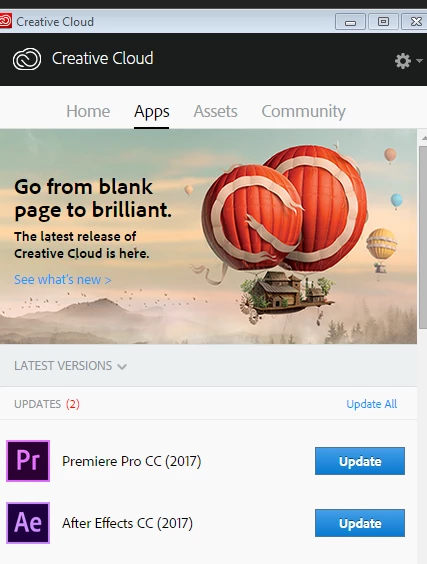
    Everybody who is having this issue please install the latest update: After Effects CC (November 2017) Bug-Fix Update Is Now Available that is supposed to finally close this thread for good! please report if this issue has been resolved.

    if you can't see the update yet, wait a while until you see it. try relaunching Creative Cloud app by typing Ctrl+Alt+R. I see it.

    this update is 14.0.1 and is a bug fix for many disturbing issues especially for Mac users. it does not fix all the bugs that are new with this release - look here for bug#2 and #3 that are still not fixed (bug #1 is fixed I believe): Known issues in After Effects CC 2017 and hopefully a bug fix for those will come pretty soon.

    58 replies

    Known Participant
    December 17, 2015

    I'm having the exact same issues.  Looks like removing the CTI and timeline or reducing the timeline significantly is the only fix for now to get real-time playback.  The older version of AE was at least rock solid in this department.  Hopefully we will get another performance update soon.

    Participating Frequently
    December 13, 2015

    I am on 10.9.5, AECC2015 13.6 and have been completely unable to use any version of AE after CC2014 because it REFUSES to play back previews at the real-time frame rate.  However: one small discovery: close vectorscope/waveform-monitor during preview playback and real-time frame-rate is much more often possible. This step of closing/hiding/disabling windows, CTI's and whatever was never necessary before and is a time-waster but it does allow you to work.

    Participant
    December 13, 2015

    I'm having same issues and surely cant wait for spring update. it has to be fixed A.S.A.P.!!!

    Participating Frequently
    December 13, 2015

    At the moment you can fix the problem with moving the "ram-preview-area" out of the visible timeline.

    Participating Frequently
    December 13, 2015

    This was mentioned in earlier posts here and other discussions but its not a "fix" and you can't really work hiding on/off the timeline when previewing stuff..

    Participant
    December 10, 2015

    crickets... crickets...

    Participant
    December 9, 2015

    Same here : When the timeline isn't visible, playback is realtime again.

    Participating Frequently
    December 9, 2015

    Same here, thats n ridiculous Bug and i can't believe that no one in the Adobe Team tested this before the release.

    Participant
    December 8, 2015

    I just wanted to follow up and say that I've tested the exact same AEP file on my machine at home. Very similar setup to my machine at work — the entire timeline plays through in real time so it's looking like the issue is mixing El Capitan + AE 2015. The two just don't want to play nice...

    iMac (Retina 5K, 27-inch, Late 2014)

    Processor: 4 GHz Intel Core i7

    Memory: 32 GB 1867 MHz DDR3

    Disk: 250GB SSD

    GPU: AMD Radeon R9 M290X 2048 MB

    OS X Yosemite 10.10.5 (14F1021)

    Again, After Effects CC 2015 works perfectly on THIS machine but on my iMac at work running El Crapitan, it does not.

    Participating Frequently
    December 8, 2015

    El Capitan 10.11.2 is out. Will it fix the problem?

    Participating Frequently
    December 8, 2015

    Just checked and it doesn't

    Participant
    December 7, 2015

    Same issue here. iMac 5K Retina with El Capitan 10.11.1. Latest version of after effects 13.6. Regardless of how simple the comp is, it will not playback or preview without stuttering, unless i hide the timeline. hitting the tilde ~ key allows me to solo out the main window and the preview works. But the update designed to fix the terrible preview system recently introduced did not fix the problem.

    Participating Frequently
    December 7, 2015

    We really need an update on this. Asap.

    Participating Frequently
    December 7, 2015

    mucke85 wrote:

    We really need an update on this. Asap.

    Adobe's already been paid. Why would they give a rats if it's broken and frustrating people?


    Subscription model is a joke for the consumer, the best thing since sliced bread for Adobe.

    "Does this update work?"

    "Nah"

    "Who cares! We already got paid! hahahah" Adobe said, and they chuckled the entire way to the bank...

    Participant
    December 4, 2015

    Having the same issues with 13.5 and 13.6. Very simple animations in a 1080p comp. I've tried everything I could think of to get this to preview realtime. It's very frustrating.

    iMac (Retina 5K, 27-inch, Late 2015)

    Processor: 4 GHz Intel Core i7

    Memory: 32 GB 1867 MHz DDR3

    Disk: 500GB SSD

    GPU: AMD Radeon R9 M395X 4096 MB

    OS X El Capitan 10.11.1

    I tested it on another machine in the office. An older (2011) iMac running AE 2015 with Yosemite and the comp previewed perfectly. Unfortunately, since this iMac shipped with El Capitan, I do not think that downgrading is an option. Please help Adobe.

    Participant
    December 3, 2015

    @rick gerard

    It's not about the comp size or frame rate at all. Here is my config : Imac 5k 27" end of 2015, 4GHz Core i7, 32 go DDR3 1867 Mhz, AMD Radeon R9 M395X 4 go. Even with this if i had a simple video, nothing on it, it cannot play normally.

    It's only about CC2015 on Mac Os El Capitan. CC2014 works but why do i have to pay the full price for a previous version, is it normal? When you buy a 2015's car, you don't want the previous version but what you pay for.

    Participant
    December 2, 2015

    What is the procedure to work on the previous stable version?

    Participating Frequently
    December 2, 2015

    If you have subscription you can simply install previous version from the Creative Cloud App. Just click on the previous versions in the window.