
After Effects 2018 Lumetri GPU Error
So I updated all CC apps to 2018 versions. I started work and everything gone quite well till next week when I first time ran After Effects with earlier made project (on 2015.3 version). I realized that AE started to crashing so i reimported project, reinstall AE. That resolved most of problems but one composition. There's two layers both with composition resolution which is 16384x12288px. I know it's quite big but it's detail map used in different comps with common resolution.
The preview rendered fine while it's half of resolution. Nevertheless when i change to Full it's start to act strange telling me there's no enough VRAM on GPU. After few tries I realize that the problem is connected exactly with Lumetri effect, when I switched it off everything worked fine, when I switched it on AE crashes !. Of course I deleted effect and add new one but It didn't changed anything.
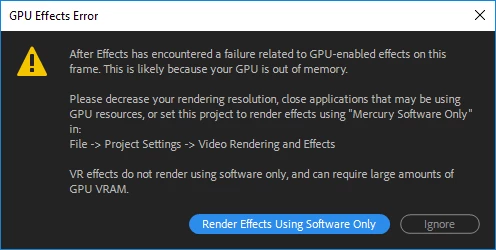
Okay, I know what does it say. It says "Your GPU is too weak". The problem is that my GPU isn't too weak, that whole composition was made with GPU acceleration on 2015.3 version and worked fine. I have Quadro GPU specially designed for that kind of stuff plus it worked earlier so it couldn't be like "Bang your GPU changed specification". Today I updated to the newest version of AE and the problem still exists.
I tried update GPU drivers - didn't helped, rolled back to supported drivers - DIDN"T HELPED.
I tried prerender - DIDN'T HELPED. I tried leaving it on half and then render on full - crash. It crashes even when only the part of composition is in different FullHD composition.
I can't move back to 2015.3 version because of dynamic link with Premiere Pro, where I've already done a lot of job, so rolling back is not an option.
Additionally: when I switch to Software Only whole AE crashes.
I mean: why designated GPUs doesn't work with your software? Any help?
My specs:
Win 10 Pro, i7-8700K, Quadro K2200, 24GB DRAM
 AdChoices