


GuruCE
Participating Frequently
March 13, 2021
Question

After Effects 2020 v18 (and v17.7) does not want to start

  • March 13, 2021
  • 4 replies
  • 5591 views

Adobe After Effects v17.7 and v18 both don't start on my PC.


The window looks like this:
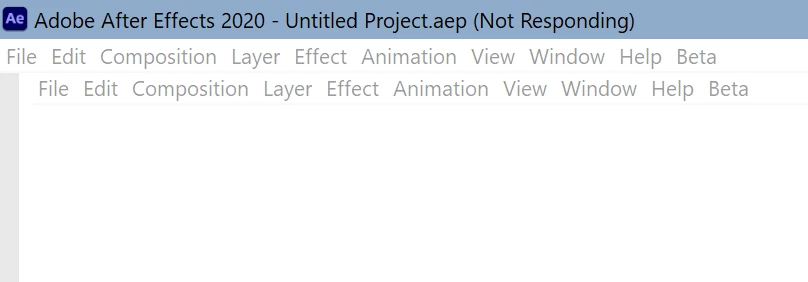
Notice the double menu bar. It hangs there forever. The only thing I can do is kill the application.


I've renamed C:\Users\<username>\AppData\Roaming\Adobe\Common to Common.old, and renamed all After Effects version folders in C:\Users\<username>\AppData\Roaming\Adobe\After Effects as well. No joy.


I updated my NVidia RTX 2080 SUPER drivers. Tried the latest "Gameready" driver and the latest "Studio" driver, both to v461.72. No improvement wrt After Effects.


Of course I also rebooted my PC (running Windows 10 64 bit fully updated).


After Effects just does not want to start. Is there any debug log I can view somehow that will show me what the issue could be?

This topic has been closed for replies.

4 replies

Participant
August 11, 2021

Good day,


is there a solution to this?


In my case AE worked "fine", until it didn't. Any 2021/18.xxx version can't be launched.
(Existing projects can be opened though.)


If I go back to version 17.xxx I can launch the software any way I want (not just existing projects).


I tried everything I could find on here, but nothing has fixed this:

- Delete settings

- Update drivers

- Delete MediaCore folder

- Delete various script files

- Win7 compatibility mode

- Admin mode

- etc.


The error message I get is:

After Effects error: Crash in progress. Last logged message was: [...] Executing startup/shutdown script at: C:\Program Files\Adobe\Adobe After Effects 2021\Support Files\Scripts\Startup\commandLineRenderer.jsx


System:

- NVIDIA Quadro RTX 3000 with Max-Q Design

- 10. gen i9-10885H

- 32 GB RAM

- Windows 10 Pro (21H1)


Thanks in advance, any help is much appreciated.

Rameez_Khan
Legend
May 13, 2021

Hi GuruCE,


I'm really sorry to hear about your issue! I'm also sorry that no one responded to your discussion since March.

Let's try these troubleshooting steps and see if that gives us a clue on what's going on:

  1. Disable your anti-virus software temporarily and then launch After Effects.
  2. Open Device Manager and expand Display Adapters. If you see both Intel and Nvidia display adapters, disable the Nvidia adapter and launch After Effects. Your display resolution might be lower after disabling the Nvidia card but that's just temporary.


Report back.

Rameez

GuruCE
GuruCEAuthor
Participating Frequently
May 14, 2021

Hi Rameez,


Yes, it looks like these support forums are really not suitable for proper support. Is there any way to get better support from Adobe? Are there any paid options for small businesses?


Anyway, thank you for responding now. I hope you can keep helping until we reach a solution.


To answer your questions:

  1. I disabled my virusscanner and launched Adobe After Effects. It still shows the exact same behaviour.
  2. My motherboard is a Gigabit Z390 Aorus Pro WIFI. This morherboard does not have any on-board display capability, so the only display adapter in device manager is the NVIDIA GeForce RTX 2080 SUPER.


Please note that as a final desperate attempt to get After Effects going, I did a COMPLETE clean install of Windows 10 Pro x64. With this I mean; remove all partitions on my NVMe and on this now completely raw NVMe drive clean install Windows 10. Then fully update the Windows 10 installation, download Adobe Cloud Desktop, install Premiere and After Effects, and start After Effects. Took me 2 days to backup and reinstall, only to be presented with the same After Effects hang.


Is there no way to enable a start log that could show what the issue is? There must be some way, right?

Rameez_Khan
Legend
May 17, 2021

Hey GuruCE,


Thanks for your detailed response and sorry to hear that you'd to do a clean sweep and reinstall the OS to no avail.

quote

Is there any way to get better support from Adobe? Are there any paid options for small businesses?

Yes, there are other support channels that I'd suggest you explore. We provide 1:1 support via chat/phone. You should be able to head over this page and start a chat session by clicking the message bubble at the bottom-right corner: https://www.adobe.com/about-adobe/contact.html

Depending on the type of Adobe license, you are eligible for support options. Here, take a look: https://helpx.adobe.com/contact/what-contact-options.html 


quote

Is there no way to enable a start log that could show what the issue is? There must be some way, right

Yes, I'd need two files from your system:

  1. Your System Info (.NFO) file
  2. Your After Effects dump file

I will send these files to a developer and see if they will be able to figure out what's going on exactly.

If you need help in knowing how to save these files, let me know.


Thanks,

Rameez

OussK
Community Expert
Community Expert
March 14, 2021
GuruCE
GuruCEAuthor
Participating Frequently
March 14, 2021

Even though this is, I'm pretty sure, the same as completely removing the version folder under C:\Users\<username>\AppData\Roaming\Adobe\After Effects, I did try your suggestion:


Box came up:


Click OK, and then After Effects again hangs with the same double menu bar.


The nasty workaround still works: Click on the After Effects menu bar so that the title bar now ends with "Not Responding", now right-click on the taskbar "After Effects" "button" and click "Close Window", then Windows comes up with the option to "Try to restore this program". If you do this without first clicking on the After Effects menu bar (or anywhere in the window) so the title bar ends with "Not Responding", it will only give the option to "Close the program", aka terminate.


Also run as administrator doesn't change anything (another suggestion I already tried before but was suggested in the link you sent as well).

GuruCE
GuruCEAuthor
Participating Frequently
March 14, 2021

This really needs to be solved, because After FX is completely useless, even with the workaround. After FX is completely crippled like this because for instance the Track Camera option starts another instance of After FX in the background, and this instance of course hangs the same causing the dreaded:


And yes, I have tried all the suggestions in all the other posts of all the other people that are reporting this dialog box.


Adobe applications are of such apalling quality, and what is worse, Adobe just doesn't give a ... We all pay, and we all have to "work" with these absolutely horrible quality applications. Obvious bugs stay open and are not dealt with for years (just search for posts on this forum with "timed out obtaining dynamiclink server connection"). So many simple improvements that would make the workflow so much better (for instance; why on earth when I save a snapshot of a video, does Adobe give me the folder of the previous project I worked with? Just default to the current project folder! arrrgh!).


What can we, as users/consumers of Adobe products do? What power do we have? Nothing apart from stop using Adobe products?

GuruCE
GuruCEAuthor
Participating Frequently
March 14, 2021

I found a workaround, but it is not great...


If I wait a while, then right click Adobe After Effects on the taskbar and click "Close Windows". this dialog pops up:

Now click "Try to restore the program" and After Effects starts working. Problem is of course when replacing footage in Premiere with After Effects footage, because then Premiere starts After Effects in the background and also Premiere will hang (and no way to get to this dialog to force After Effects to start working).


Will Adobe fix this issue? Anybody else has this issue?


PS. I have of course de-installed and re-installed After Effects many times, including the older version 17.7 and the latest version. Nothing seems to fix this issue.