
Rameez_Khan
Legend
May 10, 2022
Question

After Effects 22.4 is now available!

  • May 10, 2022
  • 15 replies
  • 5640 views

After Effects 22.4 is now available for download from the Creative Cloud desktop application. This release is recommended for all users.


What's new?

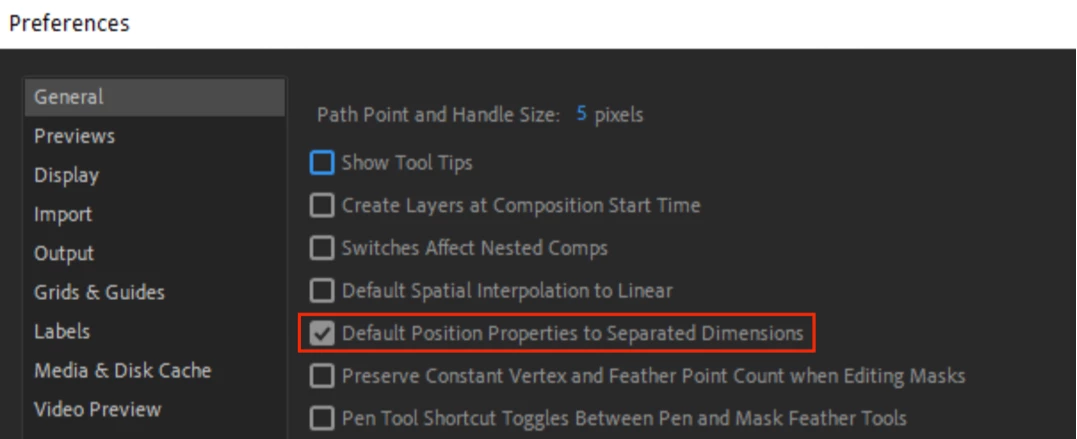
There is a new preference to separate the Position property dimensions in the Timeline by default. When enabled, the Default Position Properties to Separated Dimensions preference (available in Preferences > General) automatically separates the Position property into X, Y, and Z when a layer is created. 
 

What's fixed?

  • Fixed an issue where setFontName() would appear in an error message for setFont()
  • Fixed an issue where Motion Graphic Templates that use the Mocha Shape Importer on Apple Silicon hardware would show an unsupported error in Premiere Pro
  • Fixed an issue that caused projects with Lumetri parameters not to be backward- or forward-compatible in After Effects 22.3
  • Fixed an issue that prevented certain .png files from importing properly
  • Fixed an issue that caused prevented workspaces from reverting to saved layouts via Reset Workspace to Saved Layout option
  • Fixed an issue that caused slow playback of video footage when Multi-Frame Rendering was enabled
  • Fixed an issue that resulted in errors when refreshing the contents of the Effects and Presets panel
  • Fixed an issue that caused text animators and highlight/text selection to not work correctly for right-to-left-aligned languages
  • Fixed an issue that resulted in After Effects becoming unresponsive while using the Mocha plugin


How to update After Effects to version 22.4?

Open the Creative Cloud desktop application and click the Updates tab on the top-left. Find After Effects in the list and click Update.

I don't see the update in my Creative Cloud desktop application. What should I do?

Click Help > Check for Updates from the Creative Cloud desktop application to refresh it.

This topic has been closed for replies.

15 replies

Participating Frequently
June 20, 2022

..................... and now i just simply cannot export from AE to Media encoder anymore..... what is wrong this time adobe? (:(:(:(:(:(:

------SEE LOG BELOW ----


- Source File: D:\Google Drive\- Pixelwish\00_Projecten\46_MetaClub\Trophy_Whale\Whale_COMP_AME\tmpAEtoAMEProject-Base_00_5.aep
- Output File: D:\Google Drive\- Pixelwish\00_Projecten\46_MetaClub\Trophy_Whale\Whale_COMP_AME\Base_00.mp4
- Preset Used: Match Source - High bitrate
- Video: 1080x1350 (1,0), 30 fps, Progressive, 100 (63% HLG, 51% PQ), Hardware Encoding, Nvidia Codec, 00:00:12:16
- Audio: AAC, 320 kbps, 48 kHz, Stereo
- Bitrate: VBR, 1 pass, Target 10,00 Mbps
- Encoding Time: 00:00:26
06/03/2022 01:26:44 PM : Encoding Failed
-------------------------------------
The Operation was interrupted by user
-------------------------------------


- Source File: D:\Google Drive\- Pixelwish\00_Projecten\46_MetaClub\Trophy_Whale\Whale_COMP_AME\tmpAEtoAMEProject-Base_00_5.aep
- Output File: D:\Google Drive\- Pixelwish\00_Projecten\46_MetaClub\Trophy_Whale\Whale_COMP_AME\Base_00.mp4
- Preset Used: Match Source - High bitrate
- Video: 1080x1350 (1,0), 30 fps, Progressive, 100 (63% HLG, 51% PQ), Hardware Encoding, Nvidia Codec, 00:00:12:16
- Audio: AAC, 320 kbps, 48 kHz, Stereo
- Bitrate: VBR, 1 pass, Target 10,00 Mbps
- Encoding Time: 00:00:26
06/03/2022 01:26:44 PM : Encoding Failed
-------------------------------------
The Operation was interrupted by user
-------------------------------------
- Encoding Time: 00:00:31
06/17/2022 02:45:58 PM : Encoding Failed
------------------------------------------------------------
Export Error
Error compiling movie.

Accelerated Renderer Error

Unable to produce frame.

Writing with exporter: H.264
Writing to file: D:\Google Drive\- Pixelwish\00_Projecten\46_MetaClub\Prizes_Metaclubbers\Whales\Whale_Trophy_Thomassan.mp4
Writing file type: H264
Around timecode: 00:00:00:03 - 00:00:01:21
Rendering at offset: 0,100 seconds
Component: H.264 of type Exporter
Selector: 9
Error code: -1609629695

------------------------------------------------------------


- Source File: D:\Google Drive\- Pixelwish\00_Projecten\46_MetaClub\Trophy_Whale\Whale_COMP_AME\tmpAEtoAMEProject-Base_00_9.aep
- Output File: D:\Google Drive\- Pixelwish\00_Projecten\46_MetaClub\Prizes_Metaclubbers\Whales\Whale_Trophy_Thomassan.mp4
- Preset Used: Match Source - High bitrate
- Video: 1080x1350 (1,0), 30 fps, Progressive, 100 (63% HLG, 51% PQ), Hardware Encoding, Nvidia Codec, 00:00:12:16
- Audio: AAC, 320 kbps, 48 kHz, Stereo
- Bitrate: VBR, 1 pass, Target 10,00 Mbps
- Encoding Time: 00:01:09
06/17/2022 02:50:00 PM : Encoding Failed
-------------------------------------
The Operation was interrupted by user
-------------------------------------
- Encoding Time: 00:00:34
06/20/2022 03:44:47 PM : Encoding Failed
------------------------------------------------------------
Export Error
Error compiling movie.

Accelerated Renderer Error

Unable to produce frame.

Writing with exporter: H.264
Writing to file: D:\Google Drive\- Pixelwish\00_Projecten\03_Mediageniek\DNP_Animatie\DNP_ANI_11\04_Output\DNP_ANI_11_V2.mp4
Writing file type: H264
Around timecode: 00:00:02:24
Rendering at offset: 0,040 seconds
Component: H.264 of type Exporter
Selector: 9
Error code: -1609629695

Participating Frequently
June 20, 2022

AHHH ANOTHER AFTER EFFECTS UPDATE, YOU ALL KNOW WHAT THAT MEANS (: BUGS, BUGS, BUGS!!!!!!!

JUST A SIMPLE COPY TEXT FROM WINDWOS DOENST EVEN WORK ANYMORE. THIS SOFTWARE IS GETTING RIDICULOUS, EVERYDAY I HATE IT MORE AND MORE. PLEAE FOR THE LOVE OF GOD ADOBE LISTEN TO YOUR COMMUNITY AND CHECK YOUR SOFTWARE BEFORE YOU APPLY UPDATES THIS IS NOT THE FIRST TIME THIS BUG IS REPORTED!!!!!!!!!!!!!!!!!!!!!!!!!!!!!!!!!!!!!!!!!!!!!!!!!!!!!!!!!!!!!!!


[Moderator note: Profanity removed. Please be respectful of others.  There is no need to shout.]

Participating Frequently
June 15, 2022

Honestly speaking....I would love for you Adobe to fix

01) Its color management so that its as robust and straightforwards as Nuke...especially when it comes to handeling ACES. Right now its really painful the number of steps one needs to take in order to work in an ACES environment inside of AE


02) Multichannel EXR work flow -

(a) The extractor plugin just does not cut it any more...neither does cryptomatte...like I cant apply a mask on a layer with cryptomatte

(b) The workflow is obscenely slow...like riding a bullock cart with two overaged thin bullocks pulling the cart...and I'm running a Ryzen 9 5950x with 128GB DDR4 RAM 3600 and a RTX Quadro A4000...It's just unworkable right now

03) Make every plugin that ships 32bit...especially stuff like inner.outer key/ match grain/...I mean these are just basics at this point


These are just the very very very basics in this day an age of vfx which should just BE there

04) Get a good renoiser plugin built in considering all footage today is shot on digital

Participant
June 13, 2022

Hello, I just wanted to ask if it is possible to download Ae for free or lower the price range as we would really like to create edits, films and explore the app. Is there any possible way that you can make the Ae software a free downloadable app to install? Many thanks - Anonoymous user


Participating Frequently
June 10, 2022

Hangs when rendering .ai files inside comps

please advise


Mathieu Durand
Inspiring
June 10, 2022

Hi,

I'm having this very annoying issue, every once in a while when I open After Effects I get this error. 

It resets my output templates to the original ones.

It also does that with global preferences, workspaces and export name templates. It is slowing me down in my work and I'd like to get a fix for it. I am running the latest version, on a Windows 10 with a Nvidia 3090.

Thanks,

Mathieu

Participant
June 2, 2022

Of course, after the update After Effects 22.4 can't communicate with Media Encoder 22. Any help with fixing error, (5027 :: 12) After effects: AEGP Plugin AEDynamicLinkServer: Failed to connect to Adobe Media Encoder. (5027 :: 12)

Running Monterey Version 12.4 

All software up to date. I've already downgraded to old version, restart, reinstalled Adobe CC, deleted all the preferences.


Nothing is working. 

Rameez_Khan
Legend
June 6, 2022

Hi @easydoeswork


Sorry for your issue! 

Do you get an error log after this error message? If so, please share that with me so that I can send it to an engineer for inspection. 


Thanks,

Rameez

Participant
May 24, 2022

This is popping up when i try opening AE and wont let me launch AE. 


Rameez_Khan
Legend
May 30, 2022

Hey @George Cox


Sorry for your issue! 

Can you share a copy of the crash log here? I'll send it to a developer for inspection. 


Thanks,

Rameez 

Participant
May 21, 2022

Hi,

I can't open the new version of after effects and gives me this message alert '<78438> <DynamicLink> <5> Increase wait time to 2'... Could you help me with this issue...

Thanks very much,

Best

Mira


Rameez_Khan
Legend
May 30, 2022

Hi Mira, 


Which OS are you on? 

Do you have any third-party plugins for After Effects? 


Thanks,

Rameez

Inspiring
May 16, 2022

Hello, Rameez: I have version 22.3 but 22.4 does not appear on my CC page, even after refreshing, restarting CC and refreshing again.

Rameez_Khan
Legend
May 30, 2022

Hi @HouHouHou


Thanks for letting me know via DM that your issue has been resolved. 


Best,

Rameez