



After Effects 23.0 and MAX 2022: H.264 export, selectable Track Matte layers, and more...

October 18-20
Register Here. Attend virtually, or join us in Los Angeles for the live conference!
MAX FAQ: Find out more. See what you can learn.
MAX Sessions: Pick from a huge variety of digital video & audio courses.
Welcome to After Effects 23.0!
The October 2022 release of Adobe After Effects (v 23.0), is now available for download from the Creative Cloud desktop application. This update includes numerous bug fixes, new features, and performance improvements.
- The product team recommends the update for all users.
- If you are experiencing any issues, please create a new post explaining your problem so we can help.
- If you have a bug to report or any complaint, please do that on our community here.
System Requirements
The system requirements for After Effects 23.0 have changed. Please visit the System Requirements page for details.
What's New in After Effects 23.0?
Native H.264 Rendering:
Our community asked, and we listened. H.264 can now be rendered natively in After Effects 23.0 from the After Effects Render Queue. Yay!! You can choose from three output module presets based on your desired target bit rate. If you want more customization, you can change the resolution, frame rate, and color management settings. For more in-depth control or specific settings, you can still use Media Encoder to render your files. Oh! And H.264 export supports both hardware and software encoding modes.
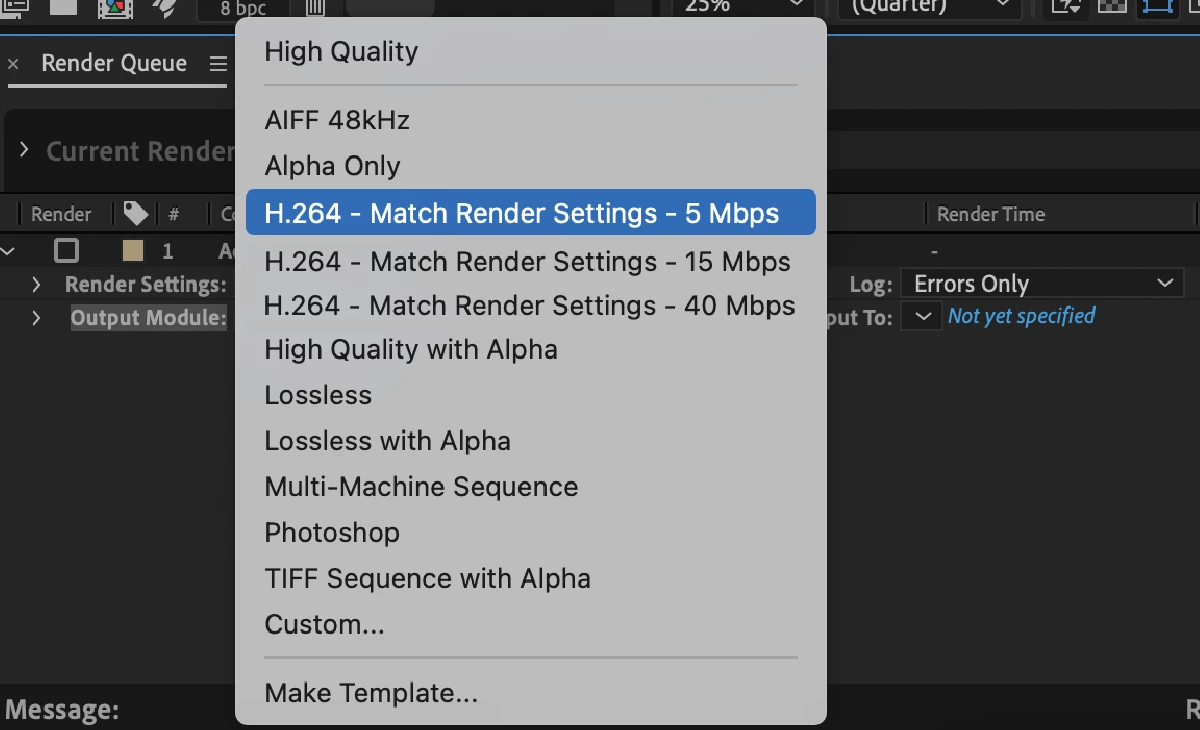
For more details on the H.264 Output Module Presets, visit the Exporting H.264 page in the User Guide.
Select Track Matte Layers:

After Effects 23.0 makes it incredibly simple to use track mattes, especially in a complex project that has multiple track matte layers. Any layer in your composition can now serve as a Track Matte, regardless of its position in the layer stack. You are no longer required to place the matte above the target layer. As a result, it is easier to navigate through the layers, make adjustments, and accelerate your workflow.
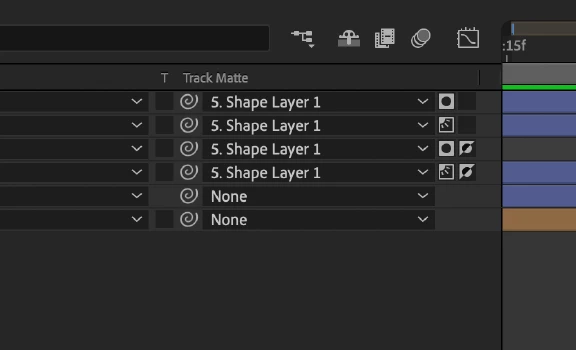
For more details on how to toggle between Alpha/Luma Matte, and preserve transparency, see the Track Mattes and Traveling Mattes page in the User Guide.
Composition Presets:
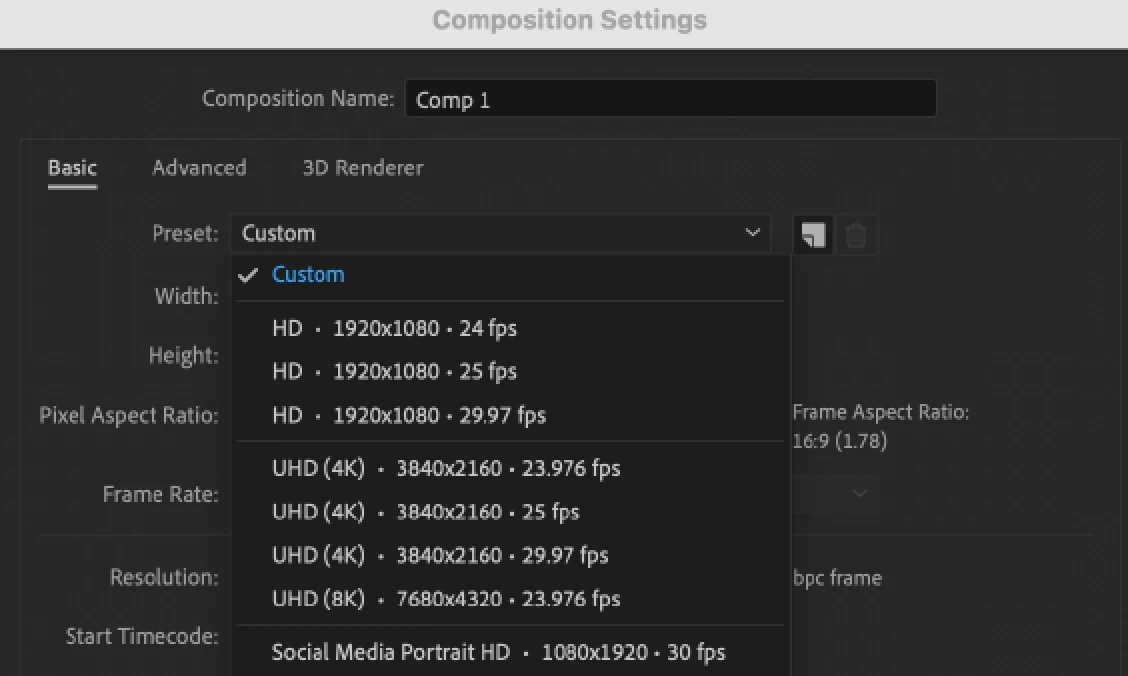
In recent years, 4K and vertical video have emerged as the most preferred choices. In order to make it simpler to find the presets that are used most commonly, the After Effects Composition Presets list has been revamped. The presets also include sizes for social media output.
New Animation Presets:
After Effects now offers 50 new Animation Presets created by our After Effects community. These presets, designed for modern motion design workflows, save you time on the techniques you use the most, allowing you to create quick animations without having to start from scratch.
Faster Timeline Navigation:
The J and K keys allowed you to easily move between the previous and next keyframes across all layers in the timeline in earlier versions of After Effects. Now you can select keyframes on selected layers and properties by holding the Shift key while using the J and K hotkeys. Holding the Shift key limits the movement of the Current Time Indicator (CTI) to keyframes on the selected layers.
Installing Cinematic4D is now optional:
Another one where the community, especially our Enterprise users, asked and we delivered! Use the Add-ons option during After Effects installation to download or skip Cinema 4D. If you want to install Cinema4D later, you can always install it through the Creative Cloud application.
What's New in Beta?
Properties Panel:
Use the Properties Panel to quickly access the important properties of selected layers in the timeline without the need to twirl open multiple layer hierarchies or a different panel. It improves the accessibility of layer and object properties that speed up your workflows. The latest Beta brings the Properties Panel feature for Shape layers.
For more details on how to use the Properties panel, visit the Properties Panel (Beta) page.
3D Model Import:
You can import a 3D model into After Effects and add it to your compositions to edit and animate its transformation, such as position, scale, rotation, etc. While importing 3D models you can specify how the model should be interpreted, like units, scale, etc.
OpenColorIO and ACES Color Management:
This release of After Effects Beta includes support for OpenColorIO and ACES. For detailed information on color management settings in the project and during export, see the OpenColorIO and ACES color management page of the user guide.
Adobe After Effects Beta Program Information
How does one download Adobe Premiere Pro Beta and provide feedback? See the following video.
What's fixed?
After Effects 23.0 includes several bug fixes. See the Fixed Issues page for more details.
How to update After Effects to version 23.0?
Open the Creative Cloud desktop application and click the Updates tab on the top left. Find After Effects in the list and click Update.

I don't see the update in my Creative Cloud desktop application. What should I do?
Click Help > Check for Updates from the Creative Cloud desktop application to refresh it.
 AdChoices