

Rameez_Khan
Legend
February 7, 2023
Question

After Effects 23.2 is now available for download!

  • February 7, 2023
  • 22 replies
  • 14319 views

The February 2023 release of After Effects, version 23.2, is now available for download from the Creative Cloud desktop application. This release adds support for OpenColorlO (OCIO) to simplify the ACES workflow. It also contains several stability and performance fixes.


What's New?

OpenColorlO and ACES color management:
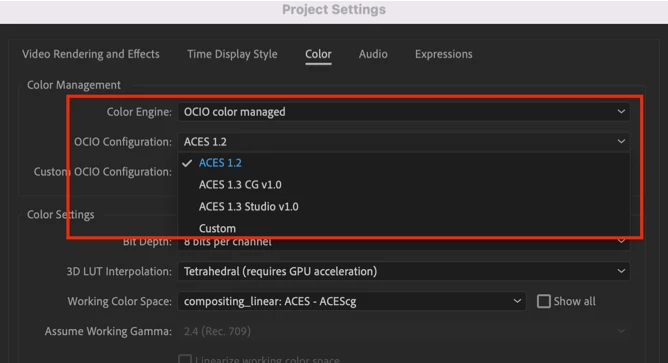
OpenColorIO (OCIO) is a color management solution used primarily in motion picture production that helps enforce a color management methodology required for high-fidelity color imaging. The Academy Color Encoding System (ACES) is a free, open, device-independent color management system that aims to be the filmmaking industry standard for managing color. After Effects enables the ACES workflow by integrating OCIO as a color management engine.


To learn more, visit the OpenColorIO and ACES color management help document.


What's fixed?

  • Fixed an issue that caused After Effects to crash on Windows when using Chinese characters in text layers.
  • Fixed an issue that allowed users to create new C4D layers when Cinema 4D wasn’t installed.
  • Fixed an issue that caused an error when saving the project with a media replacement control and a track matte.
  • Fixed an issue that caused After Effects to hang after presenting modal dialogs.
  • Fixed an issue that caused a delay in closing After Effects projects.
  • Fixed an issue that caused After Effects to crash when enabling any of the Simulate Output profiles with HW acceleration enabled.
  • Fixed an issue that prevented users from canceling an ongoing import of media files into the project.
  • Fixed an issue that slowed or interrupted CAF processing when Cache Frames When Idle was active.
  • Fixed an issue with Selectable Track Mattes when clicking and dragging on Alpha/Luma/Invert icons didn’t change settings on multiple layers.
  • Fixed an issue that prevented AErender from showing progress with interlaced render settings.


How to update After Effects to version 23.2?

Open the Creative Cloud desktop application and click the Updates tab on the top left. Find After Effects in the list and click Update.

I don't see the update in my Creative Cloud desktop application. What should I do?

Click Help > Check for Updates from the Creative Cloud desktop application to refresh it.


NOTE: Updates are rolled out in phases. Please check back after a few hours if you don't see the new version in your CC desktop app.

22 replies

Participating Frequently
May 5, 2023

It's offensive how bad the update performs. Crash crash crash. Setting Aces the whole machine starts freaking out.


Imagine this is professional software you pay for and need it to work and they update and USUALLY the update isn't working and you have to go back to older versions and imagin also it's not an accident but standard practice.


But of course it's my drivers, my settings I have to reset and bla bla. Yet literally zero other apps that work with 3D, video or images show this kind if insanity.

Disgusting.

Known Participant
April 12, 2023
Good morning,
I have been waiting for feedback from the 20th of February and still have not heard anything.
2023 does not work on a MacBook Pro M1.
You can only preview about 5 frames at a time, which is completely unworkable for an animation program!

Please can you fix this issue or let us know any workarounds?


Participant
April 11, 2023

Hi, I updated the version 23.2 but I cannot see anyupdate from OpenColorlO and ACES color management in AE 2022. Anything I can do now? Thanks

Participant
April 11, 2023

Don't use Adobe products until they actually fix the issues with them. Free or open source alternatives are as reliable or better as AE. Adobe has taken our money but not made any corr improvements to their software. All of their software is buggy and unreliable. 

Participating Frequently
March 24, 2023

I'm slowly giving up on After Effects. I've being working in AfterEffects for more then 20 years and it is just as slow as 20 years ago. I had it with RAM previews, chache getting full, utterly slow UI, horrible footage and asset previews, so many crashes. What's going on with the dev team?? When are you going to rewrite this program?? I will make the transition to Davinci Resolve and Fusion because it's getting worse and worse with every release.

Participant
February 27, 2023

Hello Adobe,

Yet another fail. After Effects is the only application on my system that cannot render out large projects, giving me "ran out of RAM" notifications. Adobe has consistantly found every excuse in the book to push me away from their echo system. 

rodneyB-Asahi_EU
Participant
February 24, 2023

This update has broken the loading of AE, doesnt go past initalising the mediacore, going to have to downgrade till fixed!!


Participant
February 22, 2023

Hi, my name is Rich. Is Adobe After Effects compatible to Mac El Capitan, 10.11? Thank you for your help. 

Sincerely,


Rich

Panorel
Participant
February 21, 2023

Gave up on this release. Crashes on saving, crushes on exporting to ME. Downgraded to previous version and all works fine again.

Known Participant
February 20, 2023

This looks like another super buggy release from Adobe, sigh. Does this new version allow previewing of more than 2 frames on a brand new Macbook M1 Pro with 16GBs of RAM? This is possible in the 2022 version and below. I have mentioned this a few months ago and still can't use the latest version of After Defects because using an animation program without being able to preview your animation is ridiculous!!!

Rameez_Khan
Legend
February 20, 2023

Hi @Thomas25259530bvpq


You should have no problems previewing more than 2 frames on your MacBook Pro. If you could screen-record your experience with the issue, it would help us understand it better.


Best,

Rameez

Known Participant
February 21, 2023

Hi Rameez,

Thanks for the quick response.
Here is the screen recording https://www.dropbox.com/s/pzxos1qtivkuf7r/Screen%20Recording%202023-02-21%20at%2008.36.45.mov?dl=0
Please let me know if there is any additional information you need?

Thank you,

Thomas

Participant
February 17, 2023

I having a lot of problems to open my 23.2 apps I re installed and do not opens. It shows the message below.Any idea about how to fix it?

Rameez_Khan
Legend
February 20, 2023

Hi @20658629128461375ia9r


This error message is for Premiere Pro. Are you facing the same issue for After Effects as well?
Please add your email address and send us the report whenever it pops up. If you have done that already, I can pull the crash reports from our crash server and investigate them.


Let me know.

Rameez