

After Effects 23.2 is now available for download!
The February 2023 release of After Effects, version 23.2, is now available for download from the Creative Cloud desktop application. This release adds support for OpenColorlO (OCIO) to simplify the ACES workflow. It also contains several stability and performance fixes.
What's New?
OpenColorlO and ACES color management:
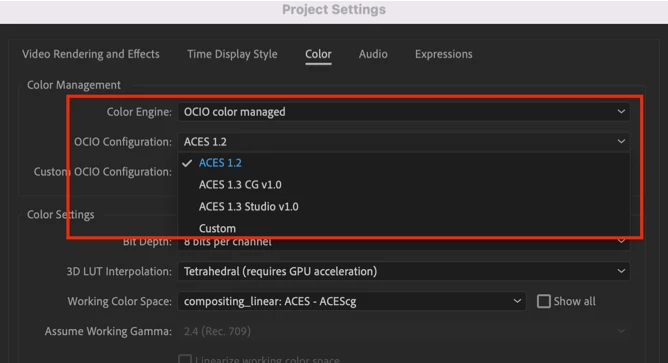 OpenColorIO (OCIO) is a color management solution used primarily in motion picture production that helps enforce a color management methodology required for high-fidelity color imaging. The Academy Color Encoding System (ACES) is a free, open, device-independent color management system that aims to be the filmmaking industry standard for managing color. After Effects enables the ACES workflow by integrating OCIO as a color management engine.
To learn more, visit the OpenColorIO and ACES color management help document.
What's fixed?
- Fixed an issue that caused After Effects to crash on Windows when using Chinese characters in text layers.
- Fixed an issue that allowed users to create new C4D layers when Cinema 4D wasn’t installed.
- Fixed an issue that caused an error when saving the project with a media replacement control and a track matte.
- Fixed an issue that caused After Effects to hang after presenting modal dialogs.
- Fixed an issue that caused a delay in closing After Effects projects.
- Fixed an issue that caused After Effects to crash when enabling any of the Simulate Output profiles with HW acceleration enabled.
- Fixed an issue that prevented users from canceling an ongoing import of media files into the project.
- Fixed an issue that slowed or interrupted CAF processing when Cache Frames When Idle was active.
- Fixed an issue with Selectable Track Mattes when clicking and dragging on Alpha/Luma/Invert icons didn’t change settings on multiple layers.
- Fixed an issue that prevented AErender from showing progress with interlaced render settings.
How to update After Effects to version 23.2?
Open the Creative Cloud desktop application and click the Updates tab on the top left. Find After Effects in the list and click Update.

I don't see the update in my Creative Cloud desktop application. What should I do?
Click Help > Check for Updates from the Creative Cloud desktop application to refresh it.
NOTE: Updates are rolled out in phases. Please check back after a few hours if you don't see the new version in your CC desktop app.


 AdChoices