nishu_kush
Community Manager
Community Manager
December 4, 2024
Question

After Effects 25.1 is now available to download!

  • December 4, 2024
  • 13 replies
  • 16878 views

Welcome to After Effects 25.1


The Adobe After Effects 25.1 December release is now available for download, introducing significant enhancements to streamline your workflow. This latest update includes a notable feature allowing users to specify whether 3D objects in their compositions interact with scene lighting. Additionally, the release addresses multiple bugs, ensuring improved stability and performance.


New in 25.1


Here are the new features coming with 25.1
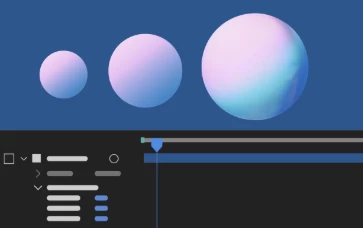
 

Accepts Lights switch for 3D layers

Disable a 3D layer from accepting lights to ensure the object’s appearance is unaffected by light sources in the 3D scene.
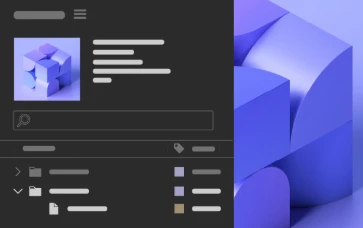
3D model preview thumbnail

Preview 3D models as thumbnails in the Project panel to speed up model identification and enhance workflow efficiency.
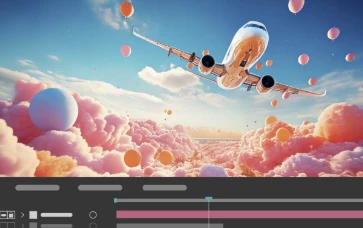
Cinema 4D 2025 upgrade in After Effects

Take advantage of the Cinema 4D 2025 upgrade in After Effects and unlock the full potential of its new features and improvements.


Fixed issues in 25.1


After Effects 25.1 brings enhanced stability and performance to elevate your creative experience, ensuring a smoother and more reliable workflow. Below is a list of fixes included in this release.

  • Using the Shatter effect with specific settings no longer causes a crash on Apple silicon machines.
  • Motion path dots are not visible when performing capture in Motion Sketch for After Effects 2025.
  • The Broadcast Wave time reference field in XMP is no longer truncated, eliminating the issue of incorrect start media timecode values.
  • After Effects Dynamic Link now adheres to the project’s hardware acceleration preferences.
  • 3D models are no longer replaced by placeholders in exports.
  • Exporting MP4 files at a width of 4100 px now accurately outputs at 4100 px instead of 4096 px.
  • Using the middle mouse button to close panels no longer causes After Effects to crash when clicking elsewhere.
  • Updated several keyboard shortcuts to include more user-friendly labels.
  • After Effects now renders compositions with non-multi-frame rendering effects more quickly.
  • Dialogs now always open on the same monitor as the main application window.

13 replies

Known Participant
March 16, 2025

Why no 50 series Nvidia GPU support?

raymondcraig
Participating Frequently
March 14, 2025

Since updating to 25.1.0 I'm experiencing a phenomenon where it's no longer saving. I even tried hitting Save As and saving to a different folder as a test. I'll see a temporary file appear (usually will have the usual string of numbers before finishing the save) but then it just disappears. The same thing happens in the auto save folder. When it pops up saying it's auto saving in AE I'll look at the auto save folder and see a temporary file appear and then it just disappears with no new auto save file there. It's not in the trash or anywhere else, it just doesn't exist. I've searched Reddit and some people seem to see this happening with Premiere as well. I've lost hours of work as I can't save any progress or recover my work.

Participant
March 13, 2025

macOS Monterey
Version 12.7.6
Mac Pro (Late 2013) 

This is my computer version, and I want to download the older After Effects program from 21 or 22 to work on this program and version

Participant
February 21, 2025

It's great to hear! When will Adobe After Effects be available for Windows ARM computers? Also, will there be a discount on the Adobe Creative Suite subscription for Windows ARM users who can't use all the apps on their Windows 11 devices because they aren't supported?

Participant
February 18, 2025

It’s great to see After Effects 25.1 now available for download! While many exciting features come with this update, I understand the frustration of losing the ability to change the highlight color. In previous versions, using Cmd + F12 to enable "Enable_Theme_Colorizing" allowed users to adjust the highlight color in "Settings - Appearance." It would be awesome if Adobe could bring this feature back in future updates. Customizing the interface helps improve the user experience and allows for more personalization. Let’s hope we see this feature return soon!

Participating Frequently
February 17, 2025

25.1 and I still get major rendering errors on a 4080ti with 16gb of memory and 64gb or ram trying to render a 1 minute 40 second clip. Error code 1609629695. Adobe, you have a long ways to go.

Participant
February 11, 2025

I thought this update might fix the frequent crashes when an mp4 is in the project. But no, still happening. 

Participating Frequently
February 5, 2025

Verry BAD UI. Crash my eyes.

Multipasser
Inspiring
December 19, 2024

They screwed up MOCHA!!! you cannot use it anymore as the CMD+A (select all) closes the app WITHOUT saving!!

I posted this on boris and it is a bug! Fix it asap!

Participant
December 17, 2024

Where should i start with this app? anyone have some suggest for the basic course of AE on YTB?


Personal info removed by Mod.

nishu_kush
Community Manager
Community Manager
December 18, 2024

Here's a place to get started with After Effects: https://adobevideotraining.com/after-effects/introductory-courses/

Hope it helps.


Thanks,

Nishu