
Pamplemuss
Known Participant
December 23, 2022
Answered

After Effects -- 3D Layers Intersection

  • December 23, 2022
  • 2 replies
  • 1089 views

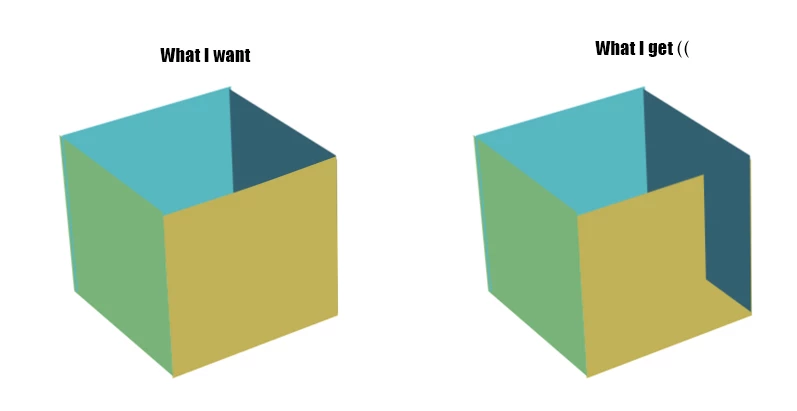
Hi, Can anybody give a hint how to avoid the 3D layers intersection?

Lower layer is getting up and cuts the upper one.

Adding an  adjustment layer in between didn't change a thing. 

Like this : 


I use After Effects 2023. 


Thanks a lot in advance! 

Erica 
This topic has been closed for replies.
Correct answer Rick Gerard

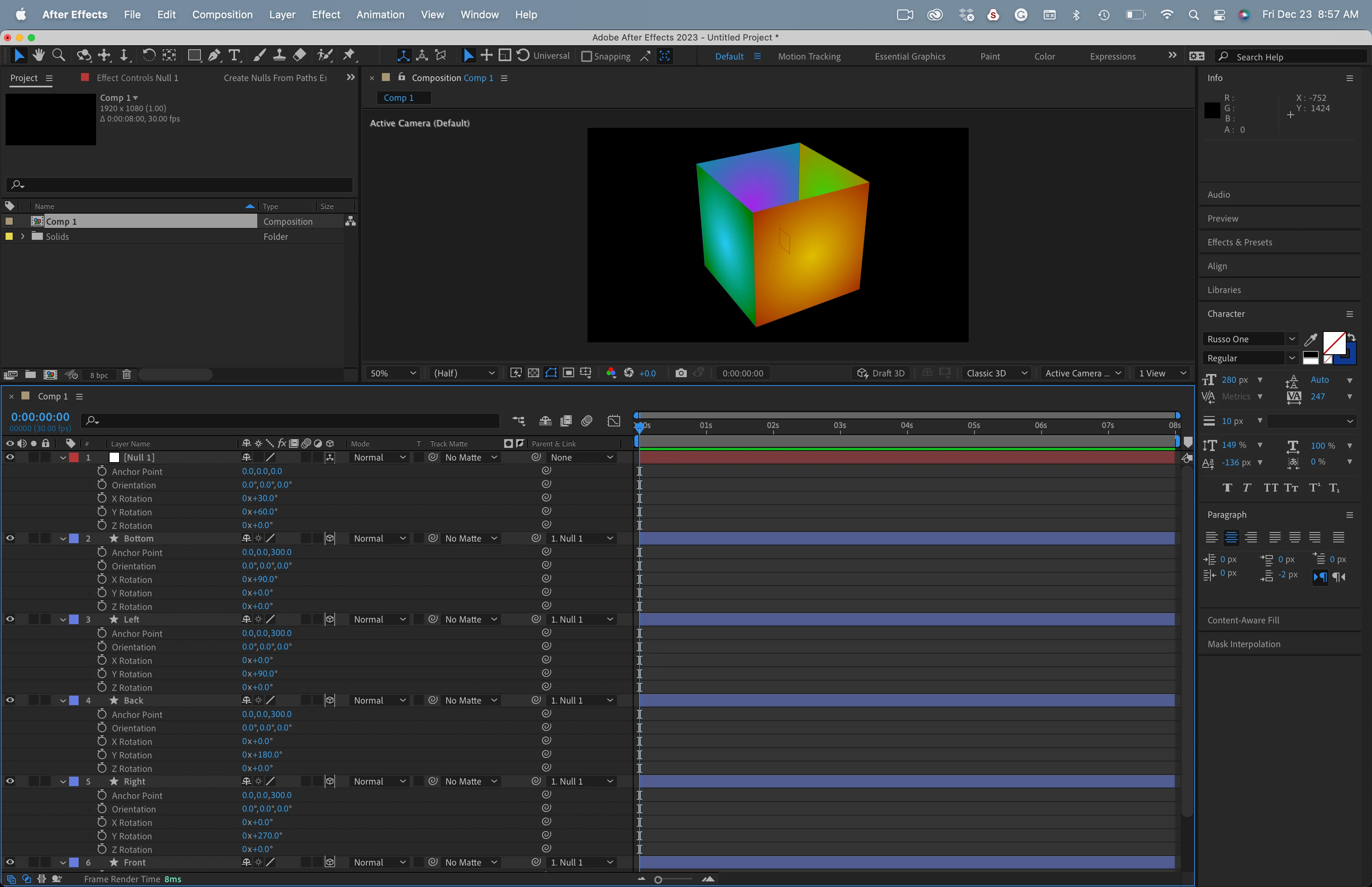
If you want to create a box like the one you show do this:

  1. Create 5 layers with the same size.
  2. Make the layers all 3D
  3. Expose the Anchor Point and set the Z value of every anchor point to half the layer size
  4. Rotate the bottom layer 90º in X
  5. Rotate the left side 90º in Y
  6. Rotate the back side 180º in Y
  7. Rotate the right side 270º in Y
  8. Add a 3D null to the comp
  9. Parent all of the box layers to the Null
  10. Move the box you have created using the null


Your screenshot looks like the front layer is not the same size as the other layers. It does not look like an intersection at all.

An open box created from 5 shape layers with a 600 X 600 Rectangle in each.


2 replies

Rick GerardCommunity ExpertCorrect answer
Community Expert
December 23, 2022

If you want to create a box like the one you show do this:

  1. Create 5 layers with the same size.
  2. Make the layers all 3D
  3. Expose the Anchor Point and set the Z value of every anchor point to half the layer size
  4. Rotate the bottom layer 90º in X
  5. Rotate the left side 90º in Y
  6. Rotate the back side 180º in Y
  7. Rotate the right side 270º in Y
  8. Add a 3D null to the comp
  9. Parent all of the box layers to the Null
  10. Move the box you have created using the null


Your screenshot looks like the front layer is not the same size as the other layers. It does not look like an intersection at all.

An open box created from 5 shape layers with a 600 X 600 Rectangle in each.


Pamplemuss
Known Participant
January 10, 2023

Thank you very much!

Sorry for a late reply (holydays)) -- I'll try this way ASAP!

Mylenium
Legend
December 23, 2022

Without seeing your timeline layout with the values exposed and critical info such as what the comp renderer is set to we can't realyl tell you much. The first thing to do would be to check the camera settings and the whole scene scale. Due to limited precision AE is not good if the 3D layers are small and the camera is zoomed in with an extremely tiny field ov view. This alone could explain the clipping issues. Anything more will require more details.


Mylenium