



After Effects aerender crashes/hangs during render on some EC2 Windows instances, but succeeds on another
Hi Adobe Community,
We are investigating an issue with After Effects aerender on Windows EC2 render workers. The same .aepx project and render command behaves differently across instances: on one instance After Effects crashes during render and produces a corrupt AVI, while on another instance the render completes successfully.
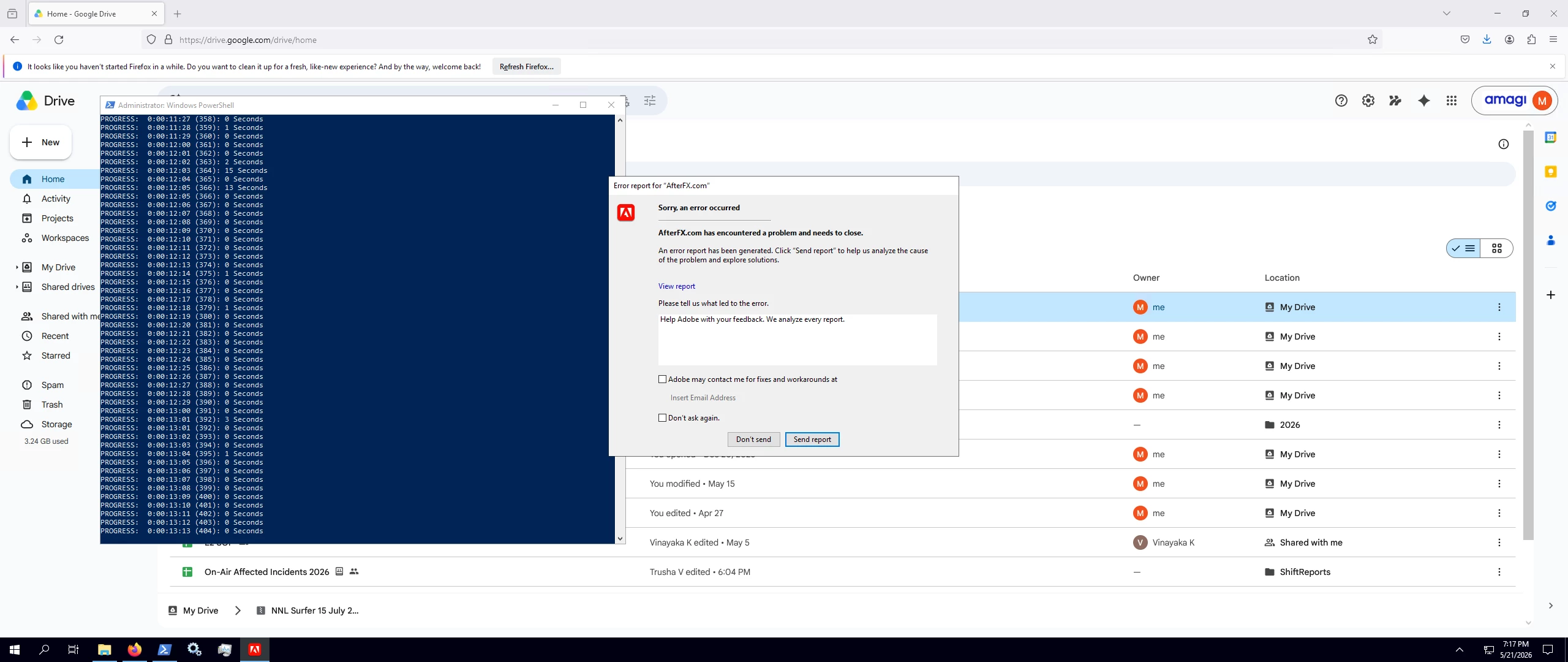
I will attach a screenshot of the After Effects crash popup that appeared during the failed render.
Environment
We are rendering an After Effects .aepx project using aerender.
Project file:
Outside NNL.aepx
Composition:
RenderComp
Render command:
aerender -project "C:\Users\Administrator\downloads\NNL Surfer 15 July 2025\NNL-Surfer15-July2025\Outside NNL.aepx" -comp "RenderComp" -OMtemplate "AmagiAVI_v3" -RStemplate "Best Settings_v3" -output "C:\Users\Administrator\downloads\NNL Surfer 15 July 2025\NNL-Surfer15-July2025\rendered\NNL-Surfer15-July2025_7d6681b313a82951.avi" -close DO_NOT_SAVE_CHANGES -v ERRORS_AND_PROGRESS -log "C:\Users\Administrator\downloads\NNL Surfer 15 July 2025\NNL-Surfer15-July2025\verbose_full.txt"
We also tested with -mp in some runs, but the issue was also seen while running without -mp.
After Effects / aerender version on the test machine:
aerender version 24.1x78
The project was originally created with After Effects 24.x.
Fonts used by the project
The project includes these fonts:
PlusJakartaSans-Bold.ttf
PlusJakartaSans-Italic-VariableFont_wght.ttf
PlusJakartaSans-Medium.ttf
PlusJakartaSans-SemiBold.ttf
PlusJakartaSans-VariableFont_wght.ttf
Manual test observations
On one Windows EC2 instance, the render starts and progresses frame by frame, but then After Effects crashes. A popup appears saying that AfterFX.com encountered a problem and needs to close.
The console/log showed progress up to around this range before failure:
PROGRESS: 0:00:13:12 (403): 0 Seconds
PROGRESS: 0:00:13:13 (404): 0 Seconds
aerender ERROR An existing connection was forcibly closed by the remote host.
: Unable to receive at line 500
After the crash, a large .avi file was present, but it was corrupt/incomplete. Running ffmpeg -i on that AVI gave:
Format avi detected only with low score of 1, misdetection possible!
Invalid data found when processing input
We also saw Adobe crash-related processes after the failure, such as:
AdobeCrashReport.exe
Adobe Crash Processor.exe
AfterFX.com
At one point, AfterFX.com was still running and holding a lock on the output AVI, so the file could not be deleted until the process was killed.
Frame-range test
To check whether the crash was caused by a specific bad frame, we rendered only frames 390-410:
aerender -project "C:\Users\Administrator\downloads\NNL Surfer 15 July 2025\NNL-Surfer15-July2025\Outside NNL.aepx" -comp "RenderComp" -OMtemplate "AmagiAVI_v3" -RStemplate "Best Settings_v3" -s 390 -e 410 -output "C:\Users\Administrator\downloads\NNL Surfer 15 July 2025\NNL-Surfer15-July2025\rendered\test_390_410.avi" -close DO_NOT_SAVE_CHANGES -v ERRORS_AND_PROGRESS -log "C:\Users\Administrator\downloads\NNL Surfer 15 July 2025\NNL-Surfer15-July2025\verbose_test.txt"
That frame-range render completed successfully:
PROGRESS: 0:00:13:20 (21): 0 Seconds
PROGRESS: Finished composition "RenderComp".
PROGRESS: Total Time Elapsed: 3 Seconds
This suggests the problem may not be a single bad frame at 00:13:13, even though the full render crashed around that area.
Successful test on another instance
We then ran the same project and render command on another EC2 instance. On that instance, the render completed successfully:
PROGRESS: 0:00:14:29 (450): 1 Seconds
PROGRESS: Finished composition "RenderComp".
PROGRESS: Total Time Elapsed: 39 Seconds
The output AVI was valid. ffmpeg -i reported:
Input #0, avi
Duration: 00:00:15.02
Video: rawvideo, bgr24, 1920x1080, 29.97 fps
Audio: pcm_s16le, 48000 Hz, 2 channels
encoder: Adobe After Effects 2024 (Windows)
So the project can render successfully, but not consistently across workers.
Questions
We would like to understand what could cause After Effects / aerender to crash or hang like this instead of failing cleanly.
1. Can aerender lose connection to AfterFX.com if After Effects crashes internally during render?
2. Can a corrupt/incomplete AVI be left behind if AE crashes before finalizing the output?
3. Could this kind of behavior be related to the output module/template being used?
4. Could -mp, AE cache, GPU settings, or memory pressure cause nondeterministic crashes during a full render, while a smaller frame-range render succeeds?
5. Is there a recommended way to detect this type of aerender / AfterFX.com crash or hang programmatically, so our render worker can report a proper failure upstream instead of waiting until timeout?
6. Are there any known aerender settings or best practices for unattended/server-side rendering to avoid hidden dialogs or crash popups causing the render to hang?
Any suggestions on what to inspect inside After Effects or aerender would be very helpful.
Thanks!
Thanks!
 AdChoices