
Participant
June 25, 2022
Question

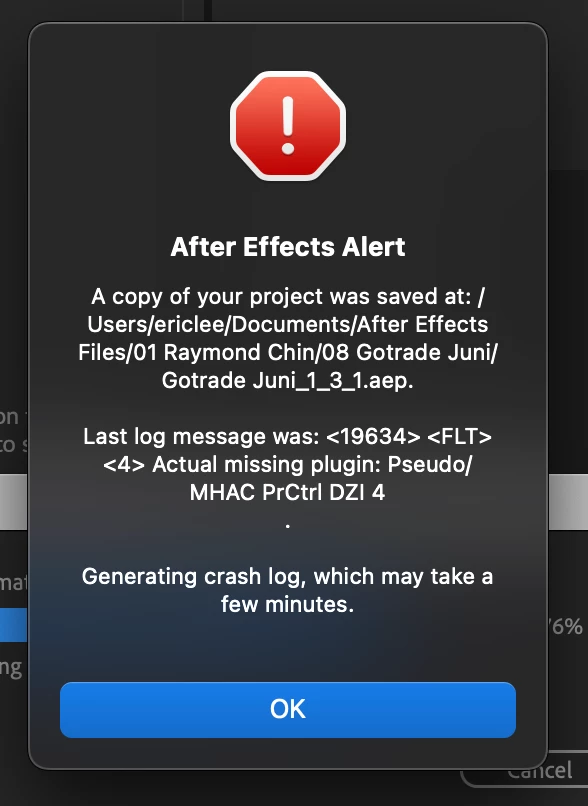
After Effects Backup Project Keep Crashing
  • June 25, 2022
  • 1 reply
  • 190 views

Currently im using my Macbook M1 Pro 14" to edit on Premiere Pro and linked it to After Effects, suddenly my AE crashed. I tried to open several backup files that AE already save for me, but it still kept crashing, any solutions?


This topic has been closed for replies.

1 reply

Vishu_Aggarwal
Participating Frequently
June 26, 2022

Try the following steps - 


1. As per the error message you're missing the plugin (did you add any third-part plugin in AE or May be premiere pro plugin used on the footage isn't supported in AE.)

or 

2. Check for updates for AE and premiere pro and update the apps.

or

3. Save as the AE project backup project and see if it works,

or 

4. Import the current AE project into a new AE project.

or 

5. Try AE preferences reset - 

  • Press Alt (Windows) or Option (Mac OS) while launching After Effects. You can release the Alt key or Option key when the splash screen appears.
Vishu AggarwalAdobe Certified Instructor, Professional and Expert