Participating Frequently
February 20, 2025
Answered

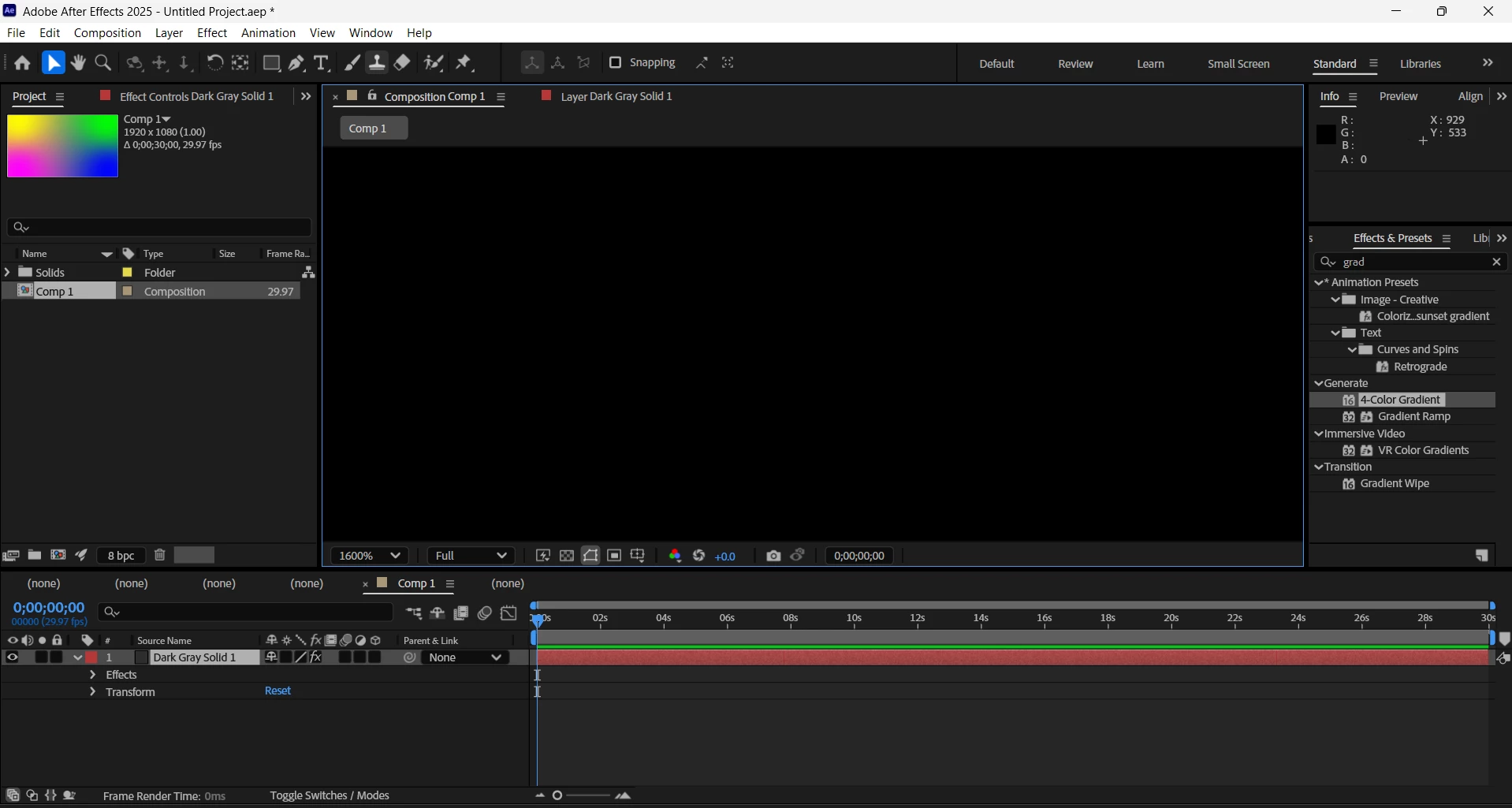
After Effects blank composition panel

  • February 20, 2025
  • 2 replies
  • 1136 views

I was trying to add gradient and its literally blank screen my eye icon is on everything is proper but at the left top you can see the gradient have been added but my compisition panel have been continously blank what should i do to fix this? I even tried adding a photo its still the same blank screen.

Correct answer nishu_kush

hmm, the plot thickens.  That means AE cannot use your graphics card.


I've resorted to google to see if I can find a solution and came across this suggestion on Reddit:

"The trick I found was through a CapCut sub believe it or not. If all else fails go to your device manager and disable your GPU. I don’t know why but it fixed my issue with both CapCut and AfterEffects."


Does your system have an Intel GPU enabled? We've seen reports that some Intel drivers are causing issues when there are also NVIDIA drivers installed.
 
Here are some steps to try:
 
• Close After Effects
• Go to the Device Manager (Run >> devmgmt.msc)
• Select Display Adapter, Right click on the "Intel UHD graphic card".
• Select "Update Driver"
• Select "Browse my Computer"
• Select "Let me Pick from a list of available drivers on my Computer".
• Select "Microsoft Display Adapter".
•  Launch After Effect


Thanks,
Nishu

2 replies

ShiveringCactus
Community Expert
Community Expert
February 20, 2025

I've just seen the other thread you posted on.   The poster is referring to updating their graphics card drivers.  It didn't seem likely, but it might be worth giving it a go seeing as it worked for them.

Participating Frequently
February 20, 2025

I even just updated my graphics card and still nothing is happening


ShiveringCactus
Community Expert
Community Expert
February 20, 2025

Can you try opening another After Effects project and see if the issue persists?

ShiveringCactus
Community Expert
Community Expert
February 20, 2025

You are currently zoomed in to 1600% percent, but that might not explain why the comp window is black.  Obviously try looking at 100% first, but in my experience the only thing that causes an unresponsive comp window is a soft-crash of the graphics card.  Try restarting your computer and see if that corrects it.

Participating Frequently
February 20, 2025

I have restarted it nad also tried looking at 100% but its still the same issue


ShiveringCactus
Community Expert
Community Expert
February 20, 2025

I've replicated your set up exactly and its working.  Is there any chance your solid does not start on the first frame.  


When I have the solid at the first frame, it looks like this:


But when it's on the second frame, it looks like this:


It's really hard to tell from your screenshot is it doesn't look exactly like either.


Any chance the layer's opacity is somehow 0%?