noura67405118
Participating Frequently
May 3, 2018
Answered

After Effects Box on Comp View?

  • May 3, 2018
  • 3 replies
  • 3062 views

Hey I accidentally clicked something on my keyboard and this showed up on my comp, how do I remove it?

This topic has been closed for replies.
Correct answer Andrew Yoole

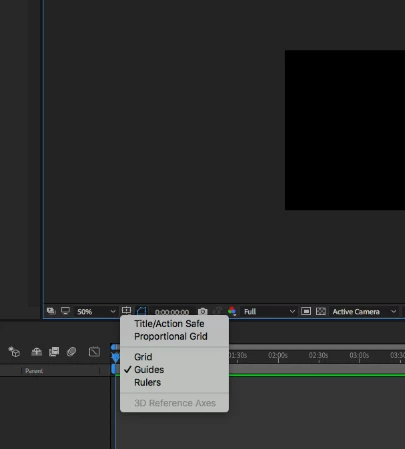
Those are the Title/Action Safe margins.  Click on the Grid and Guide Options box to turn them off.
3 replies

noura67405118
Participating Frequently
May 4, 2018

thank you so much

P.M.B
Legend
May 4, 2018

noura67405118  wrote

Hey I accidentally clicked something on my keyboard and this showed up...

For future reference:  

While the two boxes might seem obvious to you.  It probably would've done well to mention the two boxes in your comp window.

Something like:

"I accidentally clicked something on my keyboard and these two boxes showed up on my comp, how do I remove it?"

Or go into photoshop and draw an arrow pointing to it.

That way you won't have to get frustrated with people for not immediately noticing what you may think is obvious.

Assume nothing is obvious.

~Gutterfish
noura67405118
Participating Frequently
May 4, 2018

I'll keep that in mind, thank you

Dave_LaRonde
Inspiring
May 3, 2018

WHAT showed up?  Layers?  The third-party plugins?  It magically turned from 16x9 to square?

Toss us a bone, would you please?

noura67405118
Participating Frequently
May 3, 2018

Do you see my comp? The two boxes and the plus sign in the middle? I would be more specific but I'm not sure what its called.

Andrew Yoole
Andrew YooleCorrect answer
Inspiring
May 4, 2018

Those are the Title/Action Safe margins.  Click on the Grid and Guide Options box to turn them off.