
sidrandom
Participant
August 21, 2017
Answered

After effects can not play full scenes

  • August 21, 2017
  • 3 replies
  • 29285 views

When I ever I put new clips or scenes in after effects It can not make it all the way through. Sometimes even with a 15 second clip. Right now I am working with 4k footage 3 min 30 second scene.

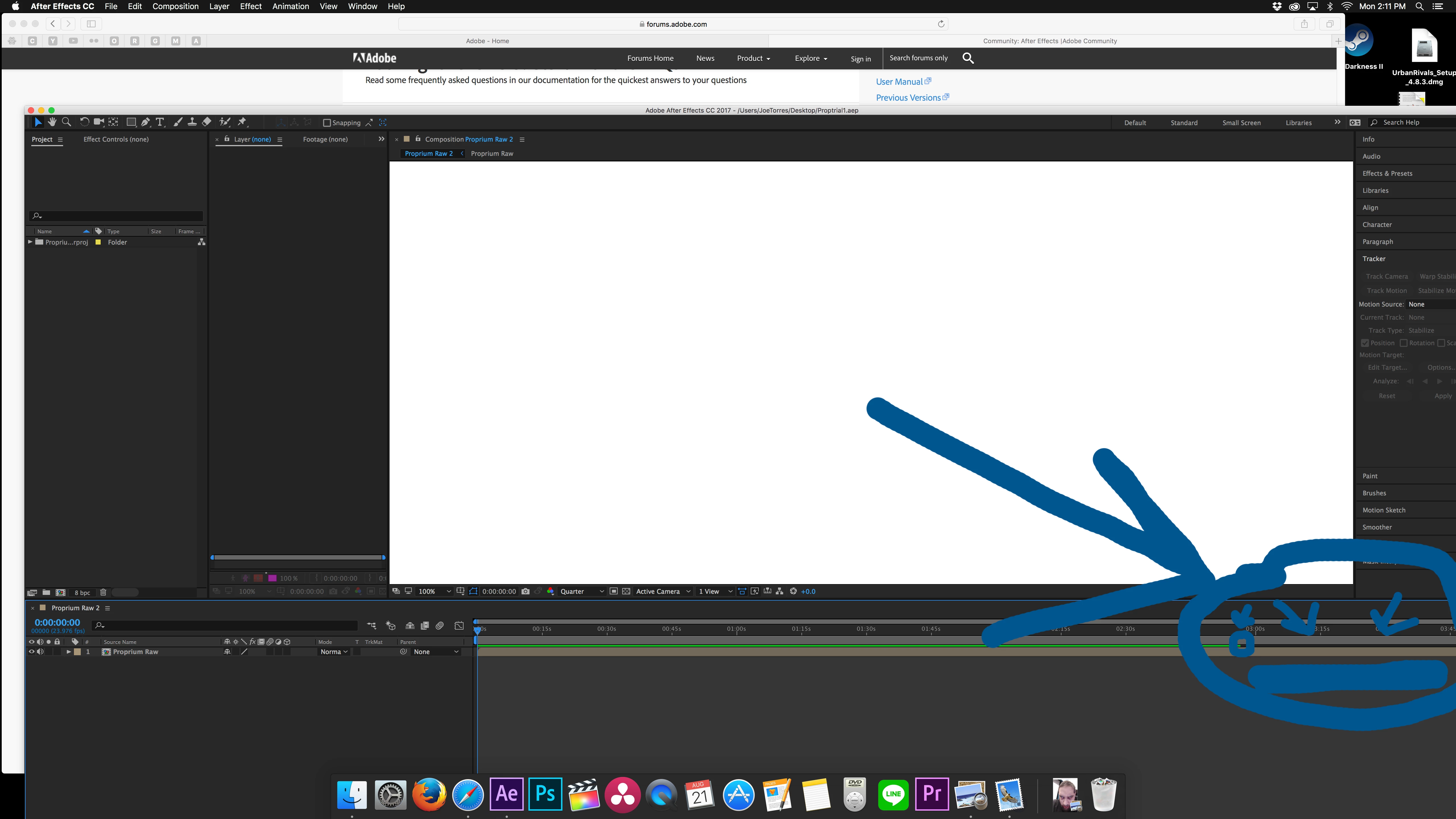
It will only play/render to where the green line stops. I circled it. Then it goes back to the beginning. the more times I add stuff and try to play it the shorter the playback gets. When I start the computer over (off then on) It plays the first partial length. I have cleaned the cache. Started the computer over. and nothing helps.

Version  10.11.6 (15G1611)

iMac (Retina 5K, 27-inch, Late 2015

processor: 3.3 GHz Intel Core i5

Memory : 16 GB 1867 MHz DDR3

Graphics :AMD Radeon R9 M395X 4096 MB

Does this sound right?
This topic has been closed for replies.
Correct answer Warren Heaton

Sid:

Yes, there is no difference as far as AE is concerned.  Unlike a video editing application where there's a compression setting associated with each Sequence, there's no compression setting associated with a Composition.  So, 3840x2160 at Full resolution is 31.6 MB per 8 bits per channel frame.  Your layers could consist of all GIF files and MB/sec. isn't going to change.

If you change your Comp Resolution to Half, Third, Quarter or lower (Custom) you might get the full length of your Comp to preview.

Some things I do for previewing longer Comps:

  • Render a low-resolution movie file.  I like to use 1280x720 Apple ProRes 422 (LT) movies when rendering from AE and the "Apple TV, iPad, iPhone 4 and newer - 960x540" H264 Preset in Media Encoder if I want to keep working in AE.
  • Import the Comp into a Premiere Pro Sequence.  This will allow you to render a PR Video Preview which, unlike AE, will play all the way through.

-Warren

3 replies

Participant
August 5, 2021

hi, 

that's your picture same me. 
Windows 10 GHz 2.9 Intel Core i7 

Memory: Ram 8GB DDR3 


it's still not work time short
I have clean and the disk cache but still not work. 
how to fix ? Please help me! 
Thank you 

Participant
July 26, 2021
Participant
September 7, 2023

This is what I needed! Thank you!!

Mike_Abbott
Legend
August 21, 2017

Normal behaviour. The length of time Ae will preview depends on the amount of RAM available in your system. Larger frame sizes, multiple layers and effects will each add to the RAM requirement - and therefore shorten the preview time. Use the work area bar to preview specific parts of your animation.

See:

Preview without rendering in After Effects

sidrandom
sidrandomAuthor
Participant
August 21, 2017

So there is no difference between 3 minutes of 4k RAW footage and 30 seconds of pro res 422?

sidrandom
sidrandomAuthor
Participant
August 21, 2017

16 gigs of ram and my video card can not handle 3 minutes of 4k footage at quarter quality playback off a

LaCie Rugged Thunderbolt USB 3.0 - 2TB Portable Hard Drive?   

Cut paste made the letters big. ANyway ...that is what you are saying? Also a 30 second pro res422 clip has the same issues on occasion.