
After Effects Can't Continue: Unexpected Error (MacOS)
I was working fine until last Friday. Then it was the weekend, I didn't touch the Mac, and on Monday morning I get this fine error message from AE.
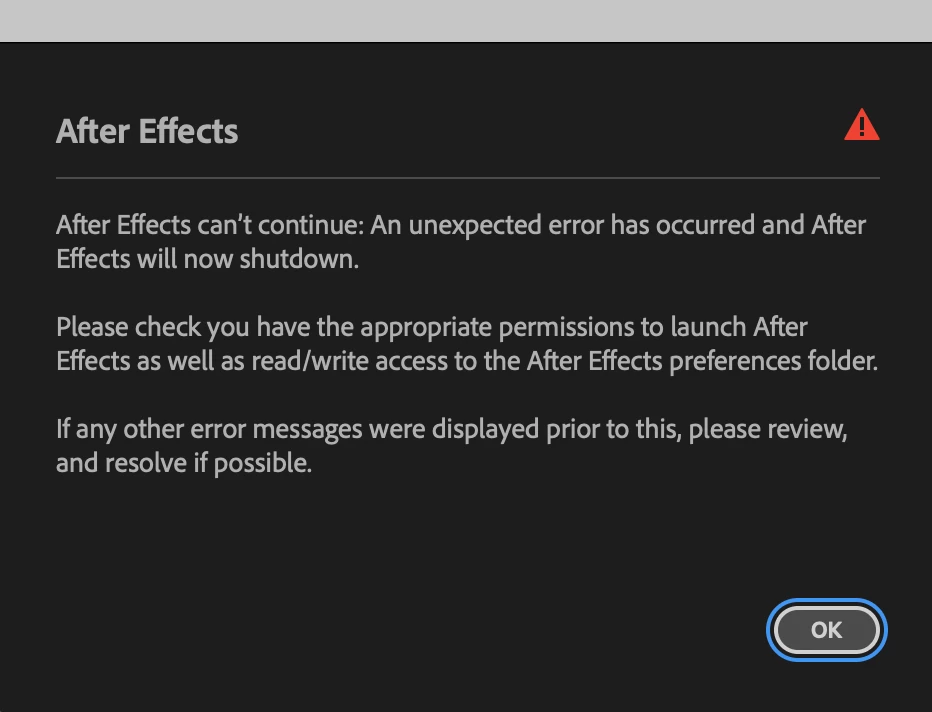
This is on a MBP M4 Pro, 24GB RAM, MacOS Tahoe (latest version), a fine machine that is working properly on anything (Premiere, etc), and was working properly with AE until three days ago.
Nothing changed from the time AE was working to the time AE decided to throw this error and stop working. No new files, no new plugins, no new installations.
Contacted Adobe support, allowed remote control, the support guy spent an hour trying to change folder permissions all over the place, nothing happened. All permissions seemed proper (that is, my user had R+W permissions on most of the folders, and “system” had R+W permissions on other folders that I guess just need system permissions). Nothing seemed out of place.
Cleared everything, removed AE version 26, rolled back to 25.6. still the same message. I followed every article I found online, checked AE Preferences folder, checked Application Support, checked Application/AE26, checked the plugins folder, removed all plugins (basic stuff from aescripts+plugins, have had these plugins for years, no new versions recently), still the same message.
Went on my Windows 11 machine, AE works fine there. Went back to MacOS, all other Adobe applications work fine (Bridge, Acrobat, Photoshop, Premiere Pro), it’s only AE that refuses to budge.
Any help with this?


 AdChoices